
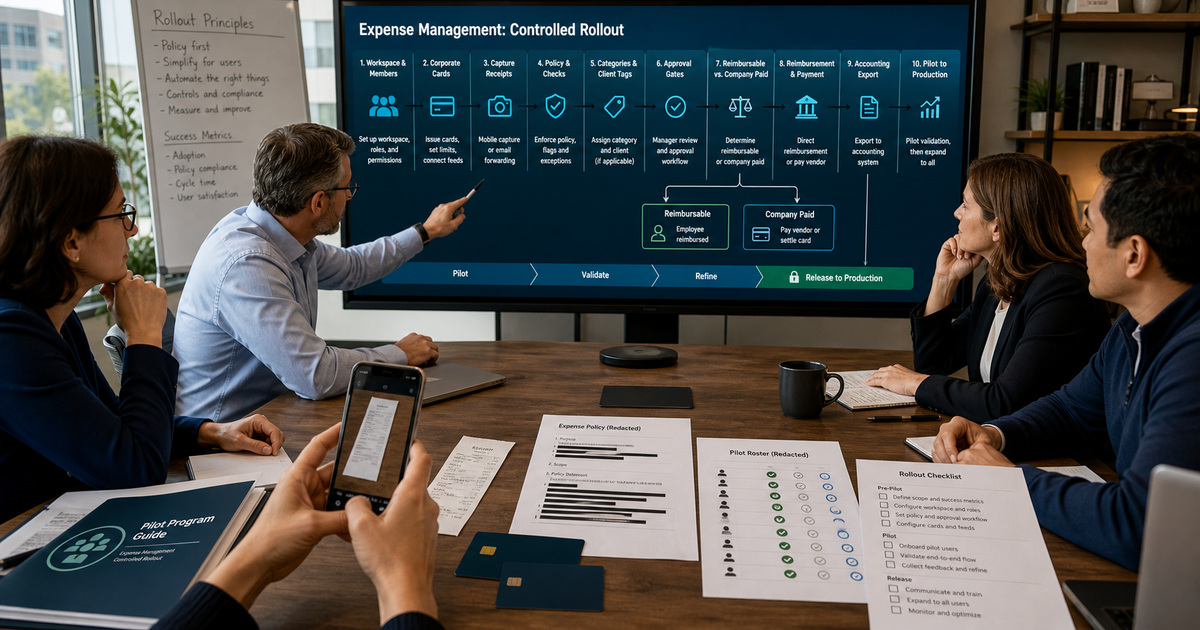
An Expensify implementation can appear successful when a receipt becomes an expense, yet still fail the first real close. A CPA firm must distinguish client-billable travel from internal overhead, out-of-pocket reimbursement from company-paid card activity, and a compliant report from one that merely passed through automation. If categories, engagement tags, receipt requirements, approval routes, payment authority, and accounting exports were designed separately, the same transaction can acquire conflicting meanings at capture, review, payment, and posting.
Start by naming the Expensify surface used for each administrative task. Current official guidance contains New Expensify and Expensify Classic procedures, and a firm may encounter both while managing workspace settings, domain controls, cards, or an established accounting connection. Record the surface, workspace, domain when applicable, plan-dependent features, and owner beside every setup step. That prevents a team from copying a valid instruction into the wrong interface or assuming a feature exists on its subscription.
Use this guide with ALLMSP's [Expensify software support library](https://www.allmsp.com/category/software-support/software-support-expensify/), [CPA and Financial Firms resources](https://www.allmsp.com/category/cpa-and-financial-firms/), and broader [Software Support guidance](https://www.allmsp.com/category/software-support/). The objective is a controlled operating model whose policy decisions can be explained to employees, reviewers, client-service leaders, and the accounting team.
Key decisions at a glance
- Write an Expensify control register before configuration: workspace, plan, members, roles, categories, tags, rules, workflows, bank ownership, cards, accounting connection, and accountable owners.
- Separate out-of-pocket reimbursement, Expensify Card activity, and other company-card feeds because their funding, matching, payment, and reconciliation paths are not interchangeable.
- Treat SmartScan and merchant automation as input accelerators; approvers still need policy, receipt, client-coding, duplicate, and business-purpose checks appropriate to the firm.
- Pilot the complete path with representative employees and exceptions before broad invitation, then release only with evidence, stop conditions, support ownership, and a rollback plan.
Design the Workspace, Policy, and Accounting Vocabulary First

Create a configuration register before enabling automation. Record the Expensify workspace name and ID, business purpose, default currency, plan, administrators, members, approval population, categories, tags, custom fields, tax treatment if used, default reimbursable and billable behavior, report naming, connected card feeds, Expensify Card status, reimbursement account owner, accounting integration, preferred exporter, and support contacts. Keep credential values, full bank details, card numbers, and personal data out of the register; store only protected references and accountable owners.
Translate the firm's written expense policy into explicit Expensify rules. Current Workspace Rules can address receipt and itemized-receipt thresholds, maximum amount, maximum age, reimbursable and billable defaults, company-card expectations, merchant automation, report approval behavior, and category-specific requirements. Decide each value from firm policy and client agreements, not from a convenient default. A category rule for client entertainment, for example, may require a receipt, business purpose, engagement tag, and a different approver even when the general workspace rule is less restrictive.
Design categories and tags around the accounting and engagement model that will consume them. Categories commonly align with expense accounts, while tags or fields can represent client, engagement, department, location, or cost center depending on the connected ledger. Avoid a free-form client label that bypasses the integration's imported list. Define who may add or disable values, how renamed or inactive accounting dimensions are handled, and what happens to draft expenses when the mapping changes.
- Separate policy decisions from Expensify navigation so the design survives a product-interface change.
- Document which requirements apply to all expenses and which are category-, tag-, merchant-, card-, or member-specific.
- Define one source of truth for client and engagement codes and test disabled, renamed, and newly added values.
- Record whether each expense path is reimbursable, company paid, or paid elsewhere and how that choice reaches accounting.
- Require independent review for changes to bank ownership, automatic payment, broad approval bypass, and accounting export settings.
Connect Receipt Capture, Card Matching, Approval, and Payment
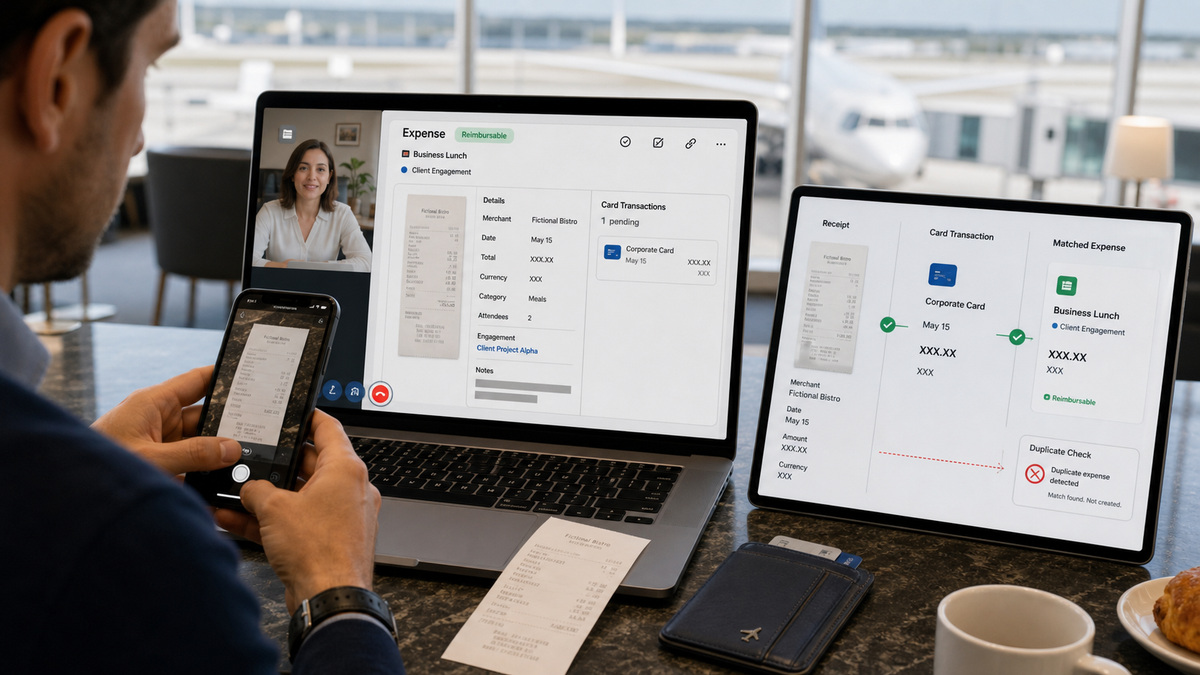
Teach employees the complete expense path, not only the camera button. A captured receipt can populate merchant, date, and amount through SmartScan, but the employee must still choose the correct workspace, business purpose, category, client or engagement code, reimbursable state, and other required fields. The reviewer should be able to see the original receipt and any modification or violation. Blurry, cropped, faded, or incomplete receipts need recapture or manual correction rather than a forced guess.
For a card purchase, preserve the imported posted transaction as the reconciliation anchor. A separately SmartScanned receipt can merge with a matching card transaction when the current matching conditions are met; differences in amount, date, currency, scan completion, posting state, or candidate ambiguity can leave two expenses. Do not delete the imported card line simply because the receipt-created expense looks cleaner. Investigate the pair, merge through the supported workflow when appropriate, and retain an auditable explanation for any manual correction.
Build approval and payment as two controls. Expensify approval workflows can route submitted workspace reports through default, member-specific, over-limit, category, or tag approvers depending on configuration and plan. Approval means the report is ready for the configured payment path; it does not prove a transfer occurred. Current reimbursement guidance distinguishes direct reimbursement from a connected business bank account and Pay elsewhere, while reports containing only non-reimbursable company-card expenses do not require employee reimbursement. Reconcile the selected path to its bank or external payment evidence.
- Test a clean receipt, unreadable receipt, missing required field, policy violation, and receipt-to-card mismatch.
- Confirm approvers can hold, reject, or return exceptions without paying or exporting an uncertain expense.
- Verify prevent-self-approval and over-limit routing with the actual people who will submit and approve.
- Prove that direct reimbursement uses the intended business and employee bank relationships without recording sensitive values in project notes.
- Trace a non-reimbursable card report through approval, accounting export, and reconciliation without creating an employee payment.
Pilot Cards, Reimbursements, and Exceptions Before Broad Release

Choose a pilot group that represents the firm's real operating edges: an employee with only out-of-pocket costs, a frequent traveler, a company-card user, a client-billable team member, an approver, a finance reviewer, and an administrator. Limit the pilot to named workspaces, explicit policies, and low-risk transactions. If the firm enables Expensify Cards, document who may issue or assign them, the limit type and amount, applicable spend rules, the preferred workspace, settlement ownership, and the process to freeze or deactivate a card.
Run a scripted end-to-end test matrix. Include receipt capture, category and engagement coding, rule violations, duplicate prevention, approval, rejection, over-limit escalation, direct reimbursement, Pay elsewhere, card transaction posting, card decline caused by limit or spend rule, accounting sync, export confirmation, and reconciliation. Validate both the happy path and recovery evidence. A green dashboard is insufficient if finance cannot locate the bank withdrawal, accounting entry, or approver decision that supports it.
Use objective release gates. Require accepted invitations, required authentication, correct roles, successful receipt matching, known violation behavior, verified approval routes, controlled bank ownership, successful low-risk reimbursement, card-limit behavior, accounting mapping, export confirmation, reconciliation, support response, and a documented rollback. Stop expansion if a payment account locks, card activity cannot be reconciled, an integration produces duplicate exports, or critical ownership rests with one unavailable person.
- Use synthetic or low-risk pilot data and never place client secrets or full payment information in screenshots or tickets.
- Record the expected result, actual result, evidence location, owner, and decision for every test case.
- Set pilot card limits and spend rules from business need, then test a controlled decline and escalation path.
- Confirm the accounting team can distinguish imported, approved, paid, exported, and reconciled states.
- Expand by group only after pilot exceptions are resolved or explicitly accepted by an accountable owner.
Operate Expensify With Evidence, Change Control, and Support Ownership
After launch, maintain a short control calendar. Review unresolved violations, failed SmartScans, unmatched receipts and card transactions, overdue approvals, reimbursement failures, locked bank accounts, card declines, unsubmitted expenses, failed exports, and reconciliation differences at a frequency that matches transaction volume and close risk. Assign a named first responder and a finance decision maker. Employees should know where to report a lost card, duplicate expense, incorrect client code, or delayed reimbursement without exposing sensitive details in chat.
Manage configuration as a financial-system change. A new category, tag, approval route, merchant rule, card spend rule, payment account, or export type can alter downstream posting and evidence. Use a ticket with business reason, owner, affected workspace, current and proposed state, test cases, approval, release time, rollback, and post-change validation. Preserve configuration snapshots and export confirmations so the firm can explain what was active when an expense was captured and posted.
Coordinate broader controls through ALLMSP's [Cybersecurity resources](https://www.allmsp.com/category/cybersecurity/) and use [Contact ALLMSP](https://www.allmsp.com/contact-us/) when the firm needs help with role design, device security, bank-account continuity, integration troubleshooting, or a controlled rollout. Vendor support can clarify product behavior; the firm's owners still decide policy, accounting treatment, client allocation, payment authority, retention, and materiality.
- Track exception age and ownership rather than judging success only by the number of automated expenses.
- Review official Expensify documentation before changing a plan-dependent or interface-specific control.
- Keep at least two trained administrators for critical workspace, bank, card, and integration responsibilities.
- Reconcile changed configuration against new transactions and accounting output before closing the change.
- Retain only the evidence required by firm policy, client obligations, regulation, and the accounting close.
Vendor documentation and ALLMSP resources
- Expensify: Workspace Rules
- Expensify: Add Approvals
- Expensify: Managing Workspace Members
- Expensify: Create an Expense
- Expensify: Troubleshoot SmartScan Issues
- Expensify: Approve Expenses
- Expensify: Connect a Business Bank Account
- Expensify: Reimbursement Payment Methods
- Expensify: Cardholder Settings and Features
- Expensify: Troubleshoot Expensify Card Issues
- ALLMSP: Expensify Software Support
- ALLMSP: CPA and Financial Firms
- ALLMSP: Software Support
- ALLMSP: Cybersecurity
- ALLMSP: Contact
Frequently Asked Questions
Should a CPA firm configure New Expensify or Expensify Classic first?
Start with the surface that owns the firm's current workspace and required feature, then document it. Current Expensify help contains procedures for both New Expensify and Expensify Classic. Do not translate menu paths by memory or assume the same role owns every setting. Record the surface, workspace, domain when applicable, plan, owner, and official help page for each configuration task. Test the resulting behavior with a pilot user before repeating it across the firm.
What should be documented before creating or changing an Expensify workspace?
Document business purpose, workspace and accounting owners, members and roles, currency, categories, client or engagement tags, receipt and amount rules, reimbursable and billable defaults, approval routes, card feeds, Expensify Card decisions, payment method, bank ownership, accounting connection, preferred exporter, support contacts, and evidence retention. Store protected references rather than credentials, card numbers, or bank details. The register should show who approves each control and how it will be tested.
How should Expensify receipt rules reflect a firm's expense policy?
Translate written policy into measurable requirements: receipt and itemized-receipt thresholds, maximum expense age and amount, allowed payment method, required category or engagement fields, reimbursable and billable treatment, prohibited items, self-approval prevention, and exception approvers. Apply narrower category or tag rules where client or regulatory requirements differ. Test a compliant item and each expected violation so employees and approvers see the intended behavior before launch.
Does SmartScan remove the need for employee and approver review?
No. SmartScan can read receipt details, but the employee still needs the correct workspace, business purpose, category, client or engagement code, reimbursable state, and required fields. The approver should compare those entries with the original receipt and firm policy. When the image is blurry, incomplete, folded, or incorrectly read, replace it or correct the expense rather than treating automation as proof that the transaction is valid.
How can a firm reduce duplicate receipt and card expenses in Expensify?
Capture the receipt promptly, allow the card transaction to post, and preserve the imported card line as the reconciliation anchor. Expensify's current guidance describes automatic merging when receipt and card details satisfy its matching conditions. If two expenses remain, compare amount, date, currency, scan completion, posting state, and whether another match already exists. Use the supported merge or correction workflow and document unusual manual changes instead of deleting the imported transaction reflexively.
How should client-billable expenses move through Expensify approvals?
Require an authoritative client or engagement value, business purpose, appropriate category, receipt evidence, and billable designation before submission. Route material or sensitive categories to the correct engagement or finance reviewer when the plan and workflow support it, while retaining the normal workspace approval chain. Test over-limit, invalid-client, and non-billable exceptions. Approval should establish policy readiness; accounting export and client billing validation remain separate downstream controls.
What is the difference between direct reimbursement and Pay elsewhere?
Direct reimbursement uses a connected workspace business bank account to send an approved reimbursable report to the member's eligible personal account. Pay elsewhere records that payment occurred outside Expensify, such as through payroll, check, or another system. Reports made entirely of non-reimbursable company-card expenses do not require employee reimbursement. Select the method deliberately, preserve external payment evidence when used, and reconcile the report status with bank and accounting records.
How should an Expensify Card pilot be controlled?
Use a small named group, low-risk purchases, explicit card owner, limit type and amount, spend rules, preferred workspace, settlement ownership, support contact, and deactivate or freeze procedure. Test activation, a permitted purchase, a controlled decline, receipt matching, approval, accounting export, settlement or withdrawal evidence, and reconciliation. Do not expand until finance can explain every state and an unavailable administrator would not strand bank, card, or integration ownership.
What evidence should be required before Expensify goes live?
Require an approved configuration register, role list, policy and mapping snapshots, invitation and authentication status, scripted test results, receipt and duplicate cases, approval evidence, low-risk reimbursement proof, card-limit tests when applicable, accounting sync and export confirmations, reconciliation, issue log, stop conditions, support roster, and rollback steps. Evidence should use redaction and protected storage. A successful demo alone does not prove the firm can recover or close its books.
When should a CPA firm involve managed IT support in an Expensify rollout?
Involve managed IT when identity and device controls, administrator continuity, bank-account access, integration ownership, secure evidence handling, or incident response cross beyond expense-policy configuration. ALLMSP can help coordinate those technical controls with finance owners while Expensify support addresses product behavior. The firm should still retain authority for policy, client allocation, accounting treatment, payment approval, retention, and materiality decisions.