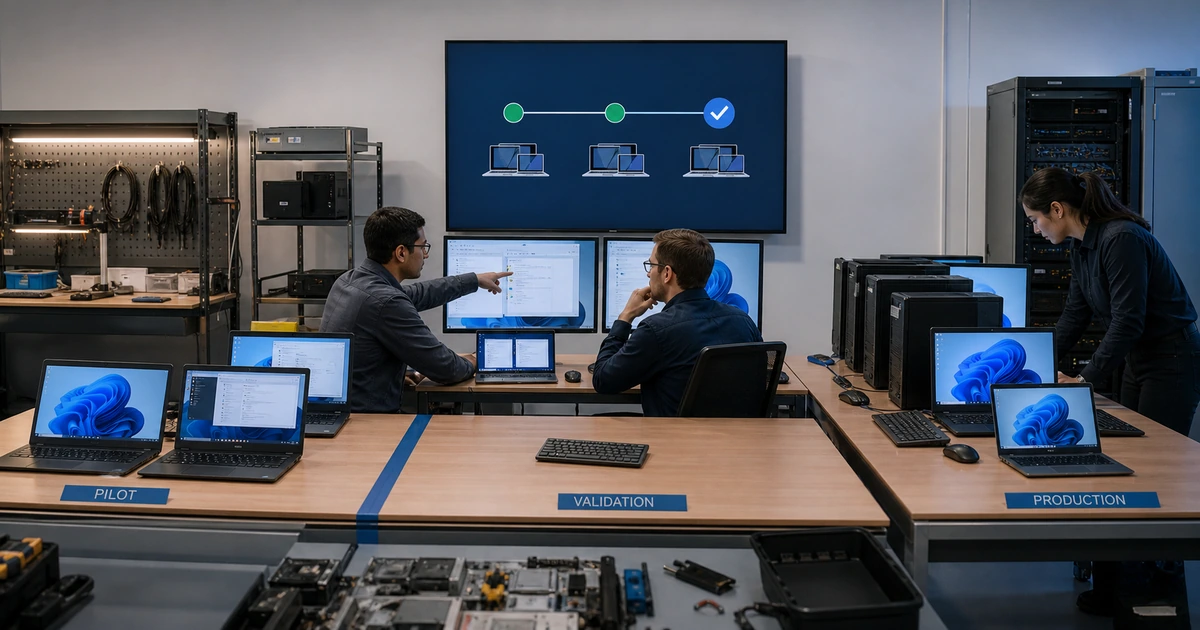
A deployment ring is valuable only when each stage reveals problems before they reach a larger population. Sending an update to a few convenient computers is not a meaningful pilot if those devices do not represent the hardware, applications, peripherals, networks, permissions, and workflows used by the rest of the organization. Ring design should maximize learning while keeping the first release small enough to investigate quickly.
Separate the behavior of the update from the behavior of the deployment platform. Policy assignment, device check-in, update availability, download, installation, restart, version detection, and application validation are different checkpoints. An update can be approved correctly but never reach a remote laptop, or install successfully while breaking a driver, VPN, accounting integration, printing workflow, or line-of-business application.
ALLMSP designs and manages staged patch releases for businesses in Lawrenceville, Suwanee, Gwinnett County, Metro Atlanta, and other Georgia communities. Our technicians build representative rings, test business workflows, configure update policies, prepare employees, monitor each stage, investigate failure, and release only after the agreed evidence is available.
Make each release stage answer a specific compatibility question
- Laboratory check: Confirm package authenticity, installation, restart, version, service health, uninstall path, and basic recovery.
- Technical pilot: Use IT-owned systems to expose management, security, networking, automation, and administrative problems.
- Business pilot: Represent departments, hardware families, critical applications, peripherals, remote work, and unusual access.
- Phased production: Expand by risk and business grouping with observation time, support capacity, and explicit release approval.
- Exception ring: Track systems that need a delayed window, different update method, vendor approval, or temporary mitigation.
- Completion sweep: Find offline, stale, failed, replaced, traveling, loaned, and manually maintained assets after broad deployment.
Select pilot devices from business evidence rather than convenience
Inventory the variables that could change an update outcome. Include device model and age, processor architecture, firmware, storage capacity, encryption, operating-system build, language, driver set, dock, monitors, printers, scanners, cameras, audio, VPN, wireless, browser extensions, endpoint security, local agents, application versions, database clients, accessibility tools, and network location. Add user variables such as standard or elevated access, remote work, shared devices, field use, executive duties, and critical deadlines.
Build a coverage matrix and choose the smallest set that represents the important combinations. The first ring can use recoverable IT systems, but the second should include willing business users who perform real work. Avoid placing every subject-matter expert in the first wave because one bad release could remove the people needed to diagnose it. Name alternates, capture pre-update state, confirm backup or synchronization, and schedule time for testing rather than expecting users to notice problems by chance.
- Hardware coverage: Represent common models, older supported devices, processors, firmware, storage, docks, displays, and key peripherals.
- Application coverage: Include productivity, finance, design, engineering, browser, database, communication, security, and custom software.
- Work pattern: Test office, remote, field, shared, executive, accessibility, high-volume, and time-sensitive use.
- Recovery readiness: Verify synchronization, backup, encryption recovery, local access, alternate equipment, and support availability.
- Pilot commitment: Give participants a test checklist, reporting path, observation period, and time to validate their actual duties.
A representative pilot uncovers compatibility risk because it mirrors the environment, not because it contains a particular percentage of devices.
Test the complete path from policy assignment through employee work
Before release, confirm update source, approval, entitlement, policy assignment, group membership, conflicting settings, network endpoints, free space, power, management check-in, and current health. During deployment, observe discovery, offer, download, installation, restart request, deadline, active hours, user notification, completion, and inventory refresh. Record how long each stage takes and distinguish a policy problem from a device, Windows Update, network, storage, or package problem.
After restart, verify sign-in, multifactor authentication, directory access, VPN, wireless, endpoint security, encryption, backup, monitoring, browser, email, meetings, shared files, printing, scanning, line-of-business applications, integrations, performance, sleep and wake, and remote support. Test the exact workflows selected for that pilot device. Microsoft compatibility and feature-update reports can provide useful signals, but the user and application checks remain necessary because a technically complete installation does not prove the work is healthy.
- Policy trace: Confirm source, approval, assignment, exclusions, conflicts, check-in, applicability, network, storage, and power.
- Install trace: Observe offer, download, preparation, installation, restart, completion, version reporting, and platform status.
- Security validation: Check authentication, encryption, endpoint protection, firewall, VPN, monitoring, backup, and administrative access.
- Workflow validation: Exercise business applications, data exchange, collaboration, browsers, peripherals, performance, and remote work.
- Evidence packet: Retain devices, versions, tests, results, failures, fixes, user acceptance, and release recommendation.
Compatibility is demonstrated when the update path and the employee’s required work both succeed on representative systems.
Control expansion, pauses, rollback, and completion
Set entry and exit criteria for every ring. Require a minimum observation period unless active exploitation justifies acceleration. Define acceptable failure rates and immediate pause conditions for boot failure, data loss, authentication problems, network loss, security-agent failure, application outage, severe performance degradation, or rising support demand. Assign one release owner who can pause expansion and one business contact who can evaluate operational impact. Keep communications ready for planned progression, delay, corrective action, and emergency rollback.
Rollback should be specific to the update and platform. Confirm uninstall windows, snapshot or image recovery, firmware downgrade limits, database compatibility, configuration restoration, application version dependencies, and data created after deployment. Sometimes the safer response is to fix forward, isolate the affected device, or provide a replacement instead of reversing the release. After broad rollout, sweep for stale, traveling, offline, failed, low-storage, unsupported, or excluded devices. Close only when each asset is remediated, formally excepted, retired, or assigned a dated alternate treatment.
- Release gate: Require test completion, observation, failure review, help-desk readiness, owner approval, and recovery confidence.
- Pause signal: Stop expansion for defined security, startup, application, data, network, performance, or support-impact thresholds.
- Response choice: Select rollback, fix forward, isolation, replacement, alternate access, or a time-limited exception from evidence.
- User coordination: Communicate progress, restart expectations, known symptoms, workarounds, support route, and resolution status.
- Final sweep: Resolve offline, stale, traveling, failed, excluded, replaced, unsupported, and manually updated systems.
Ring deployment is finished when the broad population is verified and every outlier has an owned disposition.
Staged patch deployment and compatibility support from ALLMSP
ALLMSP can classify the device and application estate, construct meaningful pilot cohorts, configure supported update-ring policies, document test cases, and prepare user and help-desk communications. We test both technical health and the business workflows that employees rely on.
During release, our in-house team watches deployment state, supports users, diagnoses installation and compatibility failures, coordinates pause or recovery decisions, and follows every outlier to closure. This creates a repeatable release process without treating employees as an uncontrolled test group.
- Represent: Choose pilots that reflect hardware, software, peripherals, locations, privileges, and important work.
- Validate: Trace policy, installation, restart, security, applications, data, performance, and user acceptance.
- Control: Use release gates, pause thresholds, recovery choices, communications, and a complete outlier sweep.
Official guidance for update rings and compatibility
Platform reports can guide staged rollout decisions, while representative testing and business acceptance determine whether a release is ready for wider use.
- Microsoft Intune update ring policies. Covers device-group assignments, deferrals, deadlines, restart settings, notifications, pauses, and uninstall actions.
- Microsoft update compatibility reports. Explains device readiness and application or driver risk reporting for a selected Windows target release.
- Microsoft update ring troubleshooting. Separates policy-delivery checks from Windows device and update-service troubleshooting.
- ALLMSP software support. Provides application configuration, troubleshooting, update coordination, licensing, and user support alongside patch releases.
Patch deployment ring FAQs
How many patch rings should a small business use?
Many teams can begin with technical pilot, representative business pilot, phased production, and exception groups, then adjust based on complexity and risk.
How large should the first pilot be?
Use the smallest recoverable group that still represents important management, security, hardware, and installation conditions.
Who belongs in the business pilot?
Choose willing users across critical departments, device types, applications, remote locations, peripherals, permissions, and unusual workflows.
How long should a patch remain in a pilot ring?
Allow enough time for normal work and delayed symptoms, while shortening the interval when credible exploitation or severe exposure demands faster action.
What should employees test after an update?
They should test sign-in, connectivity, communication, files, business applications, integrations, peripherals, performance, and the tasks unique to their role.
When should a rollout be paused?
Pause when agreed thresholds are reached for startup, security, authentication, network, data, application, performance, or support failures.
Is uninstalling an update always the best rollback?
No. Recovery may require configuration restoration, snapshot recovery, fixing forward, device isolation, replacement, or alternate access.
How are remote and traveling laptops patched?
Plan internet access, bandwidth, power, active hours, restart notices, check-in, support, deadlines, and a follow-up sweep for unavailable devices.
Can ALLMSP operate Windows update rings through Intune?
Yes. ALLMSP can configure supported policies, assignments, pilots, reports, user communications, troubleshooting, and verification in house.
Where is staged patch deployment available?
ALLMSP provides patch deployment support in Lawrenceville, Suwanee, Gwinnett County, Metro Atlanta, and across Georgia.