



















































































































QNAP HBS3 Backup Warnings: Find Skipped Files Before Repeating the Job
Use the exact HBS3 run report and file history to distinguish intentional filters, missed files, destination access and a job that needs a narrow correction.

Type at least two characters
Type at least two characters
Browse business hardware first, then explore software by the work it supports.
Managed technology, AI integration, marketing, infrastructure, and business support.
Support, protection, devices, and dependable daily operations
AI systems, integrations, automation, analytics, and governance
Marketing, websites, hosting, print, signs, and brand visibility
Cloud, backup, cabling, planning, leadership, and business support
Technology, security, automation, and marketing aligned to the way your organization works.
ALLMSP supports businesses across Lawrenceville, Suwanee, Gwinnett County, Metro Atlanta, and nationwide remote environments.
Discuss Your Environment
QNAP Hybrid Backup Sync can support cloud infrastructure, backup, storage, virtualization, recovery, networking, databases, monitoring, cost control, and hybrid operations. ALLMSP helps Atlanta and Gwinnett businesses evaluate, configure, document, train, troubleshoot, and improve QNAP Hybrid Backup Sync Backup Jobs, QNAP Hybrid Backup Sync Jobs, QNAP Hybrid Backup Sync Recovery Tools, and QNAP Hybrid Backup Sync Deduplication and Restore, with every stage handled in house.
ALLMSP provides QNAP Hybrid Backup Sync cloud, backup, virtualization, and infrastructure consulting for organizations in Lawrenceville, Suwanee, Gwinnett County, Metro Atlanta, and nearby Georgia communities. Our work covers QNAP Hybrid Backup Sync Backup Jobs, QNAP Hybrid Backup Sync Jobs, QNAP Hybrid Backup Sync Recovery Tools, and QNAP Hybrid Backup Sync Deduplication and Restore with planning tied to the way employees, locations, and business systems actually operate.
For QNAP Hybrid Backup Sync, discovery begins with workloads, data, performance, availability, recovery objectives, identity, networking, compliance, support, cost, and growth. The QNAP Hybrid Backup Sync plan defines implementation, support, security, training, documentation, and the next review for the actual environment.
Compare QNAP Hybrid Backup Sync Backup Jobs, QNAP Hybrid Backup Sync Jobs, QNAP Hybrid Backup Sync Recovery Tools, and QNAP Hybrid Backup Sync Deduplication and Restore using workloads, data, performance, availability, recovery objectives, identity, networking, compliance, support, cost, and growth. QNAP Hybrid Backup Sync subscriptions and administrative ownership are aligned with the people and workflows that actually need them.
QNAP Hybrid Backup Sync implementation work can design architecture, configure identity and networking, migrate workloads or data, implement monitoring and backup, test recovery, and document operations. The QNAP Hybrid Backup Sync rollout includes practical training and clear administrative documentation.
QNAP Hybrid Backup Sync optimization reviews performance, capacity, cost, security, backup success, recovery tests, alerts, lifecycle, and operational ownership. QNAP Hybrid Backup Sync improvements are prioritized by business value, risk, employee impact, and the effort required to deliver them.

ALLMSP plans and supports QNAP Hybrid Backup Sync Backup Jobs within the QNAP Hybrid Backup Sync environment to run scheduled protection jobs with defined sources, destinations, retention, credentials, alerts, and accountable failure handling.
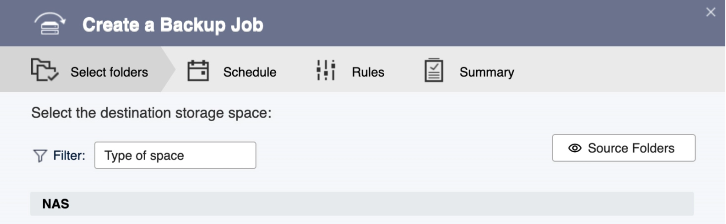
ALLMSP plans and supports QNAP Hybrid Backup Sync Jobs within the QNAP Hybrid Backup Sync environment to keep approved files synchronized across users, devices, or storage locations without hiding conflicts, access problems, or failed transfers.
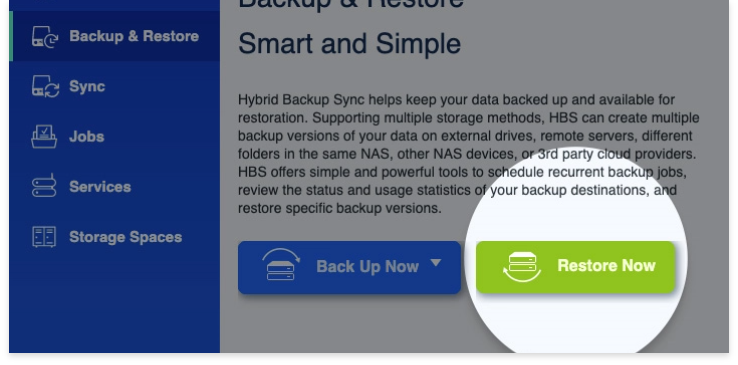
ALLMSP plans and supports QNAP Hybrid Backup Sync Recovery Tools within the QNAP Hybrid Backup Sync environment to give administrators tested tools to locate clean restore points, recover files or systems, record evidence, and communicate recovery status.

ALLMSP plans and supports QNAP Hybrid Backup Sync Deduplication and Restore within the QNAP Hybrid Backup Sync environment to reduce backup storage and transfer overhead while preserving reliable restore points, documented retention, and tested recovery.
QNAP Hybrid Backup Sync often connects QNAP Hybrid Backup Sync Backup Jobs, QNAP Hybrid Backup Sync Jobs, QNAP Hybrid Backup Sync Recovery Tools, and QNAP Hybrid Backup Sync Deduplication and Restore with the wider needs around cloud infrastructure, backup, storage, virtualization, recovery, networking, databases, monitoring, cost control, and hybrid operations. These related services keep QNAP Hybrid Backup Sync, its users, security controls, and supporting systems working as one managed business environment.
Backup and Disaster Recovery maps the data and configuration dependencies around QNAP Hybrid Backup Sync Backup Jobs, QNAP Hybrid Backup Sync Jobs, and QNAP Hybrid Backup Sync Recovery Tools, protects the right information, and tests recovery steps before they are needed.
Cybersecurity protects QNAP Hybrid Backup Sync Backup Jobs, QNAP Hybrid Backup Sync Jobs, and QNAP Hybrid Backup Sync Recovery Tools through identity, least privilege, network controls, encryption, logging, backup protection, recovery access, configuration records, and incident response, with controls documented for the actual QNAP Hybrid Backup Sync environment.
Cloud Support connects QNAP Hybrid Backup Sync Backup Jobs, QNAP Hybrid Backup Sync Jobs, and QNAP Hybrid Backup Sync Recovery Tools to the right identity, network, compute, storage, monitoring, backup, cost, and recovery standards.
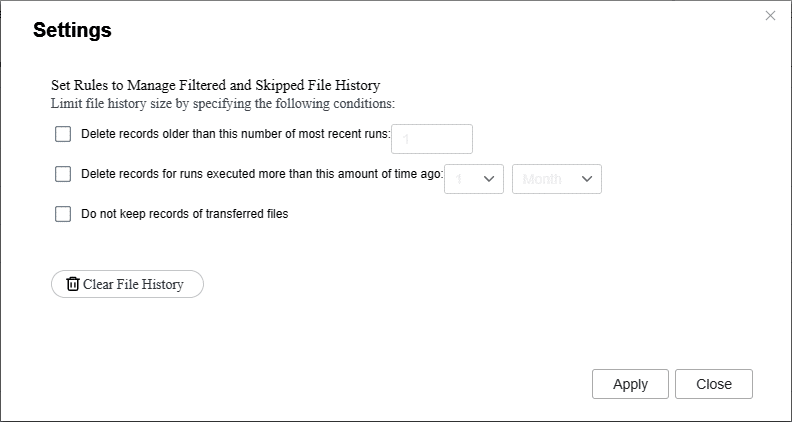
Use the exact HBS3 run report and file history to distinguish intentional filters, missed files, destination access and a job that needs a narrow correction.
Define which business files an HBS3 job protects, how versions and deletion behave, who holds recovery credentials, and what the first acceptance test must prove.
Choose the correct HBS or QuDedup recovery route, restore a version to a restricted test destination and check usable files, permissions and missing system scope.
A. ALLMSP supports business use of QNAP Hybrid Backup Sync Backup Jobs, QNAP Hybrid Backup Sync Jobs, QNAP Hybrid Backup Sync Recovery Tools, and QNAP Hybrid Backup Sync Deduplication and Restore. A QNAP Hybrid Backup Sync engagement can cover evaluation and account ownership, subscription or licensing review, configuration, migration, testing, documentation, training, and ongoing administration. For QNAP Hybrid Backup Sync, ALLMSP also provides troubleshooting, optimization, and a documented support plan for the selected platform.
A. Yes. ALLMSP provides QNAP Hybrid Backup Sync planning, implementation, and support for Atlanta and Metro Atlanta businesses. Scope is based on the organization's users, locations, current environment, risk, schedule, and the business result expected from QNAP Hybrid Backup Sync.
A. Yes. We compare QNAP Hybrid Backup Sync Backup Jobs, QNAP Hybrid Backup Sync Jobs, QNAP Hybrid Backup Sync Recovery Tools, and QNAP Hybrid Backup Sync Deduplication and Restore using source data, destinations, schedules, change rate, retention, bandwidth, credentials, exclusions, alerts, recovery objectives, and maintenance windows. The QNAP Hybrid Backup Sync recommendation documents fit, tradeoffs, implementation work, warranty or subscription impact as applicable, and ongoing support before a purchase or commitment is made.
A. Yes. ALLMSP handles the QNAP Hybrid Backup Sync engagement in house from discovery and planning through account ownership, subscription or licensing review, configuration, migration, testing, documentation, training, and ongoing administration. The ALLMSP team documents QNAP Hybrid Backup Sync ownership, resolves launch issues, and continues improving the environment after handoff.
A. Yes. We assess the current use of QNAP Hybrid Backup Sync Backup Jobs, QNAP Hybrid Backup Sync Jobs, QNAP Hybrid Backup Sync Recovery Tools, and QNAP Hybrid Backup Sync Deduplication and Restore, preserve what is working, and identify changes that remove risk or recurring friction. The QNAP Hybrid Backup Sync improvement plan is prioritized using job duration, failures, missed schedules, changed sources, destination capacity, retention, credentials, alerts, restore evidence, and exceptions.
A. Yes. ALLMSP reviews QNAP Hybrid Backup Sync account ownership, subscription or licensing needs, administrators, user access, integrations, billing access where applicable, and unused assignments. The result is a cleaner QNAP Hybrid Backup Sync administration model with documented owners and recovery contacts.
A. The QNAP Hybrid Backup Sync security review considers source data, destinations, schedules, change rate, retention, bandwidth, credentials, exclusions, alerts, recovery objectives, and maintenance windows. ALLMSP then documents QNAP Hybrid Backup Sync administrator protection, least privilege, alert or logging needs, recovery access, test results, and the person responsible for each critical control.
A. Before QNAP Hybrid Backup Sync deployment, ALLMSP checks source data, destinations, schedules, change rate, retention, bandwidth, credentials, exclusions, alerts, recovery objectives, and maintenance windows. We test QNAP Hybrid Backup Sync Backup Jobs and QNAP Hybrid Backup Sync Jobs against real devices, data, applications, integrations, and employee workflows so compatibility means more than a successful sign-in or basic connection.
A. Yes. QNAP Hybrid Backup Sync training is based on the work employees and administrators actually perform with QNAP Hybrid Backup Sync Backup Jobs, QNAP Hybrid Backup Sync Jobs, QNAP Hybrid Backup Sync Recovery Tools, and QNAP Hybrid Backup Sync Deduplication and Restore. QNAP Hybrid Backup Sync sessions include safe daily use, common errors, ownership, documentation, and the support path for questions that appear after launch.
A. Yes. ALLMSP troubleshoots QNAP Hybrid Backup Sync Backup Jobs using the product configuration, connected systems, recent changes, logs or device evidence, and the affected business workflow. Findings and completed corrections are documented so recurring QNAP Hybrid Backup Sync problems can be fixed at their source.
A. After QNAP Hybrid Backup Sync implementation, ALLMSP reviews job duration, failures, missed schedules, changed sources, destination capacity, retention, credentials, alerts, restore evidence, and exceptions. The QNAP Hybrid Backup Sync backlog separates urgent corrections from improvements in reliability, security, usability, cost, adoption, and lifecycle or subscription management.
A. Yes. ALLMSP can establish repeatable QNAP Hybrid Backup Sync models or settings, naming, access, integrations, testing, documentation, spare or licensing standards, and support procedures. Legitimate QNAP Hybrid Backup Sync differences between locations and teams are recorded instead of being forced into one unsuitable configuration.
A. Documentation for QNAP Hybrid Backup Sync can cover ownership, platform or subscription details, administrators, configuration, integrations, locations, test results, support contacts, recovery notes, warranty or renewal dates, and operating procedures for QNAP Hybrid Backup Sync Backup Jobs, QNAP Hybrid Backup Sync Jobs, QNAP Hybrid Backup Sync Recovery Tools, and QNAP Hybrid Backup Sync Deduplication and Restore.
A. Yes. ALLMSP supports QNAP Hybrid Backup Sync for organizations in Lawrenceville, Suwanee, Gwinnett County, Metro Atlanta, and nearby Georgia communities. Remote QNAP Hybrid Backup Sync support can also serve a local business with traveling staff or locations outside Georgia.
A. QNAP Hybrid Backup Sync cost depends on the selected platform, user or device count, locations, current condition, migration or installation work, integrations, security requirements, training, project timing, and ongoing support. ALLMSP defines assumptions and acceptance criteria before major QNAP Hybrid Backup Sync work begins.