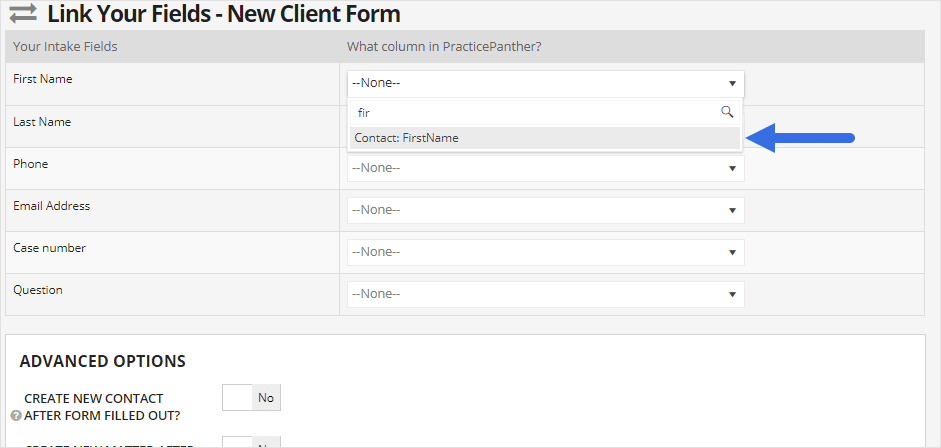





















































































































PracticePanther’s documented “Link Your Fields” example connects a form question to a contact field. Test the field destinations and create-or-update behavior with a fictional inquiry before using a live form. Keep screening and retained-or-declined decisions in the approved intake process.[6]
A contact form is the start of a law firm’s intake process. To learn which marketing brings suitable matters, follow a labeled inquiry from its practice-area page through screening, consultation and the firm’s retained-or-declined decision. This guide shows what to own, what to record and how to test the handoffs before expanding a campaign.
Have the responsible lawyer approve public claims and the intake process. Georgia’s current professional rules address communications about legal services and duties to prospective clients; a declined inquiry can still require careful information handling. Keep legal narratives and conflict details in the approved intake system. [1]
What a dependable law firm marketing system setup should accomplish
A dependable marketing setup keeps accounts company controlled, content factual and reviewable, local information accurate, prospective-client data limited, intake responsive, and reporting connected to qualification and retained matters. Analytics receives useful service and source context without confidential descriptions of a person’s legal problem.
- Practice areas, jurisdictions, service areas, audiences, exclusions, proof, and intake capacity are documented before campaigns launch.
- Every public claim, result, testimonial, award, location, fee statement, and disclosure follows a recorded attorney-review process.
- Website, Business Profile, Ads, Analytics, Tag Manager, Search Console, directories, call tracking, and forms have company-controlled owners.
- Calls and forms collect only the information needed to route an inquiry and warn users not to submit urgent or confidential detail improperly.
- Conflict review, consultation scheduling, follow-up, non-engagement, and record handling have clear owners and response expectations.
- Reporting connects source and service interest to qualified consultation and retained matter without placing client confidences in analytics.
Define services, audiences, claims, and approval
1. Define practice scope and the prospective client
Document each service, who it helps, matters the firm accepts, jurisdictions, offices and service model, disqualifiers, urgent situations, fee information approved for public use, and the evidence supporting experience claims. Separate consumer searches from referral, co-counsel, existing-client, careers, and vendor traffic.
Where to work: Attorney interviews, engagement criteria, jurisdictions, service areas, capacity, common client questions, and intake records
Verification: Intake and attorneys classify the same sample inquiries consistently and the website does not promise services, locations, or outcomes the firm cannot support.
2. Create the advertising approval record
Require review of service descriptions, comparative claims, results, testimonials, endorsements, awards, specialties, fee language, office locations, paid content, imagery, and required disclosures before publication. Record the reviewer, date, version, support, and expiration or recheck date.
Where to work: Current Georgia Rules of Professional Conduct, firm policy, responsible attorney, content brief, source evidence, disclosures, and archive
Verification: A published page or ad can be traced to its supporting facts, attorney approval, disclosure decision, and current live version.
3. Establish company ownership of marketing accounts
Record exact account IDs, primary and backup owners, provider access, billing, recovery, verification, linked accounts, and exit steps. Use individual access rather than shared passwords and keep primary ownership with the firm.
Where to work: Domain and DNS, website, hosting, Business Profile, Ads, GA4, Tag Manager, Search Console, directories, call platform, forms, CRM or intake, and social or video accounts
Verification: Two authorized firm users can reach every production account and can remove a provider without losing the domain, profile, campaigns, data, calls, or website.
Build trustworthy local pages, profiles, content, and campaigns
1. Build clear service and location architecture
Give each page a distinct user task and accurate scope. Explain who the service is for, the process, preparation, decision factors, common questions, limitations, attorney responsibility, office or remote service model, and next step. Avoid interchangeable city pages and unsupported office claims.
Where to work: Website navigation, practice-area pages, attorney pages, office and service-area pages, contact paths, and internal links
Verification: A prospective client can identify the relevant service and how to contact the firm without encountering duplicate pages that make the same promise.
2. Configure Google Business Profile and local listings
Represent real eligible offices and current public information. Assign owners and managers, use a call route the firm monitors, link to a relevant site experience, document profile edits, and create an attorney-approved review response process that avoids revealing representation or confidential facts. [2]
Where to work: Business Profile, location groups, primary category, additional categories, services, hours, phone, website, photos, questions, reviews, and major legal directories
Verification: Company owners can update the profile, public details match the website and intake, calls reach the right team, and sample review responses preserve confidentiality.
3. Create useful content with accountable review
Choose a question the intake team actually receives and explain the process, preparation and decision points in language a novice can use. Record the responsible legal reviewer and update changing facts. Keep the core explanation in text and link it to the service it helps the reader choose. [4]
For Google’s AI Overviews and AI Mode, ordinary SEO foundations still apply: the page must be indexable and eligible for a search snippet, and any structured data should match the visible content. No special AI file or schema guarantees selection. [5]
Where to work: Search Console queries, intake questions, attorney knowledge, editorial brief, source record, review, update schedule, and archive
Verification: A novice can act on the procedural information, an attorney confirms accuracy and limitations, and the page has a reason to exist beyond repeating a keyword.
4. Design Ads around qualified intent and capacity
Separate material practice areas and locations, align ads with approved pages and claims, exclude irrelevant research, jobs, support, and unsupported matters, and run campaigns only when the intake team can respond. Keep primary conversions tied to valid inquiries or deeper outcomes.
Where to work: Google Ads campaigns, search terms, locations, schedule, devices, assets, landing pages, negative keywords, conversion goals, and intake coverage
Verification: Each campaign has an approved service, audience, location, page, budget, lead route, intake owner, negative strategy, and tested conversion.
Connect measurement to controlled legal intake
1. Limit and route prospective-client data
Collect the minimum information needed to route and screen. Warn users about emergencies, deadlines, representation, and sending sensitive facts as the firm determines appropriate. Keep names, narratives, opposing parties, and confidential details out of GA4, Ads, Tag Manager, and URL parameters.
Where to work: Contact forms, chat, call recording, booking, email, privacy notice, secure intake, conflict process, and retention
Verification: A valid inquiry reaches intake securely while analytics records only non-sensitive service, location, form, source, and completion context.
2. Connect inquiry status to marketing without exposing matters
Define inquiry, valid contact, suitable service, supported jurisdiction, consultation, retained, declined, duplicate, spam and existing-client status in the firm’s intake system. Reconcile source and outcome there, using access-controlled records. Keep conflict results and legal narratives out of marketing reports; review the policy and consent requirements of any proposed platform export separately. [3]
Where to work: Intake system, call records, form records, consultation schedule, conflict result, non-engagement, retained matter, GA4, Ads, and reporting
Verification: A labeled test inquiry can be followed from source through intake and retained or declined result without placing a person’s legal facts in the advertising stack.
3. Create the review and correction routine
Assign weekly inquiry and campaign review, monthly local and content review, quarterly access and public-claim review, and immediate correction after attorney, office, service, rule, or provider changes. Archive material versions and approvals.
Where to work: Published-content inventory, profile alerts, Ads search terms, Search Console, GA4, calls, forms, intake, retained matters, account access, and change log
Verification: The owner report identifies qualified demand, response, retained matters, inaccurate public information, content due for review, and assigned corrections.
Test publication, inquiry handling, and retained-matter reporting
Test the entire system with paid, organic, local, referral, and direct scenarios. Use valid and invalid forms, mobile calls, an urgent inquiry, an unsupported matter, a potential conflict, a scheduled consultation, and a retained test outcome where possible. Confirm public claims, disclosures, source capture, intake routing, response, privacy, account ownership, and reporting.
- Advertising approval: Select a live service page and ad and trace every material claim, result, location, fee statement, and disclosure to review evidence. Pass: The firm can identify current support, responsible reviewer, date, and correction path.
- Local profile: Open the Business Profile on desktop and mobile, call, visit the website, and inspect ownership and alerts. Pass: Information is accurate, the call reaches intake, and the firm controls updates and review responses.
- Valid and invalid intake: Submit a target inquiry, unsupported matter, duplicate, spam test, and urgent scenario. Pass: Each follows the documented route and analytics does not receive confidential narrative or identity.
- Provider departure: Simulate removal of the marketing provider and use company-controlled backup accounts. Pass: The firm retains domain, website, profiles, Ads, analytics, calls, forms, content, data, and billing.
- Content correction: Change an attorney, service, office, or material fact in a tabletop exercise. Pass: The team finds every affected public asset, obtains review, publishes corrections, and retains the change record.
Work one inquiry through the boundary between marketing and legal intake
Use labeled fictional inquiries and an authorized intake owner. This is a proposed acceptance test, not an ALLMSP client result or a statement that a platform has already passed.
| Test event | Intake decision and record | Marketing reporting rule |
|---|---|---|
| One person submits a form, then calls about the same inquiry | The intake owner links both contacts to one test inquiry record. | Retain the two contact events, but count one unique inquiry under the firm's documented rule. |
| The request is outside the firm's accepted jurisdiction or service | Intake follows the approved decline or referral route. | Keep it out of the suitable-matter total; do not export the person's legal facts. |
| A consultation is scheduled and later canceled | The scheduling record shows the actual held or canceled result. | A booking remains a booking; it has not become a held consultation or retained matter. |
| The firm's authorized acceptance process records a retained matter | The approved intake or matter system supplies the retained status and date. | Reconcile the outcome in the internal report. Any external conversion upload needs a separate policy review. |
Use the law-firm marketing optimization checklist when the current service pages or follow-up are underperforming. The law-firm IT setup guide helps connect the marketing handoff to approved matter access, secure communication and continuity. ALLMSP’s managed marketing services can help implement and maintain the firm’s approved workflow.
Frequently Asked Questions
What should a law firm define before building marketing campaigns?
Decide which practice areas and jurisdictions the firm accepts, who screens each inquiry and when someone can respond. Agree on the criteria for a suitable matter before labeling a call or form a qualified lead. Give urgent requests, unsupported matters, existing clients, job applicants and spam their own routes so the marketing report does not hide intake work.
What should a law firm advertising review process document?
Keep the approved copy, supporting facts, reviewing lawyer, version, approval date and any disclosure decision together. Include claims about results, fees, credentials, testimonials and offices. Review the current rules that apply to the firm; an agency’s approval does not replace the responsible lawyer’s decision. Recheck the material when its underlying facts change.
Who should own a law firm's website and Google marketing accounts?
The firm should control the domain, primary platform ownership, billing and recovery paths. Give an agency named access with the permissions it needs, and maintain a second authorized firm owner where the product supports it. Test the actual backup account and provider-removal process; being able to view a report does not establish ownership of the website, phone number or data.
What should a useful law firm service page include?
Explain the legal service, who it may fit, the firm’s actual jurisdiction and office or remote arrangements, the initial process and a monitored contact route. Describe useful preparation without asking for a confidential narrative on a general marketing form. Use factual qualifications and clear next steps; a page should help a reader choose a service without promising an outcome.
How should a law firm manage Google Business Profile and reviews?
Use the firm’s real name, an eligible location and a phone route the firm controls and answers. Review ownership, hours, service links and practitioner-profile eligibility when the office or team changes. Have a lawyer approve review-response wording that avoids confirming a client relationship or discussing matter details, even when the reviewer has already disclosed them publicly.
How can a law firm publish useful SEO content responsibly?
Answer a real intake question in plain language, with a responsible reviewer and current support for changing legal claims. Keep the useful answer visible as text and link it to the relevant service. Google’s AI search features use the same SEO foundations; special AI files or schema do not guarantee inclusion. Judge the page by whether a prospective client understands a useful next step.
How should law firms structure Google Ads for qualified inquiries?
Start with an accepted practice area, a supported jurisdiction and an approved landing page. Match the campaign schedule to intake coverage, then review actual search terms and the resulting inquiry quality. Exclude irrelevant employment, research and unsupported-service traffic. Keep call clicks, valid inquiries, consultations and retained matters separate when deciding what a campaign achieved.
What information should a law firm avoid sending to Google Analytics?
Keep names, email addresses, phone numbers, opposing parties and legal narratives out of Analytics event values, page titles and URL parameters. Use fictional data to inspect what forms, tags and redirects actually transmit. A warning beside a form does not prevent a tag from collecting its contents; test the complete path before using it for prospective clients.
How can a law firm measure retained matters from marketing safely?
Use a firm-controlled inquiry record to reconcile source, screening, consultation and retained-or-declined status. Merge repeated contacts about the same inquiry before counting unique prospects. A scheduled consultation is not a retained matter. Keep conflict reasons and case facts in intake, and use a reviewed internal report instead of automatically uploading matter outcomes to advertising platforms.
How often should a law firm review marketing content and accounts?
Use a cadence the team can maintain: check unanswered inquiries and campaign terms frequently, review useful pages and local details monthly, and review access when a provider or employee changes. Correct attorney, office, service and material-claim changes promptly. Each review should produce an owner and next action, rather than another report of impressions and total form fills.
Sources
- State Bar of Georgia: current professional conduct rules, including Rules 7.1, 7.2 and 1.18 ↩
- Google Business Profile: guidelines for representing your business ↩
- Google Analytics: avoid sending personally identifiable information ↩
- Google Search Central: creating helpful, reliable, people-first content ↩
- Google Search Central: AI features and your website ↩
- PracticePanther Help Center: Intake forms tutorial and original field-mapping screenshot ↩