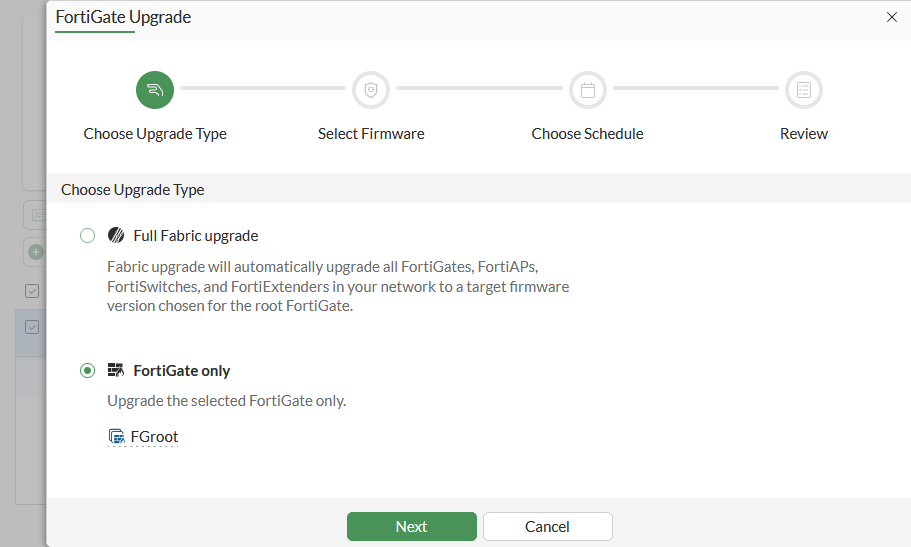
Fortinet’s 7.6.7 guide shows the first upgrade step with FortiGate only selected. Firmware selection, scheduling and review still follow. This is a scope example, not a completed upgrade or a recommendation to upgrade to 7.6.7.[5] View full-size image
Quick answer: A FortiOS upgrade is ready when the exact model and build have a supported upgrade path, the target release has been reviewed, the recovery owner can access the correct backup and credentials, and the business acceptance and rollback decisions are written down. A downloaded firmware image alone is not a recovery plan.
This planning checklist is for authorized FortiGate administrators. FortiOS 7.6 documentation and 7.6.7 release notes supply scoped examples; they are not a recommendation that every device should run 7.6.7 or follow the same sequence. Confirm current support guidance for your hardware, branch and dependencies before scheduling the change.
1. Choose the target for a reason, then verify the route to it
Record the exact device model, current build, target build, management platform, HA or VDOM design and connected services. State the reason for the change: a supported security fix, an applicable defect, a support requirement or an approved feature. Fortinet’s change guidance calls for model and upgrade-path checks, release-note review and testing before production.[1]
Build the plan from the supported path for that model and starting release, including required intermediate steps. Do not jump directly to a desired version because its number is higher. Review changes affecting FortiManager, FortiAnalyzer, FortiClient, authentication, certificates, switches and access points where those dependencies exist.
2. Treat remote access as a preflight dependency
SSL VPN tunnel mode needs a specific migration decision. Fortinet states that, beginning with FortiOS 7.6.3, SSL VPN tunnel mode is replaced by IPsec VPN on all FortiGate models; its settings are not upgraded. Migrate that tunnel-mode configuration before moving to 7.6.3 or later.[3]
Inventory the actual remote-access method, client versions, authentication and application tests. Test the replacement with a representative remote user before the production window. Do not treat an existing SSL VPN tunnel as a setting that will automatically survive the upgrade. Agentless/web-mode access is a separate feature with its own support conditions, so identify the mode precisely.
Also confirm an administrative recovery path that does not depend on the very remote-access service being changed.
3. Keep a recovery backup and a shareable support copy separate
Record the backup’s device identity, firmware version, time and scope. In a multi-VDOM deployment, confirm whether you need the global configuration or an individual VDOM. Retain the encryption password through the approved secure process, separately from an ordinary ticket attachment.[2]
| Item | Ready means |
|---|---|
| Configuration identity | Filename and record identify the correct device, build, time and scope. |
| Protected recovery copy | Approved recovery owner can retrieve the file and required password. |
| Compatibility check | Recovery procedure uses configuration and firmware appropriate to the model and version. |
| Support copy | A sanitized copy is clearly marked and kept separate from the actual recovery copy. |
| Recovery access | Named person can reach the console or approved alternative management path if normal access fails. |
Fortinet warns that restoring a password-masked configuration restores the mask values in place of the secrets. A masked file made for sharing is therefore not a substitute for the complete protected recovery configuration. A backup from a different model or firmware version can also be incompatible.[2]
4. Read known issues as specific change risks
Review the release notes for the exact target and any intermediate builds, not just a general product overview. As one version-specific example, the 7.6.7 known-issues list identifies bug 1277454: an upgrade from 7.6.6 to 7.6.7 may lose certain global settings.[4]
That example is a reason to check the applicable release notes and compare critical settings after the change. It is not a claim that every upgrade loses its configuration. Have the change owner assess current vendor guidance and any workaround for the actual path; avoid copying a configuration workaround into an unrelated device.
Record the schedule for automatic or required patching that applies to the device. Do not assume that every environment offers the same scheduling controls.
5. Set acceptance and rollback triggers before the first restart
Agree on the business tests, time budget, decision owner and recovery method. Include applications, VPNs, DNS, expected network restrictions, management access and relevant logging. Use the same baseline tests before and after each planned stage.
| Decision | Example of the evidence required |
|---|---|
| Proceed | Supported path reviewed; pilot and recovery requirements met. |
| Accept the stage | Required applications and access controls pass; critical settings match the reviewed baseline. |
| Hold | A defined noncritical issue has an accepted impact and a named owner. |
| Recover | Critical test fails or recovery deadline is reached; approved recovery procedure is invoked. |
Fortinet recommends offline current and target firmware, backups, defined rollback criteria and monitoring throughout the change.[1] Do not assume a firmware downgrade automatically preserves a newer configuration. Validate the exact recovery procedure and compatible pre-change backup in advance.
6. Complete the handoff after a full working cycle
Record the installed build, configuration comparison, test outcomes, unresolved issues and ownership. Fortinet advises post-upgrade monitoring for at least one full business cycle.[1] Include the users and scheduled tasks that matter to this site rather than ending the record when the login screen returns.
The final evidence should answer two questions: can the business complete its normal work, and can another authorized administrator understand what changed and how recovery would work?
Related FortiGate acceptance and VPN checks
For the next task, use our FortiGate cutover acceptance checklist and site-to-site VPN traffic diagnostic guide. ALLMSP provides Fortinet firewall support for planning, configuration and troubleshooting.
Frequently asked questions
Which FortiOS version should I upgrade to?
Choose a target supported for the exact model and current configuration, using current vendor guidance, relevant fixes and a supported upgrade path. This checklist does not recommend a single release for every FortiGate.
[1]Can I skip intermediate FortiOS releases?
Follow the supported upgrade path for the actual model and starting build. Include any required intermediate steps and review their release notes before the window.
[1]What happens to SSL VPN tunnel mode in FortiOS 7.6.3 and later?
Fortinet states that SSL VPN tunnel mode is replaced by IPsec VPN and its settings are not upgraded. Migrate that tunnel-mode configuration before upgrading to 7.6.3 or later.
[3]Does the SSL VPN tunnel notice mean every remote-access feature is removed?
No. Identify the exact access mode. Agentless or web-mode access is separate and has its own platform and release support conditions.
What should a pre-upgrade FortiGate backup identify?
Identify the device model, firmware version, time and configuration scope. Keep the protected recovery copy and required encryption password accessible through the approved secure process.
[2]Is a password-masked configuration suitable as the only recovery backup?
No. Fortinet warns that restoring a masked configuration restores mask values instead of the secrets. Keep an appropriate complete protected recovery copy separately from the sanitized support copy.
[2]Can I restore a backup from any FortiGate model or release?
Do not assume compatibility. Fortinet identifies a different model or firmware version as possible reasons for a configuration-file error; verify the intended restore procedure first.
[2]Why read the known-issues page if I only need a security patch?
The exact target and intermediate builds can have relevant operational limitations. Review those against your services and validate critical settings after the change.
[4]What should trigger recovery during an upgrade?
Define it before the window: a failed critical business test, loss of required administration or reaching the agreed recovery deadline. Name the person who makes that decision.
When is the upgrade fully handed over?
After the required tests, critical setting checks and an appropriate business-cycle monitoring period, with the final build, evidence, open issues and ownership recorded.
[1]Sources
- Fortinet: Firmware change management (FortiOS 7.6 best practices) ↩
- Fortinet: Configuration backups and reset (FortiOS 7.6.7) ↩
- Fortinet: SSL VPN tunnel mode replaced with IPsec VPN (FortiOS 7.6.7 release notes) ↩
- Fortinet: FortiOS 7.6.7 known issues ↩
- FortiGate upgrade scope choice before firmware selection — manufacturer technical reference ↩