






























































































































































A Square hardware purchase is not a complete point of sale. The working lane includes the seller and customer displays, payment reader, mobile device where applicable, power supply, hardware hub, network path, mount, printer, cash drawer, scanner, scale, cables, and physical counter. A mismatch anywhere in that chain can delay checkout even when the Square account itself is configured correctly.
Square’s current hardware documentation distinguishes generations and versions of Reader, Stand, Terminal, Register, Kiosk, and Handheld. That identity matters for compatibility, supported features, troubleshooting, and warranty claims. Square also notes that software updates ended on September 1, 2025 for Square Terminal first generation version 1 and Square Register first generation version 1, making model verification an immediate lifecycle control rather than paperwork for later.
This guide stays on the hardware side of the boundary. Catalog design, labor permissions, loyalty, reporting, and other Square application administration belong in the separate software plan. Here the goal is to give a Georgia retailer or restaurant a repeatable physical standard that a cashier, server, manager, installer, and support technician can all operate and recover.
Key decisions at a glance
- Choose among Square Register, Square Stand, Square Terminal, Square Reader, and Square Handheld by checkout posture, mobility, customer handoff, scanning, receipt, battery, network, and accessory needs.
- Identify the exact generation and version before purchase or redeployment because device, mobile-platform, accessory, feature, troubleshooting, and warranty compatibility can differ.
- Treat the counter as infrastructure: verify accessible customer reach, seller ergonomics, mounts, ventilation, grounded power, hub placement, Ethernet or Wi-Fi, strain relief, spill risk, and service access.
- Use Square’s current compatibility resources for every printer, drawer, scanner, scale, dock, cable, iPad, and hub rather than assuming a familiar connector makes two products compatible.
- Complete a representative acceptance test at every station and retain the device identity, installed components, software state, location, owner, spare path, and support evidence.
Select a Square Device Family by Lane and Mobility Requirements
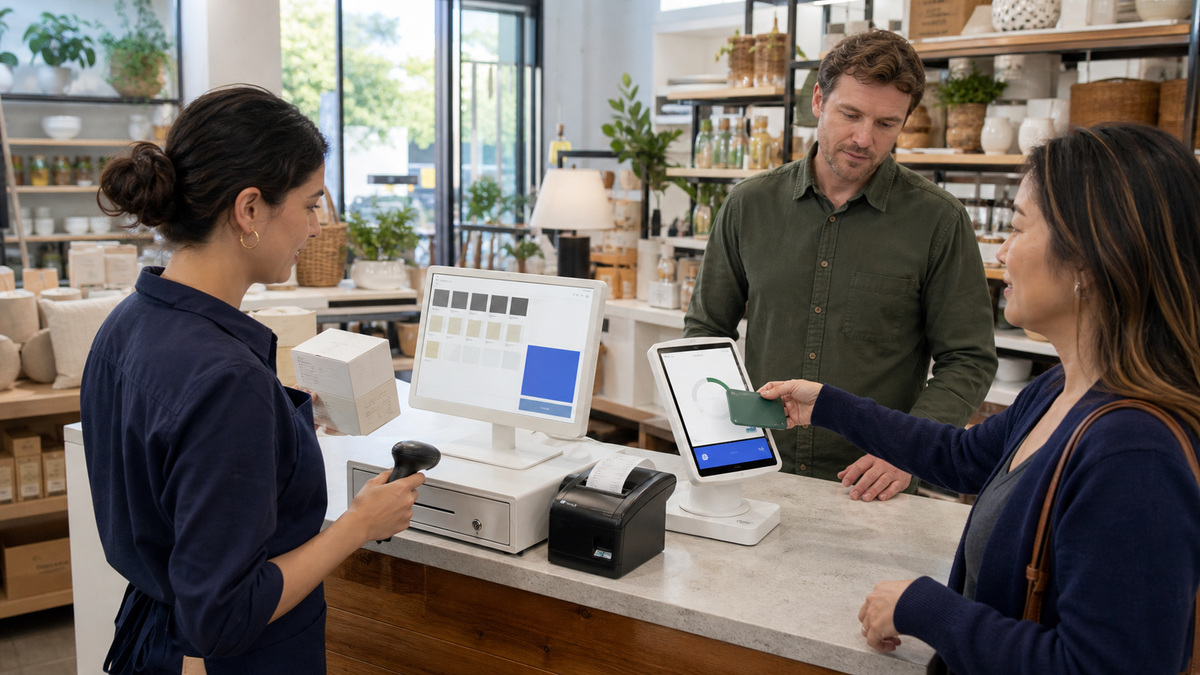
Start with the work performed at each lane. Square Register provides an integrated seller display and separate customer display for a fixed counter. Square Stand turns a compatible iPad into a countertop payment station. Square Terminal combines payment acceptance and a built-in receipt printer in a compact device. Square Reader for contactless and chip pairs with a compatible mobile device, while Square Handheld supports mobile order entry, payments, camera, and barcode scanning in one pocketable unit. Confirm current regional availability and specifications before treating that summary as a bill of materials.
Translate the business workflow into measurable requirements: fixed or mobile use, transactions per hour, tap and dip handoff, swipe contingency, employee screen size, customer-display position, barcode volume, receipt and kitchen printing, cash drawer, weighing, table-side ordering, line busting, battery window, charging location, drop protection, Wi-Fi coverage, and Ethernet preference. One restaurant may need an integrated counter register plus mobile handhelds, a pop-up seller may need a tablet and Reader instead.
Identify the exact generation and version before testing accessories. Square’s identification guide uses physical characteristics and serial-number sequences because similarly named devices can behave differently. Record both seller and customer display identities for a Register, the iPad model used by a Stand, the Reader charging-port generation, and every hub or dock. Do not publish full serial numbers in open tickets or photographs.
- Create a lane matrix for fixed checkout, mobile selling, table service, curbside, line busting, manager use, and a documented emergency fallback.
- Use Square’s identification and compatibility pages to verify the generation, version, host device, connection type, and supported accessories.
- Buy one complete pilot bundle, including every cable, mount, hub, charger, case, printer, drawer, scanner, scale, and paper type, before a fleet order.
- Reject a proposed standard when it depends on an unsupported adapter, captive-portal network, untested mobile OS, or end-of-update hardware.
Prepare the Counter, Power, Network, and Customer Reach
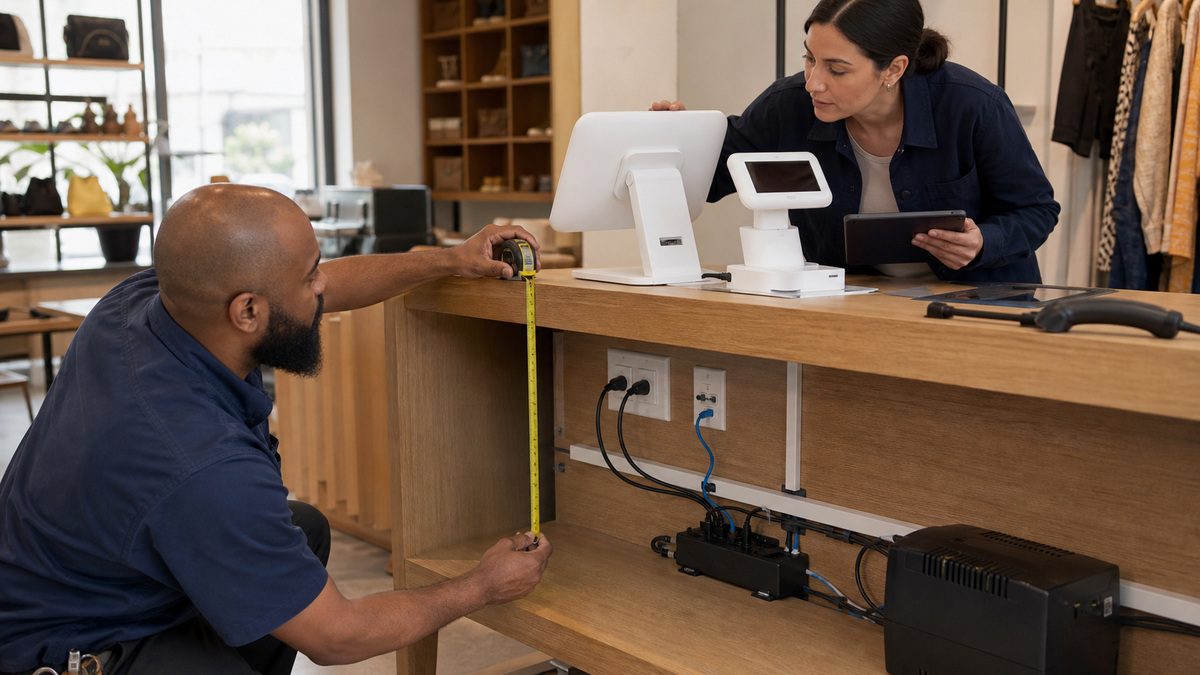
Survey the actual counter before ordering mounts. Measure seller reach, customer approach, wheelchair-accessible payment reach, display sight lines, rotation or undocking clearance, bagging space, scanner path, cash-drawer travel, receipt collection, and the distance from food, liquids, heat, and impact. Preserve ventilation and leave enough service loop to move equipment without pulling a connector.
Map grounded outlets and low-voltage paths separately. Place the supplied or approved power adapter, accessory hub, and surge or battery protection where staff cannot kick, spill on, or casually unplug them. Label both ends of Ethernet and accessory cables with an internal scheme, secure strain relief, and keep spare approved power components by device family. Square warns that third-party connectors and chargers may not be guaranteed for devices such as Handheld, and Stand power troubleshooting calls for its included accessories or an adapter capable of the documented minimum wattage.
Choose Ethernet or managed Wi-Fi from the conditions at the lane. Register needs Wi-Fi or Ethernet and does not support a captive-portal network. Handheld favors Wi-Fi for portability but can use Ethernet through Hub for Square Terminal. Validate signal and roaming at table-side and mobile selling areas, then confirm that the payment device, network printer, and any host tablet have the intended local-network access without placing guest traffic on the same unmanaged path.
- Photograph the approved counter from seller and customer positions and mark mounts, outlets, network drops, hubs, cable paths, and service clearances.
- Use the Square-supplied cable and power components unless current Square documentation explicitly approves the substitute for that exact device.
- Test Wi-Fi coverage where staff actually carry Terminal, Reader, or Handheld, including patios, pickup zones, and dense dinner or weekend conditions.
- Keep payment devices and connections away from sinks, steam, grease, direct heat, unsecured public reach, pinch points, and unprotected floor cable.
Assemble One Known-Good Station and Prove Every Accessory

Stage the pilot with an inventory record for the Square device, customer display, host tablet, mount, power adapter, hub, dock, printer, drawer, scanner, scale, and all cables. Follow the generation-specific setup sequence. Register second generation, for example, has defined cable, customer-display, network, update, sign-in, mounting, and accessory steps. Handheld requires a network and a mandatory initial software update, while Reader setup includes identification, charge state, pairing, update, and optional dock selection.
Test physical functions before training the full team. Complete tap and dip transactions, any supported swipe path, cash sale and drawer opening, customer-display interaction, receipt printing, barcode scanning, item lookup by scanner, rotation or undocking, paper replacement, device charging, and recovery from a removed accessory cable. Use a real low-value test item and approved test method, then void or reconcile it according to the organization’s financial procedure.
Check the employee and customer experience as part of hardware acceptance. A technically connected display can still sit outside comfortable reach, a scanner can collide with the customer screen, a loose handheld case can cover the camera, and a printer can be reachable only by crossing a hot service path. Have representatives for the intended role complete a normal transaction while the installer observes without prompting.
- Reconcile every delivered component and serial-bearing device with the purchase record before cardboard and protective packaging are discarded.
- Update the Square hardware on stable power and network outside trading hours, then record the observed device and application version state.
- Test every approved payment method and connected accessory from the exact employee and customer positions used in production.
- Repeat the complete transaction after any mount, hub, cable, mobile-device, printer, scanner, or network change that could alter the lane.
Scale the Pilot Into a Supportable Hardware Standard
Turn the passing pilot into a purchase-ready standard for each lane type. Include the exact Square generation and version, host device, mount, approved power adapter, hub, dock, network method, accessory models and interfaces, paper and consumables, spare parts, placement photographs, cable diagram, acceptance checklist, and the role that owns daily inspection. A device nickname without its physical bundle is not enough for repeatable support.
Roll out in groups small enough to diagnose. Keep a known-good spare appropriate to the business risk, preserve compatible cables and power adapters with it, charge battery devices on a schedule, and rehearse substitution without deleting or resetting production hardware. Review tickets by model, generation, lane, accessory, and network segment so repeated failures become a standard correction instead of separate workarounds.
ALLMSP can help Georgia retailers and restaurants survey counters, validate Square hardware identities and compatibility, prepare power and network, stage pilot bundles, document acceptance, organize spares, and maintain lifecycle records. The deliverable is a lane another technician can rebuild from evidence, not a collection of white devices that only the original installer understands.
- Publish one approved bill of materials and installation photograph set per fixed, mobile, restaurant, and contingency station type.
- Store warranty date, location, assigned mode or lane, device identity, accessory set, update state, support history, and replacement target together.
- Train staff to report the physical device, indicator state, connection type, affected accessory, and last known successful transaction.
- Revalidate standards when Square releases a generation, ends updates, changes compatibility, or introduces a new charging, network, or mounting requirement.
Official product documentation and ALLMSP resources
- Square: Identify your Square hardware
- Square: Set up Square Register (2nd generation)
- Square: Set up Square Stand (2nd generation)
- Square: Set up Square Reader for contactless and chip
- Square: Set up Square Handheld
- Square: Printer compatibility
- ALLMSP Square Hardware Support
- ALLMSP Hardware Support
- ALLMSP Retail and Restaurants
- Contact ALLMSP
Frequently Asked Questions
Which Square hardware is best for a fixed checkout counter?
Square Register is an integrated fixed-counter option with seller and customer displays, while Square Stand uses a compatible iPad. The right choice depends on lane volume, customer reach, accessory requirements, host-device ownership, mounting, network, power, and support standard rather than appearance alone.
When should a business use Square Terminal instead of Square Reader?
Square Terminal is an all-in-one portable payment device with a built-in receipt printer. Square Reader for contactless and chip pairs with a compatible phone or tablet. Compare mobility, receipt needs, battery and charging, device ownership, accessories, offline support, and the employee workflow.
What work is Square Handheld designed to support?
Square describes Handheld as a pocketable point of sale for orders, card payments, inventory, photos, and barcode scanning. Prove Wi-Fi coverage, battery and charging, case fit, drop exposure, scanner performance, receipt or kitchen printing, and role-specific workflow before broad deployment.
Why must the exact Square hardware generation be recorded?
Generation and version can affect mobile-device and accessory compatibility, available features, update eligibility, troubleshooting steps, and warranty claims. Record the identity from Square’s documented physical or serial method while keeping full serial numbers out of public tickets and images.
Can Square Register connect to a captive-portal Wi-Fi network?
Square’s current Register setup guidance says it can use Wi-Fi or Ethernet but cannot connect to a captive portal that requires accepting terms before access. Provide a business-managed network path and verify the lane under production traffic conditions.
What should be measured before installing a Square customer display?
Check customer approach and accessible reach, sight line, tap and dip position, cable length and strain relief, docked or undocked clearance, mount stability, cashier workspace, bagging path, scanner movement, receipt pickup, and exposure to liquids, heat, impact, or public tampering.
Can any USB printer or scanner be connected to Square hardware?
No. Matching connectors do not prove compatibility. Use Square’s current accessory compatibility page for the exact Square generation, host device, operating system, and connection type, then test the specific model, cable, hub, and complete workflow.
What belongs in a Square hardware acceptance test?
Test update completion, network, tap and dip, any supported swipe path, customer display, receipt and kitchen printer, cash drawer, barcode scanner, scale if used, rotation or mobile handoff, charge behavior, paper replacement, employee ergonomics, and customer accessibility.
How many spare Square devices should a business keep?
Base the spare plan on transaction volume, number of lanes, delivery time, battery dependence, accessory compatibility, and the cost of closing a lane. A spare is useful only when it is charged, updated, documented, compatible, and can be substituted without risky production resets.
How can ALLMSP manage a Square hardware rollout in Georgia?
ALLMSP can build the device and lane matrix, identify generations, verify accessories, survey counters, prepare power and network, stage pilots, execute hardware acceptance, document spares and warranty, and give Georgia retail and restaurant teams a repeatable support standard.


