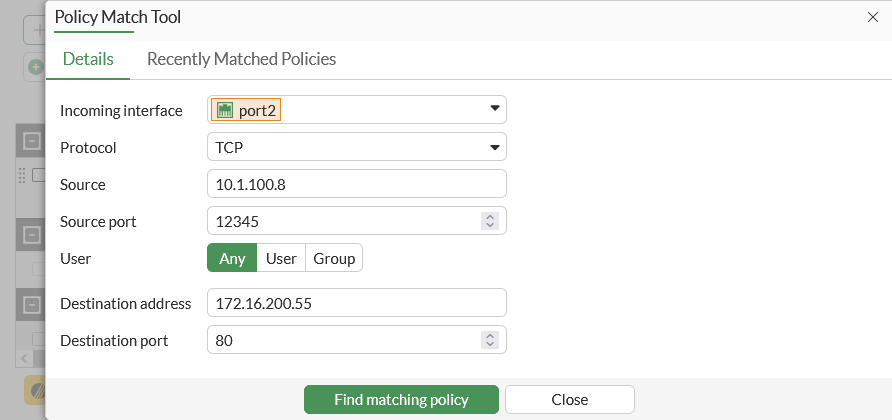
Fortinet’s 7.6.7 guide shows Policy Match Tool inputs for one TCP flow; Find matching policy has not been run. Substitute the authorized test’s interface, source, destination and service, then verify the matching policy and client task. The vendor’s sample addresses are not a production rule.[5] View full-size image
Quick answer: Accept a FortiGate deployment only after a test device can complete the business tasks it needs, prohibited paths remain blocked, administrators retain an approved management path, and the recovery configuration is available. A green link light or a successful ping from the firewall proves only part of that result.
This checklist is for an authorized administrator planning a routed edge-firewall cutover. FortiOS 7.6.7 documentation provides the examples; port names, default switch groups, SD-WAN settings and available management interfaces depend on the actual model and configuration. Confirm the device guide before applying changes.
1. Write the traffic tests before touching the cables
Start with a small acceptance sheet that names a person, a device and an observable result. Include the applications used during a normal workday, rather than an unqualified requirement that “the internet works.” Record the current result before the change so an existing application issue is not mistaken for a new firewall fault.
| Task | Test from | Expected result and evidence |
|---|---|---|
| Business application | One representative staff device on each required network | Sign in and complete a harmless agreed task; save time and result. |
| Name resolution | The same device using its assigned DNS settings | An approved hostname resolves and its application opens. |
| Network separation | An authorized test device on the guest network | An approved guest service works; the protected staff destination stays inaccessible. |
| Administration | The approved management network | Named administrator can sign in; emergency access has an owner. |
| Remote-site dependency | A device that normally uses the site-to-site tunnel | The agreed remote application completes its test. |
These are suggested acceptance tests, not claims about a particular customer environment. Replace them with your actual business requirements and approved test destinations.
2. Confirm which physical and logical interfaces you have
Record the model, serial number, FortiOS build, WAN handoff, LAN networks, VLAN interfaces and management path. Photograph or label cable destinations before moving them. Fortinet distinguishes models with a dedicated management interface from devices that share management with a LAN interface; some 7.6.5-and-later two-WAN models also have a default SD-WAN configuration.[1]
Read the actual configuration before adding a route or changing a port. A label such as “WAN1” does not prove the expected IP address, upstream gateway or policy path. If the administrator’s current connection will be changed, establish the approved alternative access method first and keep someone available to reconnect the original setup.
3. Review each allowed path as a complete decision
For each required flow, identify the incoming interface, source network, destination, outgoing path, permitted service and any required translation. FortiGate transit traffic requires a matching firewall policy; a valid route alone does not authorize that traffic.[2]
Do not turn the vendor’s basic example into an unrestricted production rule. Translate the acceptance sheet into the approved sources, destinations and services. Check the intended rule order and record the policy responsible for the test. Decide deliberately whether source NAT belongs on that path; an internet egress example is not automatically the right design for an internal or VPN path.
4. Cut over one representative device and follow the first failure
Use a bounded pilot before moving the remaining users. Fortinet’s installation workflow separates equipment and cable checks, interface addressing, firewall policy, routing, DNS and FortiGuard connectivity.[3]
| Observed result | Next check | Do not conclude yet |
|---|---|---|
| No access to the local gateway | Correct port, VLAN, link, client address and gateway | That an internet policy is the problem. |
| Firewall reaches the internet; client cannot | Client route, DNS, matching transit policy and intended NAT | That the client uses the same path as firewall-originated traffic. |
| IP-based application test works; name-based test fails | Client DNS response and the application hostname | That every encrypted application is healthy. |
| Website loads; required app fails | The app destination, service, policy result and server response | That general web access accepts the whole cutover. |
Repeat the same test after one approved correction. Preserve the before-and-after evidence so the next administrator can see why the change was made.
5. Decide whether to accept, hold or revert
Accept when every required task passes and the expected restrictions still hold. Hold when a noncritical issue has a named owner, a documented impact and an explicitly accepted workaround. Revert when a critical dependency fails or the approved recovery time is reached. Write those decisions before the window starts.
Keep a current protected configuration backup with the correct device identity and scope. Fortinet supports whole-device or individual-VDOM backup scope when VDOMs are enabled; an encrypted backup also requires its password for restoration.[4]
Finish the handoff with the cable/interface map, approved test results, configuration location, monitoring owner and unresolved items. Avoid pasting configuration secrets into the change ticket.
Continue with the next firewall task
For the next task, use our site-to-site VPN traffic diagnostic guide and FortiOS upgrade and recovery checklist. ALLMSP provides Fortinet firewall support for planning, configuration and troubleshooting.
Frequently asked questions
What should a FortiGate deployment checklist include?
Include the exact device and build, cable and interface map, approved traffic paths, business application tests, management access, configuration backup, rollback trigger and handoff owner.
Does a working WAN connection mean the deployment is complete?
Do all FortiGate models have a dedicated management port?
No. Management-interface availability varies by model. Confirm the device documentation and existing interface configuration before changing the administrator access path.
[1]Should I copy an allow-all example into production?
Use examples to understand policy fields, then apply your approved sources, destinations and services. An unrestricted example is not an acceptance requirement for a business network.
Why can the firewall reach the internet while a workstation cannot?
The workstation also depends on its own address, gateway, DNS, the matching transit policy and the intended translation. Check those against one failing application flow.
[3]Should I enable NAT on every firewall path?
No universal setting fits every path. Confirm the addressing and design for that destination; internet egress, internal routing and site-to-site VPN traffic can have different requirements.
How can I test guest and staff network separation?
Use an authorized test device and agreed destinations. Confirm the guest service works and the protected staff destination remains inaccessible; record the result without probing unrelated systems.
When should a cutover be rolled back?
Use a predetermined trigger, such as failure of a critical application or reaching the recovery deadline. Keep the approved previous configuration and physical reconnection plan available.
What makes a FortiGate backup useful for recovery?
It must correspond to the correct device and intended scope, be accessible to the recovery owner, and have any required encryption password available through the approved secure process.
[4]What should be handed over after deployment?
Provide the interface map, completed acceptance results, backup location, access owner, monitoring responsibility and a list of unresolved issues with named owners.
Sources
- Fortinet: Configuring basic settings (FortiOS 7.6.7) ↩
- Fortinet: Configuring a firewall policy (FortiOS 7.6.7) ↩
- Fortinet: Troubleshooting your installation (FortiOS 7.6.7) ↩
- Fortinet: Backing up the configuration (FortiOS 7.6.7) ↩
- FortiGate policy match inputs before cutover acceptance — manufacturer technical reference ↩