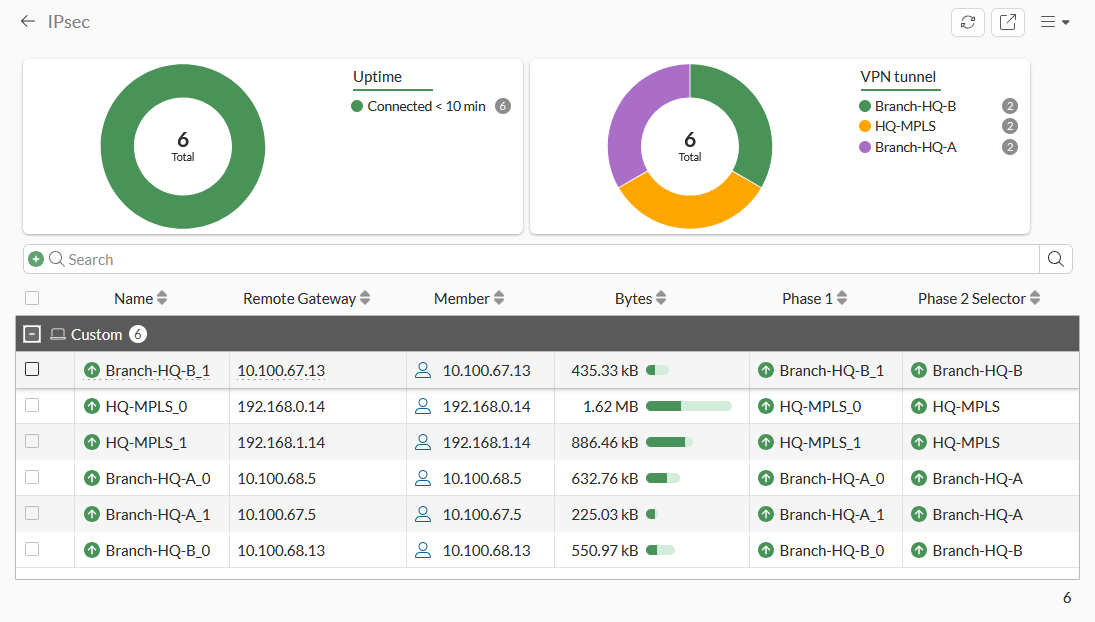
Fortinet’s 7.6.7 IPsec Monitor example shows six tunnels with byte counters and Phase 1/Phase 2 selector details. Check the relevant tunnel and agreed test flow; an up tunnel or changing counter does not prove the business application and return path work.[4] View full-size image
Quick answer: When a FortiGate site-to-site IPsec VPN shows as established but an application fails, trace one specific source-to-destination flow in both directions. Check the negotiated protected networks, route, matching firewall policy, intended NAT and remote return path before restarting the tunnel.
This guide focuses on a routed site-to-site VPN, not FortiClient remote-access enrollment. FortiOS 7.6.7 documentation is the reference; confirm the actual version, routing design and peer platform. If the tunnel itself is down, begin with peer reachability, authentication and negotiation evidence instead.
1. Define what “no traffic” actually means
Create a test record: source IP and network, destination IP, application port or protocol, direction, time and expected result. Use a known, authorized test endpoint. “The VPN is green” and “the shared folder fails” are different observations; neither tells you where a packet stopped.
Example: an illustrative branch device at 10.20.10.25 cannot reach an approved HTTPS application at 10.40.20.15. Keep that same pair and service throughout the test. Separately note whether the application works from a device already on the destination network. These addresses describe a hypothetical private network, not a customer result.
2. Separate tunnel establishment from application delivery
Fortinet’s site-to-site guide verifies tunnel status in the Dashboard network IPsec widget and then separately verifies traffic through the tunnel. Established IKE/IPsec state is useful evidence, but it does not replace an application test.[1]
| Observation | What it narrows down | Next useful evidence |
|---|---|---|
| Tunnel is not established | Peer or negotiation problem | Time-correlated VPN events and matching peer configuration. |
| Tunnel is established; one subnet fails | A flow-specific mismatch is possible | Actual local/remote protected networks, route and policy for that subnet. |
| One application fails; another passes | The tunnel carries at least some traffic | Exact destination and service for the failing application. |
| Traffic works in only one initiated direction | Initiation or return path differs | Matching policy for the initiating side and routing on the destination network. |
A failed ping is not automatically proof of a broken tunnel: an endpoint may reject ICMP while allowing the required application. Prefer the agreed application test.
3. Compare the protected networks and route on both peers
Check the actual source and destination networks selected for the tunnel. Fortinet’s example builds local and remote address objects, phase-2 network selections and routes together; a later-added subnet must fit the intended configuration on both sides.[1]
Ask which route each firewall selects for the precise remote destination. Then ask how the remote server sends its reply toward the branch network. A tunnel configured on the firewall cannot correct a server using an unrelated default gateway. Overlapping address ranges or an intentional translation design need a specific plan rather than a copied standard configuration.
Record the VDOM and routing context as well as the tunnel name. Escalate a design mismatch before changing multiple selectors, routes and policies at once.
4. Check the policy for the initiating direction
For a route-based VPN, inspect the policy between the local network interface and the virtual IPsec interface. If the remote site also needs to initiate connections, inspect the corresponding policy for that direction. Fortinet distinguishes these ordinary accept policies from policy-based VPN rules.[2]
Match the observed source, destination and service to the intended rule. Confirm whether NAT is deliberately part of this design; Fortinet’s ordinary non-overlapping route-based example disables it. Do not create an unrestricted rule or remove security inspection just to make the status appear healthy. An unexpected translated source is evidence to investigate, not a reason to rewrite both peers blindly.
5. Find the last observed point, then check the reply
Use time-correlated traffic logs and, when needed, a narrowly filtered, short capture approved for the device and build. Compare evidence at the branch LAN, the tunnel, the remote LAN and the destination response. Fortinet’s example follows request and reply through both firewalls.[1]
| Evidence for the same test flow | Focus next |
|---|---|
| No request at branch gateway | Client address, local VLAN, gateway and host routing. |
| Request reaches firewall; expected policy does not match | Interfaces, address objects, service and rule order. |
| Remote LAN sees request; server sends no reply | Server listener, host firewall, application health and destination gateway. |
| Server replies; reply does not return to branch | Remote routing, intended translation and return-path policy. |
| IP test passes; application hostname fails | DNS result and application-specific hostname requirements. |
Capture visibility can vary with hardware acceleration and the diagnostic tool. Missing CPU-visible packets alone is not a final diagnosis. Keep advanced debugging and any temporary processing changes within vendor-guided, bounded troubleshooting; do not disable acceleration as a routine first step.[3]
6. Close the incident with a repeatable test
Change the smallest verified cause, repeat the identical application test and verify the permitted initiation directions. Save the tunnel identity, affected subnets, relevant rule, timestamps and result. Share sanitized evidence through the approved support channel; configuration exports and diagnostic output may contain sensitive information.
If the evidence remains inconsistent, provide both peer administrators with the same test record. Rebooting both devices can erase useful state without identifying a selector, policy or return-route problem.
Related FortiGate deployment and maintenance guides
For the next task, use our FortiGate cutover acceptance checklist and FortiOS upgrade and recovery checklist. ALLMSP provides Fortinet firewall support for planning, configuration and troubleshooting.
Frequently asked questions
Why is my FortiGate IPsec tunnel up but no traffic passes?
What information should I collect before changing the VPN?
Record the source and destination IPs, application port or protocol, direction, timestamp, expected result, tunnel name and relevant routing context. Use the same test throughout troubleshooting.
Is a failed ping enough to diagnose a VPN outage?
No. A destination may block ICMP while its application works. Use the permitted application test and correlate its traffic with logs or a bounded capture.
Can a tunnel be established while a newly added subnet fails?
Yes. Compare the actual local and remote protected networks and the route and policy for that new subnet on both peers.
[1]Does a route-based VPN need a firewall policy?
Yes. Inspect the ordinary accept policy between the local network and virtual IPsec interface. A corresponding policy is needed when the other side initiates traffic in the reverse direction.
[2]Should NAT be enabled for site-to-site traffic?
Check the intended design. Fortinet’s ordinary non-overlapping route-based example disables NAT; overlapping networks or a deliberate translated design need their own reviewed configuration.
[2]Why does traffic work in only one direction?
The initiating direction, matching policy or remote return route may differ. Follow the same test request and reply across both sites rather than assuming tunnel status proves both paths.
What if the remote server receives the request but does not answer?
Check its application listener, local firewall, health and route back to the source. The VPN cannot make an unavailable application respond.
Should I restart the firewall before collecting evidence?
Collect the test record and relevant state first when operationally possible. A restart can remove diagnostic evidence while leaving a route or policy mismatch unresolved.
Does this guide cover FortiClient remote-access setup?
No. It addresses routed site-to-site IPsec traffic between networks. Remote-access client enrollment, authentication and address assignment require a separate diagnostic workflow.