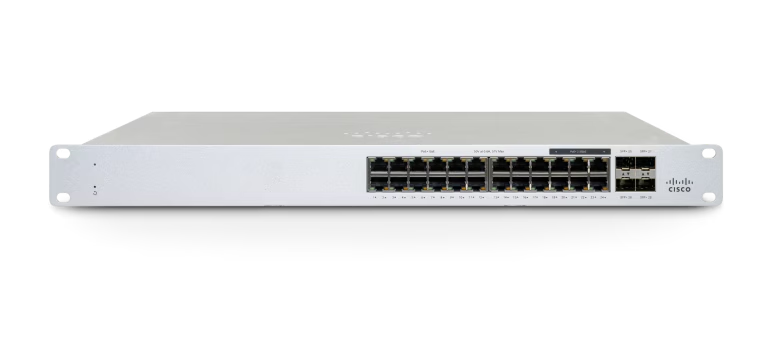
Cisco Meraki MS130 product image; ports and PoE capabilities depend on the exact switch variant.
An offline camera, phone or access point on a Meraki MS switch may lack power, physical link, the intended VLAN or authorization. Start by identifying which of those states is missing. A lit endpoint is not proof of network access, and an enabled switch port is not proof that it is supplying the required power.
This procedure covers an individual endpoint or port. If the entire switch is unreachable, first investigate switch power, its uplink and management path. Record the exact switch family, firmware, port, endpoint model and power requirements before applying a procedure from another platform.
Record the failure and choose a controlled comparison
Scroll sideways to read all columns.
| Observation | First useful test | What not to infer |
|---|---|---|
| No endpoint power and no link | PoE-capable hardware, enabled power and a known-good supported cable path | A failed endpoint solely from a dark indicator |
| Endpoint powered but no physical link | Link state, cable, endpoint interface and supported negotiation | A VLAN fault before Ethernet link exists |
| Link present but no expected address | Port role, authentication result and the intended DHCP path | Working user traffic from a green link indicator |
| Address present but service unavailable | Gateway, DNS, destination and effective access policy | A power fault solely because the application is offline |
| Several devices fail together | Shared switch power, uplink, VLAN or policy dependency | Independent simultaneous endpoint failures |
Capture the relevant event time, observed link and power state, and any recent port or policy change. Compare one variable at a time. If moving an endpoint, use an approved comparison port whose VLAN, access policy and power capabilities match the test; otherwise the move changes several possible causes together.
Prove the physical path before changing the VLAN
Check the intended port’s administrative state, schedule, negotiated link and error evidence. Inspect the patch lead, patch-panel mapping and endpoint connection. Meraki’s switch troubleshooting guidance uses known-good cables and controlled swaps to distinguish device, port and cabling faults.[5]
Try a known-good appropriate patch lead first when practical. Disconnecting a cable or cycling a port interrupts an attached device, so coordinate the test with the business owner. Do not cycle a live camera, door-access endpoint or phone simply because the tool is available.
Port capabilities differ by model. For example, Meraki’s Switch Ports documentation states that MS350 and MS355 do not support half duplex, and cloud-managed Catalyst SFP/SFP+ ports expose automatic link negotiation only. Follow the actual platform options rather than forcing a speed or duplex value copied from an older switch.[3]
If local status access is needed because Dashboard is unavailable, consult the current model and firmware instructions. Meraki distinguishes first-login behavior from MS 17 onward and gives different local-access addressing for MS390/C9300-M releases. Avoid treating one default address or login as universal.[6]
Interpret PoE state without confusing allocation and consumption
Verify that the exact switch and port support the endpoint’s PoE requirement and that PoE is enabled. Review available power supplies and configured power mode as well as the model’s supported total. The PoE page separates overall real-time Consumption from Budgeted values; they describe different things.[1]
Budgeted power reflects potential class-based allocation and is not a measurement of the endpoint’s actual draw. Read the consumption and negotiation evidence alongside it. Meraki’s troubleshooting example explicitly distinguishes a device’s request, a switch’s allocation and the class-based upper limit. A large budgeted number alone does not prove a device is drawing that power.[2]
For a repeated power failure, compare the endpoint on a known-good supported PoE path and another appropriate endpoint on the suspect path. Keep the electrical standard, allowed policy and operational impact controlled. Where the device supports LLDP or CDP, an authorized capture can help compare requested and allocated power. Meraki notes that Intelligent Packet Capture requires an active port; a down-port capture error is not additional proof of a switch hardware failure.[2]
Illustrative example: a camera boots on a supported comparison path but repeatedly loses power on its original run. That narrows the next investigation to the original cabling, port, supply or negotiation evidence. It does not by itself justify replacing the switch or increasing unrelated port power settings.
Trace the actual VLAN and authentication result
With stable power and link, compare the endpoint’s expected VLAN with the configured port type and the upstream path. An access port places ordinary untagged endpoint traffic on its configured VLAN. A trunk carries permitted tagged VLANs and has a native untagged role. An AP uplink can require multiple client VLANs; an ordinary camera connection may have a different design.[3]
Check whether an access policy is controlling the port and review the actual RADIUS or other authorization result. A powered device with link may still be unauthenticated or assigned to a restricted or dynamically selected VLAN. Changing a shared access policy can affect every port using it, so investigate the specific session before editing the policy.[4]
Do not assume every MS platform implements the same host-mode behavior. Meraki specifically limits multi-VLAN assignment with multi-auth to MS390 and C9300-M in the cited guide. Check the installed model, firmware and intended phone/endpoint arrangement before using another site’s policy as a template.[4]
Compare the client’s observed address, gateway and DNS with the approved result. If the device receives an unexpected VLAN from authentication, involve the identity owner rather than opening the port or disabling authentication. If the VLAN is correct but addressing fails, follow that VLAN’s uplinks, gateway and DHCP service.
Close the incident with a device task and preserved controls
Scroll sideways to read all columns.
| Check | Evidence to retain |
|---|---|
| Stable physical path | Expected link and a controlled cable or port comparison |
| Power | Supported PoE path, observed consumption and relevant negotiation result |
| VLAN and identity | Approved port role and actual authorization or VLAN outcome |
| Device function | The camera, phone or AP completes its intended task |
| Restrictions | The authorized role works while unrelated access remains restricted |
| Recurrence owner | Narrow correction, test time, remaining exception and responsible owner |
For an MR with stable power and link but failing client traffic, continue with the connected-without-internet guide. When several downstream VLANs fail after an edge replacement, compare the MX cutover acceptance record before changing individual endpoint ports.
Preserve event logs and swap results for vendor escalation if the evidence indicates hardware failure. A factory reset is not the first diagnostic step for one offline endpoint; use a supported recovery or replacement process only when the cause and disruption are understood.
ALLMSP’s Meraki support covers switches, PoE, VLANs and device connectivity. Request a switch-port review with the model, firmware, port, endpoint requirement and completed comparisons so the next action follows the evidence.
Frequently asked questions
What should be checked first when a device on an MS switch is offline?
Determine whether it has power, physical link, the expected address and authorization. Record the switch, port, endpoint, firmware and failure time before changing VLANs or cycling the device.
Does an enabled MS port always provide PoE?
No. The exact switch and port must support the endpoint’s power requirement, PoE must be enabled, and the available supply and power configuration must support the load.
[1]Is Budgeted PoE the device’s actual power consumption?
Can an endpoint have power and link but still be blocked?
Is moving an endpoint to any working port a valid comparison?
Only if you account for the differences. Use an approved port with the required PoE capability, VLAN and access policy, and change one relevant variable at a time.
Should link speed or duplex be forced to fix every port fault?
No. Verify the actual platform’s supported settings. Meraki documents model-specific restrictions, including no half duplex on MS350 and MS355 and automatic negotiation on cloud-managed Catalyst SFP/SFP+ ports.
[3]Why can a packet capture fail when a switch port is down?
Meraki documents that Intelligent Packet Capture requires an active switch port. A down-port capture error does not establish another hardware fault; collect the physical and power evidence first.
[2]Can every MS switch assign multiple data VLANs using multi-auth?
Do not assume so. The cited Meraki access-policy guide limits that multi-VLAN behavior to MS390 and C9300-M. Confirm the exact platform, firmware and required host mode.
[4]Should a shared access policy be disabled for one offline device?
No. Inspect the specific authorization result and intended VLAN with the responsible owner. A shared policy change can affect other ports, and restoring access should preserve the approved restrictions.
[4]What proves that an MS port problem is repaired?
Power and link remain stable, the device receives the intended VLAN and authorization, its business function works, and unrelated access remains restricted. Save the narrow correction and comparison results.