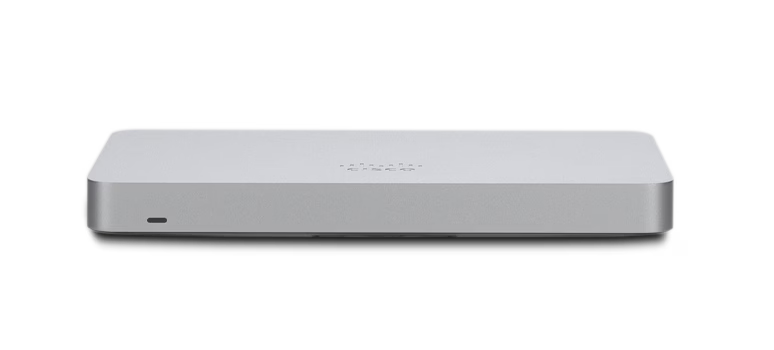
Cisco Meraki MX68 shown as a product example; the guide’s cited MX75 hardware has a different port layout.
A Meraki MX cutover is ready when the replacement has the correct organization and network configuration, the ISP handoff is understood, and the team can prove the required branch workflows or return to the former design. An MX appearing online in Dashboard does not prove that every client VLAN, remote route or business application works.
This guide covers a planned branch firewall replacement in routed mode. Passthrough, VPN concentrator, warm-spare and more complex routed designs need their own topology review. Use the exact appliance model and installed firmware as the basis for port, feature and recovery decisions.
Confirm ownership and the intended topology before connecting the branch
Check authorized Dashboard access, the intended organization and network, device identity and the applicable licensing status. Meraki stores configuration in the cloud and devices obtain their network configuration after they can reach it. Claiming a serial into inventory and assigning the device to the correct network are separate readiness checks.[1]
Write down what the current edge actually does: default gateway, DHCP service or relay, DNS dependencies, VLAN boundaries, static routes, VPN peers and published services. Mark each function as retained elsewhere, recreated on the MX or intentionally retired. A copied list of firewall rules is not a complete migration plan.
In routed mode, the MX generally serves as the LAN gateway and translates internet-bound client addresses. Passthrough/VPN concentrator mode has a different role and does not perform that address translation. Changing Addressing & VLANs settings can disrupt traffic, so agree the design and change window first.[3]
Stage the exact WAN handoff and model before the change window
Scroll sideways to read all columns.
| Item | Decision to confirm | Evidence to bring to the change |
|---|---|---|
| ISP addressing | DHCP, static addressing or provider-required authentication | Provider-confirmed address, gateway, DNS and any handoff VLAN or credentials |
| Appliance interfaces | Correct WAN/LAN roles and supported media for this model | Labeled physical ports, cables and model installation instructions |
| Cloud access | The appliance reaches its actual organization requirements | Current Dashboard connectivity requirements and a completed staged check |
| LAN responsibilities | One deliberate gateway and DHCP design for each subnet | VLAN/subnet map, DHCP owner and approved switch uplink settings |
| Recovery ownership | Who decides to continue or roll back | Former-device record, cable mapping, deadline and available hands-on contact |
The MX75 installation guide is a useful reminder that similarly placed connectors need not have identical roles. It also directs administrators to the current organization-specific Dashboard firewall requirements for cloud connectivity. Use the installation guide for your actual model and the applicable organization requirements; do not copy a fixed internet-port list from an old deployment note.[2]
Stage the appliance on an approved connection, let the planned firmware operation finish and confirm the configuration it receives. Record the firmware release and relevant release-note review. Resolve a device identity, uplink or incomplete-update problem before moving production cables.
If local status access is required, use the current product and firmware instructions. Meraki documents different first-login behavior for MX 19 and later than for earlier firmware. Do not assume an older installation guide’s default credential description fits the device in front of you, and keep administrative access controlled.[4]
Reconcile VLAN, DHCP and remote-route behavior explicitly
For each client VLAN, record the subnet, gateway, DNS, address-assignment owner and permitted destinations. Compare the MX LAN port with the connected switch port: access or trunk, native/untagged role and allowed tagged VLANs must match the intended design. A trunk’s allowed list is a real boundary; a correct VLAN name in Dashboard cannot compensate for its absence from the uplink.[3][5]
Meraki documents a specific first-enable behavior: when VLANs are first enabled, the default VLAN’s site-to-site VPN mode is Disabled. Review the actual VPN inclusion of each required subnet instead of inferring it from the fact that a tunnel appears up.[3]
Illustrative planning example: the existing switch remains the gateway for a warehouse subnet while the new MX becomes the internet edge. The cutover record must identify the transit network, route in each direction and existing DHCP owner. Simply creating a matching VLAN on the MX could introduce an unintended second gateway or DHCP design. Approve the topology before implementation.
Cut over against a short acceptance sheet
Capture the former configuration and cable placement through the supported administrative process, preserve the previous appliance and agree a rollback decision time. Ensure someone can reach the site without relying solely on the connection being replaced. Label the WAN and LAN connections so restoring the documented old path is a concrete operation.
Scroll sideways to read all columns.
| Check | Useful pass evidence | Hold or investigate when |
|---|---|---|
| Management | The intended MX reports the expected network and current configuration | Wrong network, inconsistent uplink or an unfinished firmware operation |
| Addressing | A test client in each required VLAN receives the approved gateway and DNS | Wrong subnet, competing address service or an unavailable relay path |
| Internet and business services | The real application or service transaction succeeds from each required role | A generic web page works but the required application does not |
| Segmentation | Approved cross-VLAN access works and a deliberately denied path remains denied | Only broad temporary allows make the test pass |
| Remote connectivity | Required remote subnets and name resolution work in both intended directions | Tunnel status is up but actual traffic fails |
| Operational handoff | The owner records results, exceptions and the rollback decision | No one accepts an unresolved business-blocking fault |
Run equivalent tests before and after the change so the comparison means something. Include a wired client, a relevant wireless client and any business-critical appliance that uses a different VLAN or DNS path. Test an alternate uplink or failover only when that capability is part of the verified design and the interruption is approved.
Keep troubleshooting focused and complete the handoff
If management works but wireless clients fail, use the MR connected-without-internet guide to trace the client’s addressing and service path. If the uplink or a powered endpoint is the failure boundary, use the MS port, PoE and VLAN guide. These comparisons keep an edge cutover from turning into unrelated fleet-wide changes.
Save actual test results, model and firmware, circuit details, current VLAN/route map, administrative ownership and the accepted exceptions. Assign a follow-up owner for monitoring and cleanup of the former design. A successful change window includes a supportable record for the next incident.
ALLMSP’s Meraki support covers firewalls, switching, Wi-Fi and network operations. Request a branch cutover review with the current topology, MX model, ISP details and required business workflows so planning starts with the paths the branch must retain.
Frequently asked questions
What should be ready before a Meraki MX branch cutover?
Confirm authorized Dashboard ownership, the correct organization and network, licensing status, exact appliance and firmware, ISP handoff, VLAN and DHCP responsibilities, business acceptance tests and a documented rollback decision.
Is an MX appearing online in Dashboard enough to approve the change?
No. It confirms a management connection, not every client workflow. Test addressing, DNS, business applications, required remote routes and intended network restrictions from the relevant client VLANs.
Are routed and passthrough MX deployments interchangeable?
No. Routed mode generally provides the LAN gateway and address translation, while passthrough or VPN concentrator mode has a different role. Choose the topology before changing production settings.
[3]Should the same WAN port assumptions be used for every MX model?
No. Verify interface roles and supported media in the exact model’s installation guide. Record the actual cable and handoff mapping rather than relying on chassis appearance or an older appliance.
[2]Which firewall rules should allow MX cloud connectivity?
Use the current requirements shown for the actual organization in Dashboard and review them with the upstream firewall owner. Do not rely on a fixed list copied from an old installation note.
[2]Can an old MX local-status default login always be reused?
No. Local-status first-login behavior depends on product and firmware; Meraki documents a change for MX 19 and later. Follow the current applicable instructions and your configured administrative controls.
[4]What must match between an MX LAN port and its switch uplink?
Does enabling VLANs automatically advertise the default VLAN over site-to-site VPN?
Not on first enablement. Meraki documents the default VLAN’s VPN mode as Disabled in that case. Inspect actual VPN inclusion and test the required subnet traffic.
[3]When should the team roll back an MX cutover?
Use the agreed decision point and business criteria, such as an unresolved required application or remote path. Preserve the old configuration and labeled connections so the authorized rollback is practical.
What should the cutover handoff contain?
Save actual acceptance results, circuit and device identity, firmware, VLAN and route map, DHCP and DNS dependencies, administrative owners, accepted exceptions and the next monitoring or cleanup actions.