





























































































































































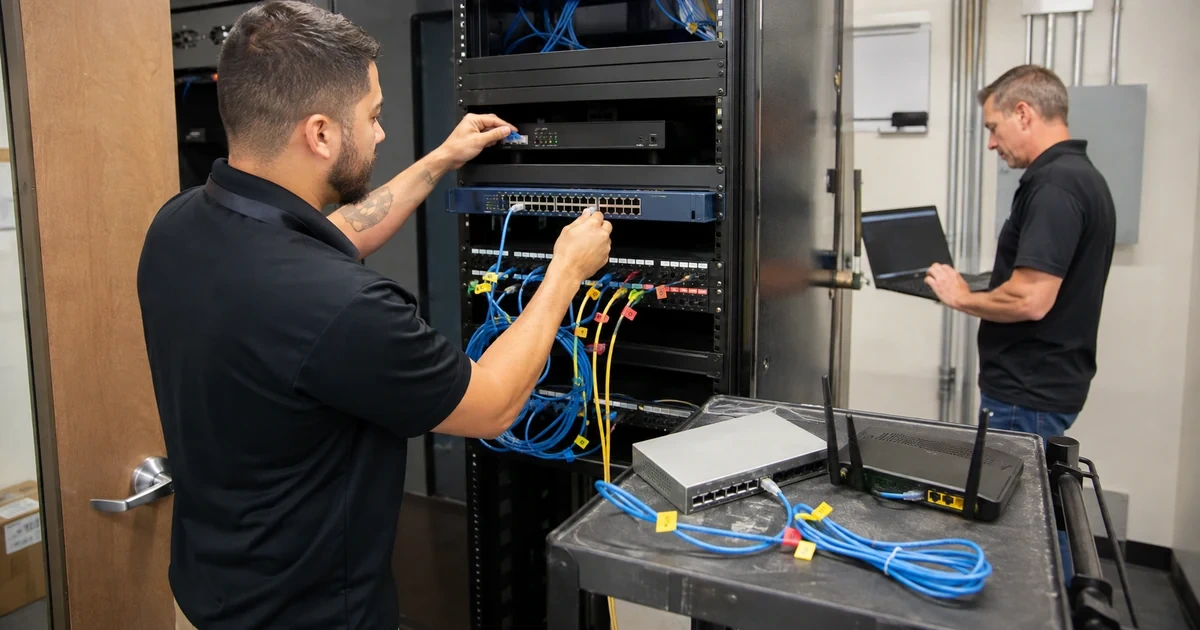
Many growing businesses rely on network equipment that was appropriate for a home office or an earlier stage of the company. Consumer routers, unmanaged switches, unsupported firewalls, daisy-chained access points, improvised power supplies, and undocumented port forwards may continue working until growth, a security incident, an internet change, or a failed device exposes their limits. Remediation should replace risk without creating an avoidable outage.
The goal is not to buy the largest appliance. The organization needs an architecture sized for internet throughput, secure remote access, users, sites, cloud traffic, phones, wireless, cameras, servers, point of sale, guest access, applications, logs, redundancy, and expected growth. Management ownership, licensing, support, updates, backups, monitoring, and recovery are part of the design.
ALLMSP plans and performs switch and firewall remediation in house for businesses in Lawrenceville, Suwanee, Gwinnett County, Metro Atlanta, and throughout Georgia. We can discover the current environment, design the target network, procure suitable equipment, migrate configurations, coordinate cabling and internet, execute the cutover, validate business services, train administrators, and provide ongoing support.
Replace fragile network equipment with a secure and supportable architecture
- Find hidden risk: Inventory consumer gear, unmanaged switches, unsupported devices, shared access, public management, stale rules, and single points.
- Size the design: Model users, sites, traffic, applications, VPN, security features, ports, PoE, uplinks, wireless, logs, growth, and resilience.
- Segment services: Separate corporate, guest, voice, cameras, point of sale, servers, management, building systems, and other trust zones.
- Clean policy: Review inbound, outbound, inter-zone, remote-access, administrative, published-service, and temporary firewall rules.
- Migrate safely: Build and test configurations, preserve backups, stage hardware, communicate downtime, maintain rollback, and verify dependencies.
- Operate afterward: Monitor health and security, manage firmware and licenses, back up configurations, document changes, and test recovery.
Identify equipment, configuration, capacity, and ownership gaps
Inventory every device from the carrier handoff to the endpoint. Include modems, optical terminals, routers, firewalls, switches, access points, controllers, injectors, extenders, media converters, VPN appliances, UPS units, and cloud management. Record model, serial, location, management method, owner, credential custody, firmware, support date, license, configuration backup, power, uplinks, ports, PoE, and purpose. Search for small unmanaged devices and personal routers added to solve a local problem.
Document the current security and traffic architecture. Identify public addresses, inbound services, port forwards, VPNs, remote management, routes, VLANs, trunks, access lists, wireless networks, guest access, phones, cameras, point of sale, servers, printers, building systems, and cloud connections. Determine which trust boundaries exist only on paper. Review management exposure, shared accounts, default settings, weak protocols, stale vendors, broad rules, and systems that cannot produce useful logs.
Measure current and future capacity. Record internet speed, firewall throughput with intended security features enabled, concurrent users, VPN demand, sessions, switch ports, uplinks, PoE, wireless density, controller limits, routing, rack space, power, cooling, and growth. Confirm whether subscriptions are required for security, updates, cloud management, support, or visibility. Separate a licensing limit from a hardware limit and identify what happens when either is reached.
- Hidden equipment: Find consumer routers, unmanaged switches, injectors, extenders, personal access points, converters, and unsupported appliances.
- Ownership gap: Identify accounts, billing, licenses, domains, cloud portals, recovery, configuration custody, support, and responsible staff.
- Exposure gap: Review public interfaces, remote management, port forwards, VPNs, weak protocols, default access, and stale vendors.
- Segmentation gap: Compare intended and actual separation for users, guests, voice, cameras, servers, point of sale, and management.
- Capacity gap: Model throughput, security inspection, users, sessions, VPN, ports, PoE, uplinks, wireless, power, and growth.
The remediation scope becomes clear when the business can see which devices are unsupported, undersized, insecure, undocumented, or owned by no one.
Design managed switching, segmentation, firewall policy, and recovery
Define the target zones and permitted flows from business requirements. Corporate devices, guests, phones, cameras, point of sale, servers, management, building systems, labs, and vendor equipment may need different trust. For each zone, identify owner, devices, data, authentication, addressing, internet access, internal destinations, management, logging, and exceptions. Use default-deny between trust zones where appropriate and add explicit flows for verified applications. Avoid creating VLANs without enforcing meaningful boundaries at routing and firewall layers.
Review firewall policy rule by rule. Record source, destination, service, application where supported, direction, translation, schedule, user or device context, business owner, purpose, creation date, expiration, log behavior, and last observed use. Remove duplicates, overly broad objects, obsolete published services, stale VPN access, and temporary rules after validation. NIST describes firewalls as controls for traffic between networks or hosts with different security policies. The rule base should express the organization’s current policy, not its entire history.
Build operational recovery into the design. Use protected named administration, restricted management networks, secure protocols, centralized logs, synchronized time, approved configuration baselines, automated or scheduled backups, tested restore procedures, vendor support, spare strategy, compatible firmware, licenses, certificates, console access, and documented bootstrap steps. Plan internet or device redundancy according to business impact. Confirm that both redundant components do not share a hidden carrier, power, pathway, or management failure.
- Zone definition: State devices, users, data, owner, trust, authentication, addressing, internet, internal flows, management, and logs.
- Firewall rule: Document source, destination, service, direction, translation, owner, purpose, schedule, expiration, logging, and use.
- Management design: Restrict paths, use named privilege, protect recovery, encrypt protocols, centralize logs, and monitor changes.
- Configuration recovery: Maintain baseline, backups, history, secure storage, firmware, licenses, certificates, access, and tested restoration.
- Resilience design: Evaluate devices, links, carriers, paths, power, UPS, management, failover behavior, manual steps, and monitoring.
The target design should make permitted communication explainable, administration accountable, recovery practical, and future changes easier to govern.
Stage the migration, execute a controlled cutover, and verify every service
Create the migration workbook from current evidence and the approved target. Include device inventory, physical connections, interface mappings, VLANs, addressing, routes, firewall rules, NAT, VPNs, certificates, DHCP, DNS relationships, authentication, wireless, PoE, management, monitoring, logging, backups, licensing, and owners. Build and review configurations before the window. Update firmware in staging when appropriate, register support, claim cloud devices in company-controlled accounts, label equipment, and prepare cables, optics, adapters, and console tools.
Write the cutover sequence with decision gates. State prerequisites, communication, affected services, start time, expected interruption, carrier coordination, physical steps, configuration steps, validation, rollback threshold, and authority. Preserve the old configuration and equipment until acceptance. Move critical functions in a planned order and test after each stage. Maintain alternate communication and emergency contacts because phones or internet may be part of the change.
Validate from the user’s perspective and the management plane. Test wired and wireless access, internet, cloud applications, internal servers, DNS, DHCP, identity, VPN, phones, cameras, printers, scanning, point of sale, remote support, published services, monitoring, logs, alerts, failover, throughput, and expected segmentation. Watch errors, resource use, PoE, temperature, and support tickets after release. Finish documentation, train operators, remove temporary access, close old services, sanitize retired equipment, and schedule a post-change review.
- Migration workbook: Map old and new devices, ports, VLANs, routes, rules, VPNs, services, certificates, power, logs, and owners.
- Staging: Register ownership, licenses, support, firmware, baseline, accounts, certificates, monitoring, labels, and physical accessories.
- Cutover gate: Confirm prerequisite, scope, communication, window, interruption, sequence, validation, rollback, and decision authority.
- Service test: Exercise internet, wired, wireless, cloud, server, voice, camera, printer, point of sale, VPN, monitoring, and isolation.
- Closure: Update records, remove temporary access, cancel old services, sanitize equipment, preserve evidence, and review outcomes.
A successful replacement is not merely online. It carries every approved service, enforces the intended boundaries, reports its health, and can be restored by the support team.
Business switch and firewall remediation from ALLMSP
ALLMSP can inventory existing equipment, assess security and capacity, design segmentation, clean firewall policy, procure supported hardware, stage configurations, migrate internet and network services, validate applications, document ownership, and provide ongoing monitoring and support through its in-house team.
We replace fragile consumer and unsupported network equipment for organizations in Lawrenceville, Suwanee, Gwinnett County, Metro Atlanta, and across Georgia. The project can include cabling, racks, wireless, phones, cameras, servers, point of sale, cloud connections, VPN, and redundant connectivity.
- Assess: Find hidden equipment, exposure, ownership, segmentation, capacity, licensing, support, and recovery gaps.
- Modernize: Design managed switching, firewall policy, secure administration, useful logs, resilience, and lifecycle.
- Migrate: Stage configurations, control cutover, preserve rollback, validate business services, and operate the new system.
Official switch and firewall remediation references
Use current vendor documentation, applicable standards, and business-specific risk analysis. Verify feature capacity and subscription requirements with the exact proposed hardware and software release.
- CISA communications-infrastructure hardening guidance. Recommends restricted management, centralized configurations and logs, strong accounts, inventory, monitoring, and secure protocols.
- NIST firewall and firewall-policy guidance. Addresses firewall technologies, policies, selection, configuration, testing, deployment, and management.
- CISA Known Exploited Vulnerabilities Catalog. Provides evidence-based vulnerability information for remediation prioritization.
- NIST network-connection security resources. Collects practical references for routers, modems, firewalls, and small-business network security.
- NIST Cybersecurity Framework 2.0. Connects network safeguards with governance, asset management, detection, response, and recovery outcomes.
Switch and firewall remediation FAQs
When should a business replace a consumer router?
Replace it when support, security, throughput, users, VPN, logging, management, segmentation, redundancy, licensing, or recovery no longer meets business requirements.
Why replace unmanaged switches?
Managed switches provide port visibility, VLAN control, monitoring, PoE management, configuration, security, troubleshooting, and recoverability needed for accountable business operation.
How is a firewall sized correctly?
Model internet speed, users, sites, sessions, VPN, applications, enabled security inspection, logging, redundancy, growth, support, and the vendor’s tested capacity for that configuration.
What is network segmentation?
Segmentation separates systems into defined trust zones and permits only required communication among users, guests, servers, phones, cameras, point of sale, management, and other groups.
Should every VLAN be blocked from every other VLAN?
Policy should follow business and security requirements. Start from necessary trust boundaries and allow documented flows, while preserving services that legitimately need communication.
How often should firewall rules be reviewed?
Review on a routine risk-based schedule and after application, vendor, remote-access, site, merger, incident, or architecture changes. Temporary rules need explicit expiration.
How can a network upgrade avoid downtime?
Perform discovery, stage equipment, review configurations, define windows and rollback, coordinate carriers, move in controlled stages, and test every business service.
What should be tested after a firewall replacement?
Test internet, cloud, DNS, identity, VPN, phones, wireless, servers, published services, applications, printers, cameras, point of sale, logs, alerts, segmentation, throughput, and failover.
Can ALLMSP provide and install the new equipment?
Yes. ALLMSP can design, source, configure, install, migrate, test, document, monitor, and support suitable network equipment directly.
Where does ALLMSP perform network upgrades?
ALLMSP serves Lawrenceville, Suwanee, Gwinnett County, Metro Atlanta, and sites throughout Georgia with planned onsite and remote implementation.


