A new employee should be able to sign in, communicate, reach approved files, use required applications, and get help without spending the first morning waiting for missing access. That outcome depends on decisions made before the account or laptop is created. The hiring manager must define the role, HR must provide accurate dates and identity details, operations must identify location and equipment needs, and IT must translate those inputs into secure accounts, devices, applications, permissions, and support records.
A repeatable new hire IT setup process separates standard access from exceptions. It uses role profiles for common jobs, requires named approval for sensitive systems, stages equipment against a checklist, and validates the employee’s real work instead of stopping when a login screen appears. The same process also records ownership, licensing, asset custody, recovery methods, and future offboarding requirements from the beginning.
ALLMSP handles account preparation, equipment procurement, device configuration, access setup, security controls, employee orientation, and first-day technical support in house for organizations in Lawrenceville, Suwanee, Gwinnett County, Metro Atlanta, and across Georgia. The following workflow can be adapted to Microsoft 365, Google Workspace, cloud applications, local systems, remote employees, shared workstations, and regulated environments.
Turn an approved hire into a secure and productive user
- Collect the request: Record legal name, preferred name, start date, manager, department, role, location, employment type, work schedule, and support needs.
- Approve access: Start from a role profile, identify exceptions, name the business owner for each system, and preserve approval before granting access.
- Prepare identity: Create the account, groups, licenses, mailbox, collaboration access, recovery controls, and multifactor authentication through an authorized process.
- Stage equipment: Tag, enroll, configure, secure, update, test, and document the laptop, displays, dock, headset, mobile device, and other assigned assets.
- Validate work: Test sign-in, email, meetings, files, applications, printing, remote access, security, and the employee’s primary business workflow.
- Close the setup: Confirm custody, orientation, support contact, unresolved items, owner acceptance, completion evidence, and a follow-up date.
Collect complete onboarding inputs and approve access before IT begins
Use one controlled request rather than disconnected emails, chat messages, and hallway instructions. At minimum, collect the employee’s legal and display names, personal contact method for prehire communication, start date and time, manager, department, title, work location, remote or onsite status, employment type, expected end date for temporary workers, cost center, device profile, phone needs, software, shared resources, physical access, and accessibility requirements. Flag fields that drive automation, because an incorrect start date, manager, department, or location can place a user in the wrong workflow or group.
Create role profiles for recurring positions. A profile can define the standard device class, Microsoft 365 or Google Workspace subscription, baseline groups, applications, file locations, communication channels, printers, browser configuration, security training, and support instructions. Keep privileged roles, financial systems, customer data, regulated data, remote administration, and unusual export rights outside automatic baseline access unless the risk owner explicitly approves them. Role profiles should accelerate ordinary setup without turning a manager’s old access into the permanent template for every successor.
Assign a business owner to each requested system and make approval traceable. The manager confirms the work need, the application owner confirms the role, and IT verifies that the requested access can be implemented safely. Record rejected and deferred requests as clearly as approved ones. Microsoft Entra Lifecycle Workflows uses the joiner, mover, and leaver model and can schedule account tasks around employee lifecycle events. Even when a business does not license that feature, the same model is useful for defining when access begins, changes, and ends.
- Identity record: Confirm names, manager, department, title, start date, employment type, location, contact method, and authoritative source.
- Role baseline: List standard account, subscription, group, application, file, device, communication, training, and support requirements.
- Sensitive access: Require a named owner, business reason, least-privilege role, duration where appropriate, and recorded approval.
- Exception path: Define how urgent, unusual, temporary, contractor, executive, regulated, and shared-device requests are reviewed.
- Readiness date: Set deadlines for approvals, purchasing, account creation, shipping, staging, testing, and manager confirmation.
IT can prepare a reliable first day only when the request identifies the person, the work, the equipment, the access owners, and the deadlines with enough precision to act.
Provision the account and device from a controlled technical checklist
Create the user in the authoritative directory and verify the username, primary address, aliases, manager, department, location, employee identifier, organizational unit, and group placement before licenses and applications depend on them. Assign only the subscriptions required for the approved role. Configure mailbox and collaboration access, calendars, distribution lists, shared mailboxes, Teams or Google Groups, SharePoint or shared drives, line-of-business applications, remote access, and telephony according to the request. Google advises administrators to create an individual account for each user instead of sharing one account among multiple people.
Establish authentication securely. Use an approved method to deliver initial sign-in information, require password change where the platform supports it, enroll multifactor authentication, register recovery methods, and verify that emergency access is controlled separately. Do not send a username and reusable password together through an exposed channel. For remote hires, plan identity proofing, device custody, shipping, and a live support appointment so the person receiving the equipment is the intended employee. Google Workspace administrators can enforce two-step verification through organizational-unit or group policies after planning enrollment and exceptions.
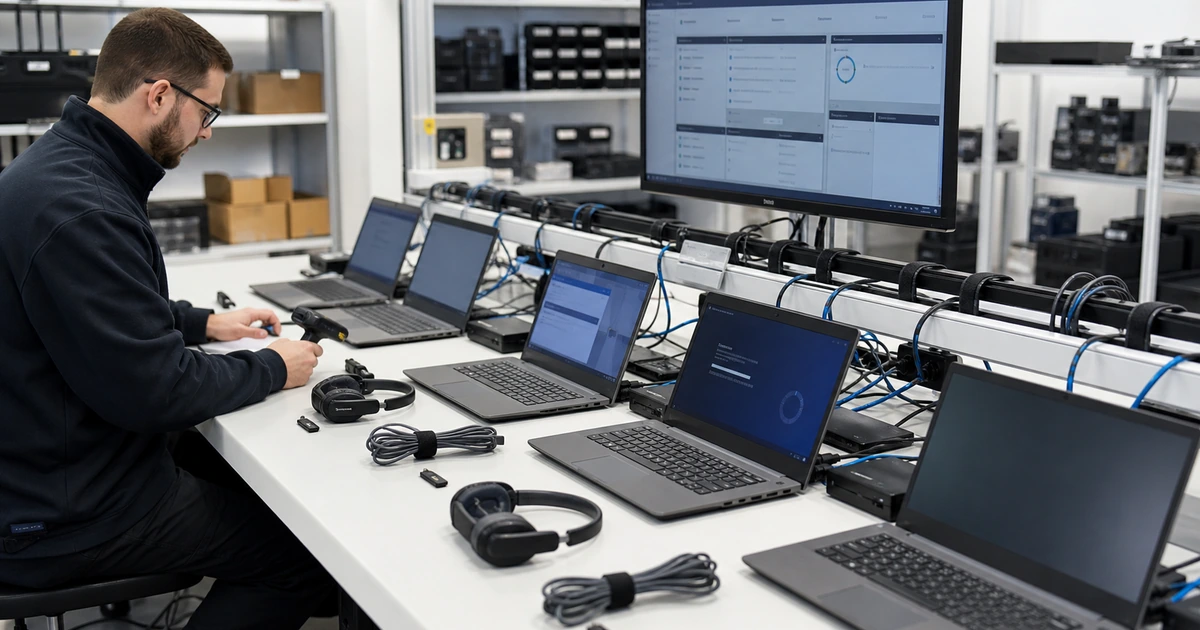
Stage each device against a documented baseline. Record serial number, asset tag, model, warranty, assigned user, location, accessories, and shipment tracking. Enroll the system in endpoint management, apply encryption, endpoint protection, firewall, updates, browser policy, approved applications, certificates, Wi-Fi, VPN, printers, backup, and remote support. Test camera, microphone, audio, display outputs, dock, power adapter, network, battery, and restart behavior. Microsoft documents Windows enrollment options in Intune, including Windows Autopilot for organization-owned devices that should enroll when the employee signs in.
- Directory setup: Verify identity attributes, username, aliases, manager, organizational placement, licenses, groups, and policy targeting.
- Authentication: Prepare secure credential delivery, multifactor enrollment, recovery, conditional access, and exception handling.
- Application access: Confirm installation, assignment, sign-in, role, data location, browser behavior, integration, and license availability.
- Managed device: Tag and enroll equipment, then apply updates, encryption, endpoint protection, policies, applications, and support tools.
- Technical test: Test hardware, connectivity, sign-in, restart, meetings, email, files, printing, remote access, backup, and the core workflow.
A device is ready when its inventory, management, security, applications, access, peripherals, and actual business tasks have been tested under the new employee’s assigned configuration.
Run a first-day validation and close every unresolved item
Schedule a short orientation with the employee and manager. Confirm the employee can sign in, complete multifactor authentication, lock the device, reach email and calendars, join a meeting, open approved files, use the required applications, find team resources, print or scan where needed, and contact support. Explain where company data belongs, which sharing methods are approved, how updates and restarts are handled, what to do with suspicious messages, and how to report a lost device or suspected compromise. Keep the orientation focused on the person’s first week rather than presenting every available feature.
Use a role-specific acceptance test. A salesperson may need customer records, calling, calendar scheduling, proposal files, and mobile access. A bookkeeper may need accounting software, secure document exchange, printing, banking controls, and dual approval. A field employee may need offline files, mobile connectivity, camera access, maps, forms, and rugged accessories. The manager should witness or confirm at least one representative workflow. Testing a generic website does not prove that the employee can perform the assigned work.
Close the onboarding ticket with evidence. Record the accounts and roles created, groups and applications assigned, device and accessories delivered, security controls verified, training completed, tests passed, exceptions, pending items, responsible owners, and due dates. Ask the manager and employee for confirmation after the first working day and again after the first week for complex roles. Feed recurring failures back into the role profile and checklist so the process improves instead of producing the same preventable tickets for every hire.
- Employee orientation: Cover sign-in, multifactor authentication, files, communication, support, security reporting, updates, and device responsibilities.
- Role acceptance: Complete a representative task using the employee’s live account, managed device, approved data, and normal network path.
- Manager confirmation: Verify the access and equipment match the approved role and identify any deferred business requirement.
- Completion record: Preserve approvals, assignments, tests, custody, training, exceptions, unresolved work, owners, and target dates.
- Process improvement: Review late approvals, unavailable equipment, failed policies, missing apps, access errors, and repeat first-week incidents.
The onboarding process is complete when the employee can perform approved work securely, the manager accepts the result, and every exception or remaining task has an owner and deadline.
New hire account and device setup from ALLMSP
ALLMSP can build the onboarding request, role profiles, approval path, account procedures, device standards, staging checklist, employee orientation, and completion record. Our in-house team can procure and configure equipment, administer Microsoft 365 or Google Workspace, deploy security controls, install applications, prepare remote access, ship equipment, conduct first-day testing, and provide ongoing help desk support.
We tailor the process to the customer’s existing HR, identity, device-management, security, cloud, and line-of-business systems. Local support is available for organizations in Lawrenceville, Suwanee, Gwinnett County, Metro Atlanta, and across Georgia, including onsite device delivery and setup when the project requires it.
- Plan: Define role profiles, required inputs, access owners, deadlines, exceptions, equipment standards, and completion evidence.
- Prepare: Create and secure accounts, stage managed devices, configure applications, test workflows, and document custody.
- Support: Orient the employee, resolve first-day issues, confirm manager acceptance, and improve the standard for future hires.
Official employee onboarding and account setup references
Use current vendor and security guidance when designing the process, then apply the organization’s approved roles, licensing, data handling, devices, and risk requirements.
- Microsoft Entra Lifecycle Workflows overview. Explains joiner, mover, and leaver identity tasks that can run around employee lifecycle events.
- Microsoft Intune Windows enrollment guide. Compares supported Windows enrollment methods for organization-owned and personal devices.
- Google Workspace add a new user. Documents user creation, profile fields, organizational placement, credential delivery, and post-creation options.
- CISA Cybersecurity Performance Goals. Provides prioritized security outcomes that can inform authentication, inventory, and access controls.
- NIST Cybersecurity Framework 2.0. Offers a risk-based structure for governing and operating identity, device, protection, and response practices.
New hire IT setup FAQs
When should IT receive a new hire setup request?
Submit the approved request as soon as the start date, role, manager, location, and equipment needs are known. Purchasing, shipping, licensing, application approval, and remote setup may require more lead time than account creation.
What information does IT need before creating a new employee account?
Provide verified names, start date, manager, department, title, employment type, location, schedule, role profile, device needs, applications, shared resources, phone requirements, sensitive-access approvals, and any expected end date.
Should a new employee copy the previous employee's permissions?
Not automatically. Begin with the approved role profile, compare current duties, and require owners to approve sensitive systems or exceptions. A predecessor may have accumulated access that the new employee does not need.
How should initial passwords or sign-in information be delivered?
Use an approved protected method, verify the recipient, separate exposed pieces where appropriate, require secure enrollment, and never send a reusable password beside the username through an unprotected channel.
What should be configured on a new hire laptop?
Include asset tracking, endpoint enrollment, encryption, endpoint protection, firewall, updates, browser policy, approved applications, certificates, Wi-Fi, VPN, printers, backup, remote support, peripherals, and role-specific settings.
How do we know a new hire computer is actually ready?
Test the hardware, sign-in, multifactor authentication, policies, email, meetings, files, applications, printing, remote access, backup, restart behavior, and at least one realistic task for the employee’s role.
What should a first-day technology orientation cover?
Show secure sign-in, multifactor use, file locations, communication tools, support contact, security reporting, update expectations, approved sharing, lost-device reporting, and the employee’s essential first-week workflows.
How should remote employee onboarding be handled?
Plan identity verification, managed-device shipping, custody confirmation, secure credential delivery, network requirements, a live support appointment, role testing, return procedures, and a backup contact before the start date.
Can ALLMSP handle the complete employee onboarding process?
Yes. ALLMSP can manage planning, procurement, account setup, device configuration, security, application access, orientation, testing, and help desk support through its in-house team.
Where does ALLMSP provide new hire IT setup services?
ALLMSP supports businesses in Lawrenceville, Suwanee, Gwinnett County, Metro Atlanta, and throughout Georgia, with remote and onsite service based on the equipment, locations, and schedule.