





























































































































































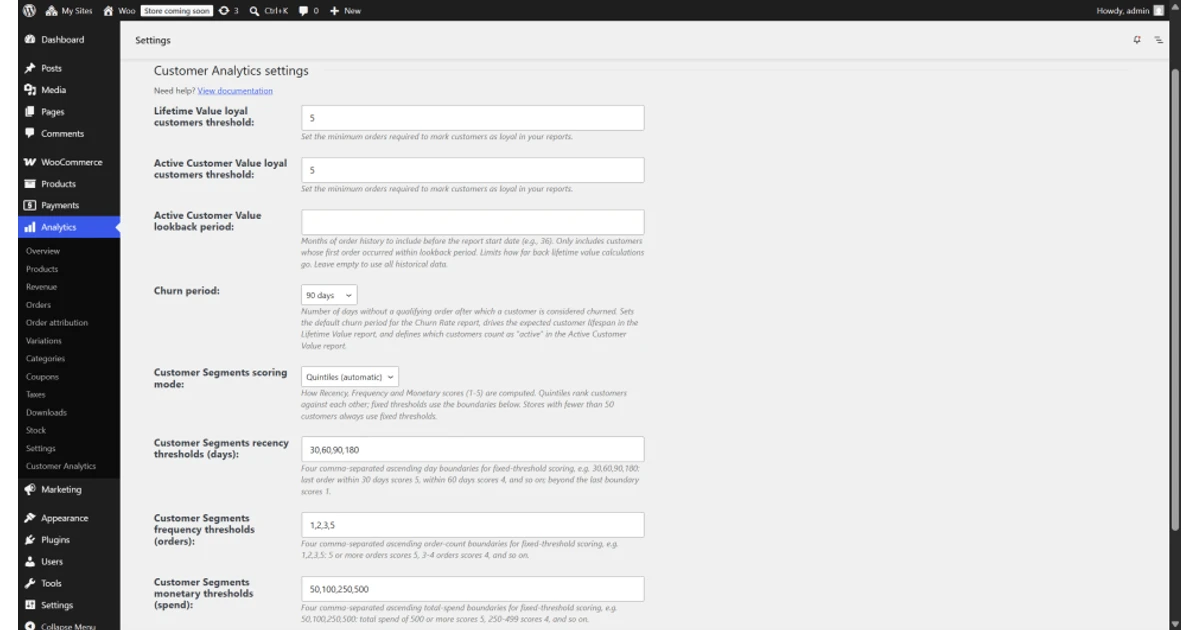
WooCommerce security extends far beyond the password used to open wp-admin. WordPress roles, WooCommerce capabilities, hosting control, domain and DNS, administrator email, identity and security layers, remote support, developer repositories, REST API keys, webhook secrets, payment and shipping portals, backup storage, and staff devices can each preserve control of the store. Disabling one WordPress user does not remove those other paths.
WooCommerce adds Customer and Shop Manager roles and extends the WordPress Administrator role. Shop Manager is intentionally powerful: current WooCommerce documentation says it can manage settings, products, orders, refunds, coupons, and customers and also receives WordPress editor capabilities. That may be appropriate for a trusted operations lead, but it is not a harmless default for a packer, merchandiser, agency contractor, or integration.
This guide gives Georgia retailers and restaurants an operating model for named access, least privilege, multifactor authentication through the actual chosen control layer, integration identities, API keys, webhooks, complete backups, offboarding, and incident recovery. It deliberately does not claim that WordPress or WooCommerce core supplies MFA. ALLMSP can help connect the relevant identity, hosting, security, backup, and support controls while the business owns approval, financial authority, and data-retention decisions.
Key decisions at a glance
- Use named WordPress identities and map each real task to the minimum capabilities, Administrator and WooCommerce Shop Manager are both broad roles that require deliberate assignment.
- WordPress and WooCommerce role controls do not by themselves provide core MFA, so enforce MFA through the chosen identity provider, hosting access control, access proxy, or vetted security layer and document its recovery owner.
- WooCommerce REST API keys are linked to a WordPress user, have explicit read, write, or read/write permissions, reveal the consumer secret once, and must be inventoried and revoked when no longer needed.
- Treat webhook destination, topic, signing secret, delivery state, and logs as controlled integration assets, monitor failures because repeated failures can disable delivery.
- Protect both database and files, test isolated restoration, and coordinate WordPress access, identity systems, hosting, email, devices, API keys, webhooks, vendors, and recovery during offboarding or an incident.
Map Named People and Services to the Minimum WordPress Capabilities

Create an access register that begins with business tasks: manage products, adjust inventory, fulfill orders, issue refunds, configure tax or shipping, read reports, update plugins, edit users, administer hosting, deploy code, support an integration, or restore the store. For each person or service, record the named sponsor, employer or vendor, role and capabilities, locations or stores, access layer, device, start and end dates, approval, emergency contact, and recovery dependency. Shared administrator accounts prevent reliable attribution and make a departure needlessly disruptive.
Use WordPress capabilities as the enforcement foundation. WordPress recommends checking capabilities rather than assuming a role name, and WooCommerce documents what its Customer and Shop Manager roles add. Reserve Administrator for the few people who must change plugins, themes, users, or site-wide configuration. Test narrower roles or carefully reviewed custom capability sets for merchandise, fulfillment, support, and reporting. A role name created by an extension can change meaning after an update, so verify required and prohibited actions from the user’s own session.
Separate human work from integration work. A connector should not depend on the personal account of an agency developer or departing employee. Where the design requires a WordPress user for a WooCommerce REST API key, create an appropriately governed service identity, grant only the required capabilities and API permission, document its business owner, and prevent interactive use unless the recovery plan explicitly requires it. Review inactive accounts, old administrators, temporary support users, unused roles, and ownership concentrated in one mailbox or phone.
- Give every administrator and Shop Manager a named account, prohibit password sharing and undocumented browser profiles.
- Test ordinary duties plus prohibited refund, user, plugin, export, configuration, and financial actions before approving a role.
- Time-limit agency, developer, vendor, and emergency access and require a sponsor who reviews it before renewal.
- Inventory hosting, domain, DNS, email, payment, shipping, backup, repository, and remote-support authority alongside wp-admin access.
- Retain only the sanitized evidence needed to prove approval and effective access, never copy passwords or recovery codes into the register.
Require MFA Through the Identity or Security Layer You Actually Operate

Do not write an access policy that merely says WooCommerce MFA. WordPress roles and WooCommerce roles do not themselves create a core multifactor challenge. Identify the exact control that enforces MFA for wp-admin and every adjacent control plane: an identity provider, hosting login, access proxy, or selected security implementation. Record supported factors, enrollment authority, remembered-session behavior, device requirements, exclusions, logging, break-glass design, and who can disable or reset the control.
Prefer phishing-resistant factors such as supported hardware security keys or passkeys where the chosen layer permits them, while maintaining an approved recovery method. The administrator should control both factors, a help-desk worker should not ask the user to read a one-time code aloud or send it in chat. Store recovery material separately under restricted access, test recovery with a nonproduction or controlled account, and require independent approval before bypassing MFA on an owner or administrator identity.
Offboarding must reach every authentication layer. Disable or remove the named WordPress user, identity-provider assignment, hosting and domain access, mailbox sessions, password-manager membership, remote-support tooling, managed device, repository keys, payment or shipping portals, and backup access. Reassign scheduled jobs, integration ownership, administrator email, and recovery contacts before the person leaves. Rotate shared secrets only after identifying their consumers, then verify denied access and uninterrupted order processing.
- Document which system enforces the second factor, never infer protection from a role name or a security-policy sentence.
- Require MFA for hosting, domain, DNS, email, backups, secret stores, remote support, and payment controls as well as WordPress administration.
- Keep break-glass identities few, monitored, protected with independent custody, tested, and excluded from daily work.
- Review remembered browsers, application passwords, active sessions, trusted devices, and remote-control agents after a departure or incident.
- Alert on MFA resets, bypasses, new administrators, owner-email changes, and unusual sign-ins using the logs available in the chosen control stack.
Govern REST API Keys and Webhooks as Production Credentials
Maintain an integration register for every application, middleware service, report export, fulfillment link, and custom script. WooCommerce REST API keys are created for a selected WordPress user and assigned Read, Write, or Read/Write permissions. Record the user, key description, business purpose, data objects, environment, endpoints, vendor, owner, storage location, created date, rotation method, last use where observable, and revocation condition. The consumer secret is shown once, so place it directly into an approved secret store rather than a ticket, email, spreadsheet, or screenshot.
Review both the API permission and the associated user’s capabilities. Use separate identities and credentials for unrelated applications, separate staging from production, restrict network and secret access where supported, and test a required request plus a prohibited one. Rotation is a deployment: identify every consumer, install the new key securely, validate the business transaction, revoke the old key, watch errors, and reconcile data. Deleting an employee’s interactive login is not proof that a key, application password, or vendor token is gone.
For webhooks, record the topic, delivery URL, status, secret owner, receiver, expected event volume, retry behavior, monitoring, and repair process. WooCommerce signs payloads with an HMAC derived from the webhook secret, and delivery evidence is available in WooCommerce logs under the webhook-delivery source. Current WooCommerce guidance says a webhook can be disabled after more than five consecutive delivery failures. Alert before silence becomes normal, validate the receiver’s signature handling, and design downstream work to tolerate retries and duplicates safely.
- Use one descriptive key per integration and environment so revocation does not disable several unidentified workflows.
- Grant Read, Write, or Read/Write only as the documented transaction requires, then test denial of an operation outside that purpose.
- Never expose consumer secrets, webhook secrets, authorization headers, customer records, or payment details in logs and support evidence.
- Monitor API and webhook failures in business terms, such as paid orders not reaching fulfillment within the accepted interval.
- Retire the application, API key, webhook, scheduled job, vendor access, secret-store entry, alert, and billing relationship as one controlled change.
Recover the Store, Its Data, and Its Authority After an Incident
Build recovery around WooCommerce’s two essential data domains: site files and the complete database. Protect multiple generations in storage that an ordinary WordPress administrator or compromised host cannot silently erase, encrypt sensitive copies, restrict restore authority, monitor job failures, and define retention from legal and business needs. Test an isolated restore and verify users, products, variations, orders, order notes, settings, media, extensions, theme, HPOS or order-table state, webhooks, scheduled actions, and representative reports before calling it recoverable.
When compromise or destructive error is suspected, preserve evidence before indiscriminate cleanup. Record timestamps, observed behavior, affected identities, recent changes, relevant sanitized logs, hosting events, system status, orders and payments at risk, API or webhook activity, and backup checkpoints. Contain the known path, protect payment and customer operations, rotate or revoke exposed access in a controlled order, and involve the host, extension developer, payment provider, legal or insurance contacts, and authorities according to the incident plan. Do not restore a vulnerable image and immediately reconnect it to production.
Validate business truth after technical restoration. Reconcile orders, authorizations, captures, refunds, stock, shipments, customer messages, scheduled actions, webhooks, accounting, and fulfillment events that occurred between the restored checkpoint and containment. Rebuild questionable systems from trusted sources, patch the exploited path, re-enroll administrators, reissue integration credentials, and observe the store before reopening. ALLMSP can coordinate the evidence, infrastructure, identity, backup, and vendor work, while the merchant decides customer, financial, regulatory, and operational responses.
- Define recovery time and recovery point objectives from order volume, payment exposure, inventory movement, and customer commitments.
- Test files and database restoration together and document the exact hosting, encryption, key, and administrator dependencies.
- Keep backup deletion and restore authority separate from daily site administration wherever the selected platform permits it.
- Reconcile external systems because payment, shipping, tax, and fulfillment events may continue beyond the restored database checkpoint.
- Close the incident with root cause, eradication proof, restored controls, residual risk, owner decisions, and a retest of the recovery path.
Official product documentation and ALLMSP resources
- WooCommerce: Roles and capabilities
- WordPress Developer: Roles and capabilities
- WordPress: Hardening WordPress
- WordPress: Backups
- WooCommerce: REST API keys
- WooCommerce: Webhooks
- WooCommerce: Backing up WordPress and WooCommerce content
- WooCommerce: Understanding the system status report
- ALLMSP WooCommerce Software Support
- ALLMSP Software Support
- ALLMSP Managed IT Services
- ALLMSP Cybersecurity Services
- ALLMSP Cloud Computing and Migrations
- ALLMSP Retail and Restaurant Resources
- Contact ALLMSP
Frequently Asked Questions
Which WooCommerce role should a store manager receive?
Assign access from actual duties, not the title alone. WooCommerce Shop Manager can manage settings, products, orders, refunds, coupons, and customers and also has WordPress editor capabilities. Test required and prohibited actions, and use a narrower reviewed role when those powers are unnecessary.
Should WooCommerce administrators share one login?
No. Give each person a named identity so approvals, activity, recovery, and offboarding remain attributable. Shared administrator credentials make it difficult to identify misuse, remove one person’s access, enforce individual MFA, or understand which browser and device still retain a session.
Does WordPress or WooCommerce core provide MFA through its roles?
No. Roles and capabilities control authorization, they do not by themselves provide core MFA. Enforce MFA through the actual identity provider, hosting control, access proxy, or vetted security implementation chosen for the store, and document enrollment, logs, bypass, and recovery.
Which accounts around WooCommerce should use MFA?
Protect WordPress administrators and Shop Managers according to risk, plus hosting, domain, DNS, email, backup, secret-store, remote-support, repository, payment, and shipping control planes. The precise factors and enforcement come from the chosen identity or security layer, not from a WooCommerce role label.
How are WooCommerce REST API keys associated with users?
WooCommerce creates a key for a selected WordPress user and assigns Read, Write, or Read/Write API permission. Inventory both the key and associated user’s capabilities, use a governed service identity where appropriate, store the one-time secret safely, and revoke unused keys.
Where should a WooCommerce API consumer secret be stored?
Place it directly into an approved encrypted secret store with access logging and restricted operators. Do not paste it into source code, email, chat, tickets, spreadsheets, screenshots, logs, or shared notes. Document ownership and rotation without recording the secret itself.
How can a team monitor WooCommerce webhook failures?
Inventory each webhook and watch its status and the WooCommerce webhook-delivery logs. Correlate delivery time and outcome with the receiver. WooCommerce says more than five consecutive failures can disable a webhook, so alert on failure and absence before a business workflow silently stops.
What must WooCommerce offboarding include besides disabling a user?
Remove WordPress, identity, hosting, domain, email, device, remote-support, repository, payment, shipping, backup, and vendor access, revoke or transfer API keys, webhooks, scheduled jobs, reports, and recovery contacts, rotate shared secrets deliberately, and verify denied access plus continued order processing.
What makes a WooCommerce backup complete enough for recovery?
Protect the full database and required site files, including wp-content, in restricted storage, then restore them together to an isolated target. Verify users, products, orders, settings, media, extensions, order storage, scheduled actions, webhooks, integrations, and representative business reports.
How can ALLMSP improve WooCommerce security and recovery in Georgia?
ALLMSP can map access, reduce roles, coordinate MFA through the selected control layer, inventory API keys and webhooks, secure and test backups, execute offboarding, collect incident evidence, restore services, and reconcile technical recovery with payment, stock, and fulfillment operations.


