






























































































































































A Xero user can be a subscriber, Advisor, Standard user, Invoice only user, Read only user, payroll participant, expense participant, project user, or holder of an optional permission such as Manage users or Bank account admin. Those labels are not interchangeable, and the available combination depends on edition, plan, region, and enabled modules. A reliable access review begins with the actual invitation screen and live subscription rather than a generic role matrix copied from another Xero environment.
Identity is personal in Xero. Current Xero guidance says each invited user should have individual login details, and anyone who logs in with access to a paying subscription is prompted to set up multi-factor authentication, subject to documented trial and portal-only exceptions. Xero Verify can use push notifications, while other authenticator applications can generate time-based codes. The recovery path can involve a backup email or security questions, so MFA readiness includes recovery ownership, device change, and loss testing rather than a single successful enrollment.
Audit expectations also need calibration. Xero’s History & Notes report can show dated user changes to financial data, but only Advisor users can access it and the report excludes important activity such as payroll transactions, expense claims, organisation settings, reporting, printing, and exporting. Connected apps create another evidence and ownership plane: deleting the user who connected an app can require another user to reconnect it, while disconnecting an app stops new data but may not erase provider-held data or cancel the provider subscription.
Businesses can use ALLMSP for Xero access, ownership, and security review for organizations in Lawrenceville and Suwanee, throughout Gwinnett County and Metro Atlanta, and across Georgia, with local assistance available when device, network, office, or employee work needs an on-site component.
Key decisions at a glance
- Treat the Xero subscriber and Manage users permission as continuity controls because they influence subscriptions, invitations, role changes, and removal.
- Assign a Business-edition base role and optional permissions from observed duties, do not assume the same role catalog applies to Practice products, payroll-only users, every region, or every plan.
- Each person needs an individual Xero login and personal MFA setup, shared credentials or a shared authenticator destroy attribution and create preventable recovery risk.
- History & Notes is useful financial-change evidence but not a universal event log, so combine it with identity, payroll, app-provider, banking, and endpoint evidence.
Govern the Subscriber, Roles, and Optional Permissions
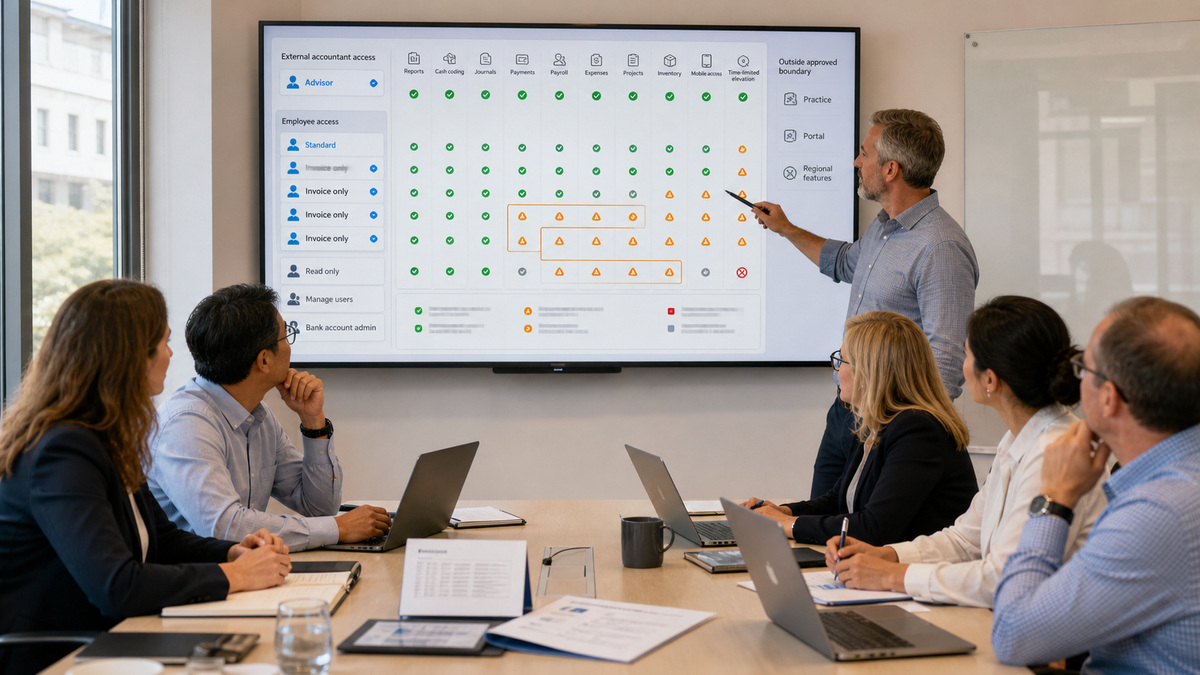
Maintain a Xero access register that names the subscriber, subscription and billing owner, at least one authorised continuity contact, every user, base role, optional permission, external firm, connected organisation, and review date. The subscriber is not merely a finance label, Xero identifies the subscriber as the person who establishes the organisation and can invite users, while subscription changes and provider relationships may depend on that ownership. Document succession and recovery before a sole owner becomes unavailable.
For Xero Business edition, map duties to the live role choices. Advisor has broad accounting access, Standard has almost full business access with optional reports and cash-coding capabilities, Invoice only has distinct draft, sales, purchases, and approve-and-pay variants, Read only can view much of the organisation but cannot create or edit transactions or run new reports. Additional permissions such as Manage users, Bank account admin, Reports, bill payments, payroll, projects, inventory, and expenses can materially expand a base role. Confirm the current screen because regional and subscription differences matter.
Test effective access with representative tasks, not role names alone. An accounts-payable clerk may need purchase entry without user administration or contact bank-detail editing. A controller may require reports and journals without subscription ownership. An external accountant may require Advisor access to History & Notes and lock-date work but should still use an individual identity. Record prohibited combinations, time-box elevated duties, separate approval from payment initiation where the workflow supports it, and require an independent reviewer to confirm high-risk changes.
- Record the subscriber, billing contact, continuity owner, each user, base role, optional permissions, external firm, connected apps, and last-review evidence.
- Validate Business-edition roles in the live organisation and keep Practice, payroll-only, portal, regional tax, and other product permissions out of the matrix unless used.
- Reserve Manage users, Bank account admin, Advisor, reports, payroll administration, inventory adjustment, and payment permissions for named duties.
- Test create, approve, pay, reconcile, report, journal, contact-bank-detail, user-management, and settings actions with non-sensitive samples.
- Review dormant users, external accountants, emergency access, shared inboxes, role drift, and conflicting duties on a documented cadence.
Deploy Personal MFA and Recovery That Can Survive Device Loss

Require a unique user account before MFA enrollment. Xero states that anyone accessing a paying subscription is prompted to set up MFA, while a 30-day trial and portal-only or Ask portal use are documented exceptions. Do not convert those narrow exceptions into a reason to share an identity. Each employee, contractor, accountant, and bookkeeper should authenticate their own actions so the organisation can attribute entries and revoke one person’s access without disrupting everyone else.
Xero supports more than one authentication experience. Xero Verify can send a push notification, and another recognised authenticator app can provide a time-based code, Xero also documents installation on a computer when a mobile device is unavailable. Xero recommends keeping the authenticator on a different device from the one used to access the account, especially on shared computers. Train users to initiate the login themselves, verify context, reject unexpected prompts, and never relay a code, setup key, QR code, security answer, or push approval to support personnel.
Every user also needs a protected backup path. Xero’s current setup guidance uses either a backup email address different from the login email or security questions. Changing the backup method can require disabling and setting up MFA again, which is a high-risk change worth logging. Test new-device enrollment before replacing a phone, verify that the backup address is controlled by the user, and keep help-desk identity proof separate from the recovery secret. If a device is lost, change the Xero password, use the user’s backup method, enroll the replacement, and review recent activity.
- Inventory every person with access to a paying subscription and confirm an individual login, MFA method, enrolled device, and tested backup path.
- Prefer a separately controlled authenticator device, prohibit team phones, shared setup keys, photographed QR codes, and relayed one-time codes.
- Distinguish a Xero Verify push from an authenticator code and teach users to approve only a login they personally initiated.
- Validate backup email ownership or security-question readiness without recording answers, codes, setup keys, or screenshots of secrets.
- Exercise device replacement, lost-device response, password change, backup authentication, support escalation, and post-recovery activity review.
Interpret History & Notes and Connected Apps Honestly
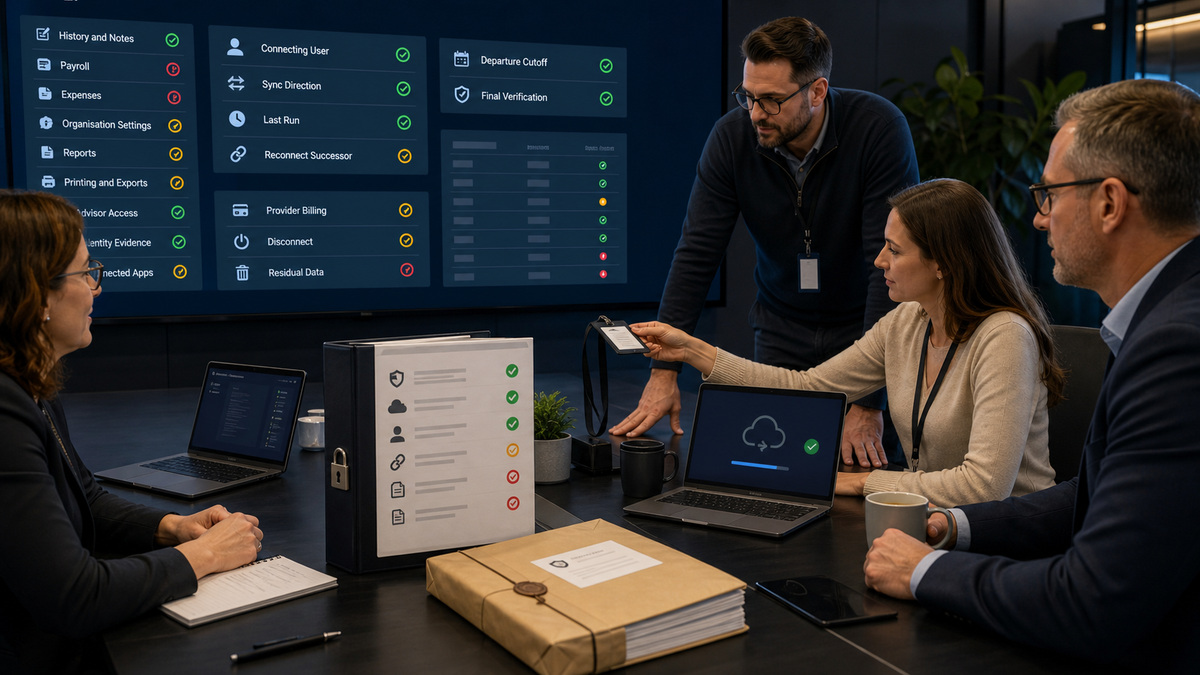
Use History & Notes for what Xero says it contains: dated user changes to transactions, inventory, fixed assets, contacts, notes, and financial settings, filterable by date, item, and user. Only an Advisor user can access the report. Export relevant evidence before making a sensitive correction or removing access, but do not describe the export as a complete security log. Its useful attribution still depends on unique logins and controlled user accounts.
Design compensating evidence around the exclusions. Xero says History & Notes does not include changes to payroll transactions and expense claims, and also excludes organisation settings, reporting, printing, and exporting. That means a review of bank-detail changes, payroll administration, bulk exports, subscription events, identity recovery, endpoint activity, and third-party automation may require other Xero screens, provider logs, bank controls, email evidence, or IT telemetry. Define the evidence owner and retention period for each material activity instead of discovering the gap during an incident.
Keep a connected-app inventory with the app name, purpose, data classes, provider, subscription owner, Xero connecting user, authorisation scope, sync direction, last successful run, failure alert, and successor. Xero notes that if the connecting user is deleted, another user may need to reconnect the app without losing information already synced. Disconnecting stops new data immediately, but previously sent data might remain with the provider, and the provider-billed subscription may continue. Therefore disconnect, cancellation, retention, deletion, and reconnection are separate checks.
- Export History & Notes for high-risk review windows with the Advisor role, selected filters, report timestamp, reviewer, and case reference.
- List excluded event classes explicitly and name the payroll, expenses, reporting, export, identity, endpoint, bank, and provider evidence that covers them.
- Inventory each app’s connecting user, provider contract, billing route, data direction, scope, credentials, alerts, and reconnect procedure.
- Test a low-risk app reconnection with a successor before the current connector leaves, compare record counts and sync boundaries afterward.
- When removing an app, verify new flow stopped, provider billing status, residual-data handling, downstream jobs, webhooks, exports, and retained evidence.
Offboard in an Order That Preserves Access and Accounting Evidence
Start departure planning from the access and integration registers rather than the employee record alone. Identify whether the person is the subscriber, holds Manage users or Advisor access, controls MFA recovery, connected a bank service or third-party app, owns a provider subscription, administers payroll or expenses, approves payments, or is the only relationship owner for an external accountant. Assign and test successors before revocation so an urgent security action does not strand the organisation.
Preserve the required evidence at a fixed time: user and role screens, relevant History & Notes exports, connected-app list, unresolved sync failures, lock dates, open bank reconciliation work, approval queues, payroll or payment handoffs, and provider-side activity where appropriate. Then transfer subscription, app, bank, and workflow responsibilities using the supported process, revoke the person’s Xero access, rotate separate provider credentials and API secrets they controlled, disconnect or reconnect integrations as needed, recover managed devices, and confirm future access attempts fail.
Close with independent verification. Confirm the user is absent, elevated permissions did not migrate accidentally, apps still sync from the intended boundary, provider subscriptions and residual data have the chosen disposition, bank feeds and payment approvals still function, and financial reports remain stable. For an involuntary departure or suspected compromise, coordinate password reset, MFA recovery, endpoint containment, email review, app token revocation, and accounting exception analysis. Xero Support may verify and reset the affected account, but one user should not claim recovery authority over another person’s identity.
- Classify the departure as routine, urgent, or suspected compromise and establish an exact access-cutoff time with HR, finance, IT, and the subscriber.
- Transfer subscriber continuity, Manage users, Advisor duties, payment approvals, payroll, bank connections, connected apps, and provider billing before deletion.
- Export scoped evidence and record unresolved reconciliations, drafts, approvals, scheduled work, sync errors, lock dates, and open support cases.
- Remove Xero access, revoke related provider sessions and secrets, recover managed devices, and separately cancel services or request data deletion where required.
- Re-test authentication, roles, app sync, bank data, payment separation, reports, and audit evidence with an independent reviewer after the cutoff.
Official product documentation and ALLMSP resources
- Xero Central: User roles and permissions in Xero Business edition
- Xero Central: Standard user role
- Xero Central: Multi-factor authentication explained
- Xero Central: Set up multi-factor authentication
- Xero Central: Manage multi-factor authentication
- Xero Central: Fix issues with multi-factor authentication
- Xero Central: Keep your Xero account safe
- Xero Central: History and notes report
- Xero Central: Using connected apps with Xero
- Xero Central: Update, cancel, disconnect or review connected apps
- ALLMSP: Xero software support category
- ALLMSP: Software support
- ALLMSP: Managed IT
- ALLMSP: Cybersecurity services
- ALLMSP: CPA and financial firms
Frequently Asked Questions
What is the Xero subscriber responsible for in an access program?
The subscriber is a continuity and subscription owner, not just another accounting user. Record who holds that status, who manages billing, who can invite or remove users, and who can assume responsibility if the subscriber is unavailable. Test the supported succession path before a departure or emergency makes it urgent.
Are Xero roles identical across every product, plan, and region?
No. This guide addresses Xero Business edition, where Advisor, Standard, Invoice only, Read only, and optional task permissions form the core model. Practice products, payroll-only access, portals, tax features, projects, expenses, payments, and regional offerings can differ. Confirm the live organisation and current Xero documentation before approval.
Can several employees share one Xero login if MFA is enabled?
They should not. Xero says each invited user should have individual login details, and shared credentials make the audit trail unreliable. Shared MFA adds another failure because one person can authenticate another person’s session. Invite each user, assign the narrowest role, enroll personal MFA, and revoke identities individually.
Who is prompted to set up MFA for Xero?
Current Xero guidance says anyone who logs in and has access to a paying subscription is prompted to set up MFA. A 30-day trial and portal-only or Ask portal use are documented exceptions. Verify the actual account state, but do not treat an exception as permission to share credentials or recovery methods.
Does Xero MFA require a push notification?
No. Xero Verify can use push notifications, while another authenticator app can supply a time-based code. Xero also documents computer-based authenticators when a mobile device is unavailable. Keep authentication under the user’s control, verify login context, and never transmit a code, setup key, QR code, or approval.
What backup authentication methods does Xero support?
Xero’s current setup guidance uses a backup email address different from the login email or security questions. Protect the backup channel, test it without recording secrets, and review it during role changes. Changing the backup method can require disabling and re-enabling MFA, so treat that as a logged security event.
Is Xero History & Notes a complete audit log?
No. It is valuable for dated user changes to financial data, but Xero says it excludes payroll transactions, expense claims, organisation settings, reporting, printing, and exporting. Only Advisor users can access the report. Pair it with provider, identity, payroll, banking, email, and endpoint evidence for broader investigations.
What happens when the user who connected a Xero app leaves?
Xero says another user may need to reconnect the app when the connecting user is deleted, while already synced information remains. Identify the connector, assign a successor, test reconnection, document the sync boundary, and compare record counts before removing the old identity so integration continuity is proven.
Does disconnecting a connected app cancel it and erase its data?
Not necessarily. Xero states that disconnecting stops new data immediately, but information already sent may remain at the provider. A provider-billed subscription can also continue until cancelled with that provider. Verify connection status, contract cancellation, residual-data retention or deletion, and any downstream processes separately.
What should happen after suspected Xero account compromise?
Contain the user’s email and endpoint, change the Xero password, recover or replace the MFA device through the user’s backup method, revoke app and provider access, inspect roles and relevant History & Notes, review bank and payment activity, preserve evidence, and escalate unexplained accounting changes to an Advisor and Xero Support.


