





























































































































































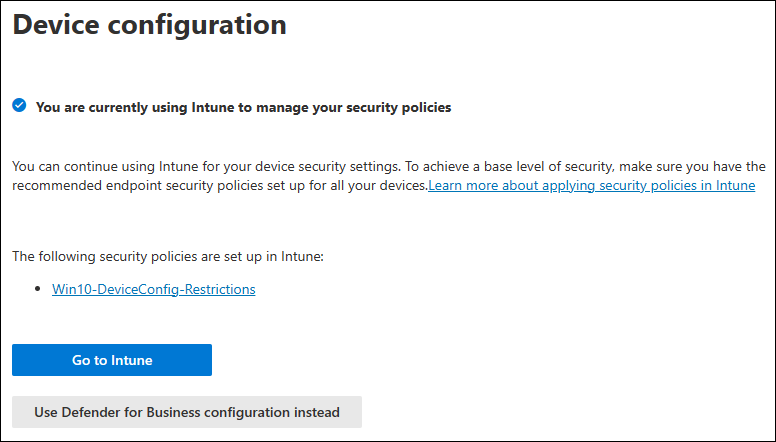
Microsoft’s example shows an existing Intune policy owner and an option to use Defender for Business configuration instead. Decide where policies will be managed before rollout and resolve conflicts before switching. This screen does not establish purchased licences or feature entitlement.[7] View full-size image
Choose Defender for Business when its small-business scope and management model fit your organization; compare Defender for Endpoint plans when you need enterprise capabilities or a different licensing design. Decide which devices and response tasks must be covered before purchasing. Having Microsoft Defender Antivirus on a Windows computer does not prove that the device is onboarded to your company’s endpoint detection service.
The practical buying question is: can the licensed service protect the actual fleet, show the evidence your responders need, and support the actions they are expected to take? Use a device and task worksheet, then prove the answer on a small pilot. This guide covers company-managed endpoints, rather than Azure workload protection or the entire Microsoft security suite.
Separate the products that share the Defender name
| Offer or component | What the distinction means | Decision to record |
|---|---|---|
| Microsoft Defender Antivirus | The antimalware component on supported Windows devices. Its local status is different from cloud onboarding and central response. | Which product provides prevention, telemetry and incident handling for this device? |
| Defender for Business | An endpoint offer for organizations up to 300 users, sold separately or included in Microsoft 365 Business Premium. It has an SMB management experience. | Does this organizational scope fit, including expected growth? |
| Defender for Endpoint Plan 1 | Primarily prevention and attack-surface reduction; do not assume Plan 2 investigation capabilities. | Are prevention controls enough for the required operating model? |
| Defender for Endpoint Plan 2 | Adds capabilities such as endpoint detection and response and advanced hunting beyond Plan 1. | Which investigation capability is actually required and licensed? |
Defender for Business includes optimized EDR and selected higher-tier capabilities; it is not simply another name for Endpoint Plan 1 or a promise of every Plan 2 feature.[1] Defender for Office 365 addresses email and collaboration threats, while Defender for Cloud addresses cloud workload posture and protection. Seeing their names in the same portal does not make their entitlements interchangeable.
Count client devices and server instances separately
Microsoft documents up to five client devices per Defender for Business user license. Windows and Linux server instances need additional licensing. Its Business FAQ directs organizations with more than 60 servers to a different server licensing option.[2]
Build one row per device or server instance. Record its owner, operating system and edition, role, current security product, management system, location, connectivity pattern and business importance. Include shared workstations, spare laptops and externally hosted servers. An employee count alone cannot expose an unlicensed server or an unmanaged shared computer.
Assign the selected user licenses in the Microsoft 365 admin center and validate the supported platform requirements. The Business requirements list Windows Business, Professional and Enterprise editions; do not assume a consumer Home device qualifies. The standalone offer also does not provide every Business Premium entitlement: Conditional Access requires the appropriate Microsoft Entra license.[3]
Check the operating-system release as well as Defender eligibility. Windows 10 22H2 reached its ordinary end of support on October 14, 2025. Continuing commercial use needs an appropriate migration or Extended Security Updates decision; ESU has its own eligibility and limitations and does not provide general technical support. An endpoint protection subscription does not replace those operating-system updates.[6]
Mixed Defender for Business and Defender for Endpoint licensing requires particular care: Microsoft’s FAQ says Business does not support mixed licensing and describes the tenant defaulting to the Business experience. Confirm the intended tenant experience with your licensing provider before trying to buy one advanced seat for one investigator.[2]
Choose who owns policy before onboarding
Name the system that will author endpoint security policy, the team that will approve exceptions, and the people who can respond to alerts. Reusing a familiar portal is not enough if two management paths keep setting the same option differently.
The Business setup process supports security-role assignment, notifications, onboarding and default policies. Organizations already using Intune are prompted to continue with it or use the simplified Defender configuration experience.[4] Keep a readable policy ownership register: control, authoritative system, target group, exception owner and test device.
- Prevention: identify the intended antivirus, firewall and attack-surface settings for each device group.
- Administration: give readers reporting access and responders the permissions their work needs; test using the actual responder account.
- Notifications: use a monitored destination and a backup responder, then test delivery.
- Migration: document how the existing antivirus will be changed without creating an unintended protection gap or incompatible overlap.
Record a specific expected policy on the pilot device. If the effective setting differs, resolve that ownership conflict before expanding the deployment; broad exceptions made to silence a pilot problem tend to become permanent.
Use a pilot with explicit acceptance results
Select representatives of the real fleet: an office laptop, a remote laptop behind the normal VPN, a shared computer and any separately licensed server type. Use the onboarding method appropriate to that platform and management system. Microsoft’s Business local-script guidance recommends small batches of up to ten devices; larger deployments should use the suitable managed deployment method.[5]
For a Business Windows pilot, open Settings > Endpoints > Device management > Onboarding in the Defender portal. Select the actual operating system, connectivity type and deployment method before obtaining the package from that company tenant. Follow the current procedure for the chosen method; do not reuse an onboarding package collected for a different customer.
| Check | Useful evidence | Hold the wave when |
|---|---|---|
| Correct organization | The intended device identity appears in the intended company tenant. | A package came from another organization or the device identity is ambiguous. |
| Protection and reporting | Expected antivirus mode, recent telemetry and the intended effective policy are verified. | Installation succeeded but protection or sensor reporting is unhealthy. |
| Alert handling | An approved Microsoft detection test reaches the portal and the monitored response queue. | Nobody receives, owns or investigates the test alert. |
| Ordinary work | The user completes the relevant VPN, application, printing and business-data tasks. | A control blocks required work and the cause is still unknown. |
| Supportability | A responder can find the device, inspect evidence and execute an approved action. | Licensing, permissions or platform limitations prevent the planned response. |
Keep the pilot result against each named device. A successful alert test demonstrates one detection-and-reporting path; it does not certify that every application, identity control or backup is ready. Expand in measured waves, and reconcile the actual inventory after each one.
Example: a licensing assumption discovered before migration
Consider a fictional 45-person business with laptops, shared reception computers and four virtual server instances. Its team sees Business Premium licenses assigned to employees and assumes the whole estate is covered. The worksheet separates the servers from client devices and records the extra server entitlement. The pilot also checks the remote staff member’s normal VPN path instead of relying only on office connectivity.
The result is a purchasing and rollout decision, not a promised security outcome: the team knows which offer covers each device, who owns the policy, and which test must pass before the next wave. If growth or investigation requirements point beyond the Business offer, compare an enterprise design before the migration creates dependencies.
Continue from plan choice to operational proof
After selecting the offer, use Defender onboarding and sensor-health troubleshooting to investigate missing devices or stale signals. Then use Defender alert triage, containment and recovery to prove that the response team can act on what the rollout reports.
For the surrounding identity and collaboration controls, read Microsoft 365 Security Baseline for Growing Businesses. Azure workload protection has a separate scope in Operate Azure Security with Defender for Cloud and Tested Response.
For help reviewing the rollout, contact ALLMSP cybersecurity support. Bring the device list, current subscriptions, management tools and pilot results so the review starts with the actual environment.
Frequently asked questions
Is Defender for Business the same as Defender for Endpoint Plan 1?
No. Business uses an SMB management experience and includes optimized endpoint detection and response plus selected capabilities beyond Plan 1. Compare the required feature rather than assuming the plans are equivalent.
[1]Is Defender for Business included in Microsoft 365 Business Premium?
Yes. It is also available as a standalone offer. Confirm the licenses assigned to the people and the actual subscription in the company tenant.
[1]Can an organization with more than 300 users use Defender for Business?
Microsoft positions it for organizations up to 300 users. Above that scope, evaluate an enterprise endpoint security offer and the applicable licensing terms.
[2]How many client devices does a Business user license cover?
Microsoft documents up to five client devices per user license. Server instances need separate licensing.
[2]Do Business Premium user licenses cover Windows servers?
They do not include the required server entitlement. Select the appropriate server license before onboarding those instances.
[3]Can one Endpoint Plan 2 seat upgrade an entire Business tenant?
Do not assume that. Microsoft says Defender for Business does not support mixed licensing and describes a Business-default tenant experience. Confirm a supported licensing design before buying.
[2]Does the standalone Business offer include all Intune and Conditional Access features?
No. Endpoint protection and those management or identity entitlements must be checked separately. Business Premium bundles additional capabilities; the standalone endpoint offer is not the whole bundle.
[3]Does Defender restore full Windows 10 operating-system support?
No. Review the specific Windows edition and release. Windows 10 22H2 needs a separate migration or eligible ESU plan after its October 2025 end of support; endpoint protection does not replace OS security updates.
[6]Does a successful installation prove that Defender is protecting the device?
No. Confirm the effective antivirus state, expected sensor reporting, intended policy and an approved detection test on the actual device.
Which guide should I use when a pilot device does not report?
Use the companion onboarding and sensor-health guide. Diagnose the missing reporting path before rerunning packages or changing the rollout policy.
Sources
- Microsoft Learn: What is Defender for Business? ↩
- Microsoft Learn: Defender for Business questions and answers ↩
- Microsoft Learn: Defender for Business requirements ↩
- Microsoft Learn: Set up and configure Defender for Business ↩
- Microsoft Learn: Onboard devices to Defender for Business ↩
- Microsoft Learn: Windows 10 Extended Security Updates program ↩
- Microsoft: Set up, review, and edit your security policies and settings in Microsoft Defender for Business ↩


