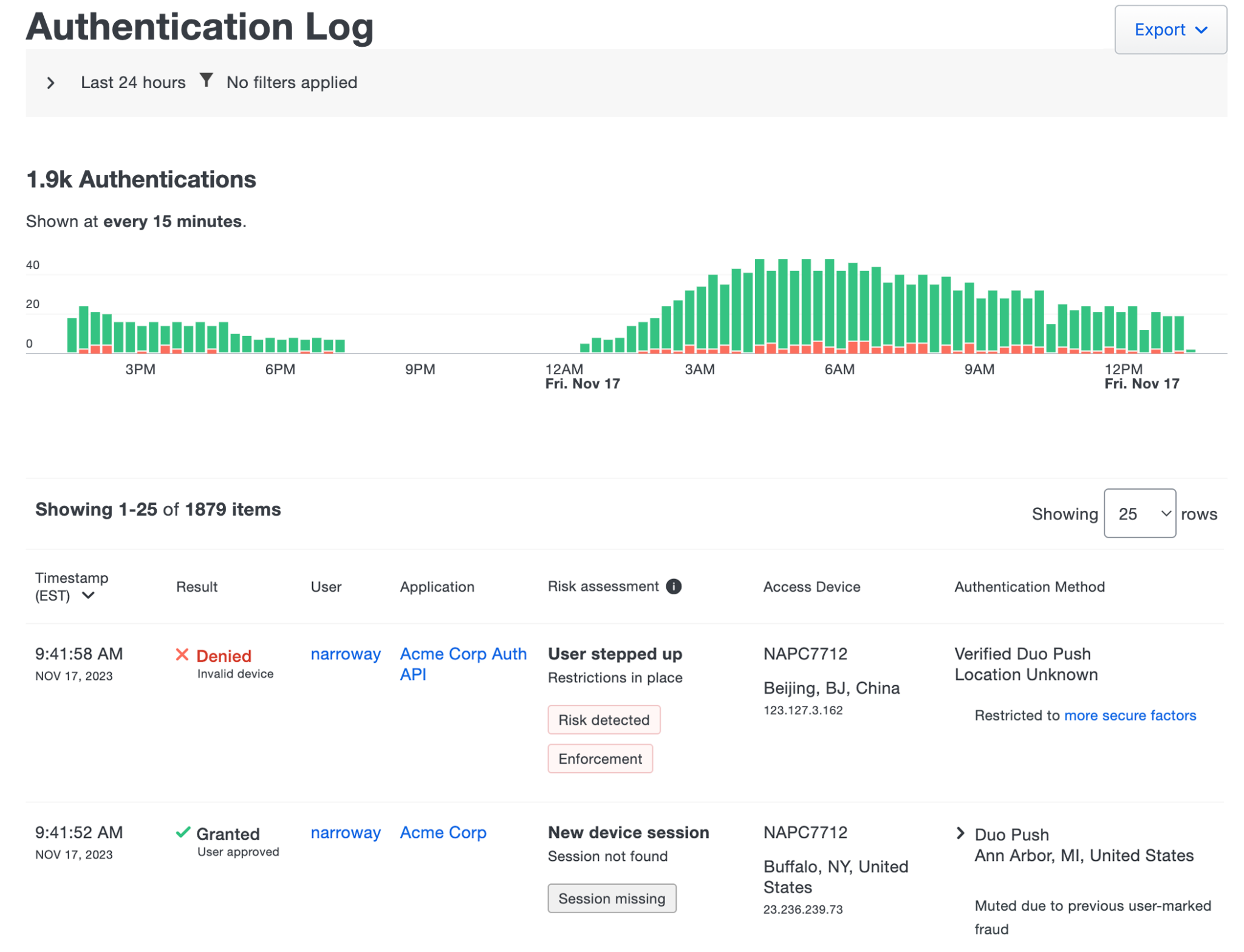
Duo’s published Authentication Log sample contains November 2023 denied and granted events for an Acme Corp Auth API application. Correlate the actual user, application, timestamp and reason in your own authorized view. Sample risk fields do not prove an incident, every edition’s capabilities or downstream application access.[1] View full-size interface image
“Duo denied my login” is a starting observation, not yet a diagnosis. An authorized administrator needs the attempted user, exact application and time before interpreting a denial reason. A success in one app does not explain a failure in a different integration.
Ask the user to record one attempt they initiated, including the visible error and time zone. Do not ask them to approve repeated Push requests while you search. Preserve the evidence already available before changing a policy or issuing a new activation.
Open the relevant report with the right authorization
Use the authorized Duo Admin Panel account, not the end user’s password. Duo documents report access for administrator roles other than Billing; administrator roles and scope still govern what that person can do. Read-only investigation does not authorize a policy change or account recovery.
[1][3]Find one event before reading the chart
The Authentication Log initially shows the previous 24 hours. Set a time window around the user’s attempt and narrow by the actual user and application. Compare the timestamp, outcome and supplied reason on the matching row. The documented maximum selectable window is not a promise that every event is retained or available for your incident.
The screenshot is a published November 2023 example for Acme Corp Auth API. Its counts, users and risk fields are illustrative. They establish neither an incident in your tenant nor that every edition shows the same fields.
[1]| Observation | What to compare | Next evidence |
|---|---|---|
| A denied row matches the intended app and time | Exact reason and factor, not just the red outcome | Administrator review of the relevant setting or device |
| A granted row is followed by an app error | Same user and app; where the error appears | Application or SSO evidence for the later stage |
| Only a different application has an event | Integration name and actual address the user opened | Correct application identity before another attempt |
| No matching event is visible | Window, time zone, filters and username spelling | Whether the request reached this Duo integration |
| The attempt was an offline Windows login | Original local time and later online authentication | Deferred reporting context rather than an immediate cloud event |
Check the effective setting, not a policy’s reassuring name
Duo’s precedence order is application-group, application, user-group, then global policy. A higher-precedence value wins when it configures the same setting. Review the applicable assignment for this user and application; do not assume the global value or a policy named “Standard” is effective everywhere.
Keep the investigation proportional to the reason. Write down the relevant setting and authorized owner. A reason label is evidence to investigate, not permission to relax a factor requirement, trust an unfamiliar network or remove a device restriction for the entire organization.
[2]Separate authentication from application access
For Duo Single Sign-On, the separate SSO reporting view can help distinguish primary and secondary authentication stages where available. A granted Duo event alone does not verify the user’s application role, entitlement or completed session. Capture the next error at its actual layer instead of sending the user through phone reactivation again.
For disconnected Windows access, Duo sends offline activity after a later online authentication. Keep that reporting delay attached to the case so a missing immediate row is not mistaken for proof that no attempt occurred.
[1][4]| Field | Useful entry | Avoid |
|---|---|---|
| Attempt identity | User identifier, application and one timestamp with zone | A broad unfiltered export when one event is enough |
| Duo result | Exact matching outcome and reason | An interpretation based only on aggregate counts |
| Effective setting | Applicable assignment and responsible administrator | An unapproved proposed global exception |
| Next layer | Visible application error or offline-reporting context | Assuming authentication success proves the user’s business task completed |
| Closure | What was tested, by whom and what remains unresolved | A pass inferred from a screenshot of a different attempt |
Close the loop with one controlled retest
After the responsible owner makes any approved correction, agree on one user-initiated retest. Compare the new event with the original user, application and time. Record both the Duo outcome and whether the intended application actually opened.
If the investigation identifies a replaced phone, the reactivation guide explains the invalidation boundary before issuing a code. If the problem exists only at a disconnected Windows console, use the offline guide instead. If evidence remains incomplete, record the missing item and stop short of declaring either a successful fix or an outage.
Frequently asked questions
Can a Billing administrator use this report workflow?
Does the default log view include every past attempt?
No. It initially covers the previous 24 hours. Adjust the relevant window and filters before concluding an event is missing.
[1]Does a denied event always mean the user rejected Push?
No. Read the recorded reason and factor on the matching event. The outcome alone does not identify why access was denied.
[1]Does a granted Duo event prove the application works?
No. Check the subsequent application session or error separately; Duo authentication is only one stage of access.
[1]Can I diagnose an outage from the absence of one row?
No. First check the time window, filters, user and integration. Then establish whether that request reached Duo.
[1]Why are the screenshot’s risk fields missing in my view?
Available fields and capabilities vary. Risk-based features can depend on the plan and configuration; the vendor sample is not an entitlement promise.
[1]Should I check only the global policy?
No. Review the effective application and group assignments using Duo’s documented precedence for the setting involved.
[2]Why might an offline Windows attempt appear later?
Its activity is reported after a later online authentication. Preserve the original time and offline context for the review.
[4]Should I repeatedly retry or approve Push while the administrator searches?
No. Agree on a single user-initiated attempt and record its time. Unexpected requests should not be approved.
[1]What is the most useful evidence to give the next support owner?
Provide the minimum authorized user/app/time identifier, exact matching result and reason, and the next visible error. Keep activation codes and unnecessary personal log data out of the handoff.
[1]