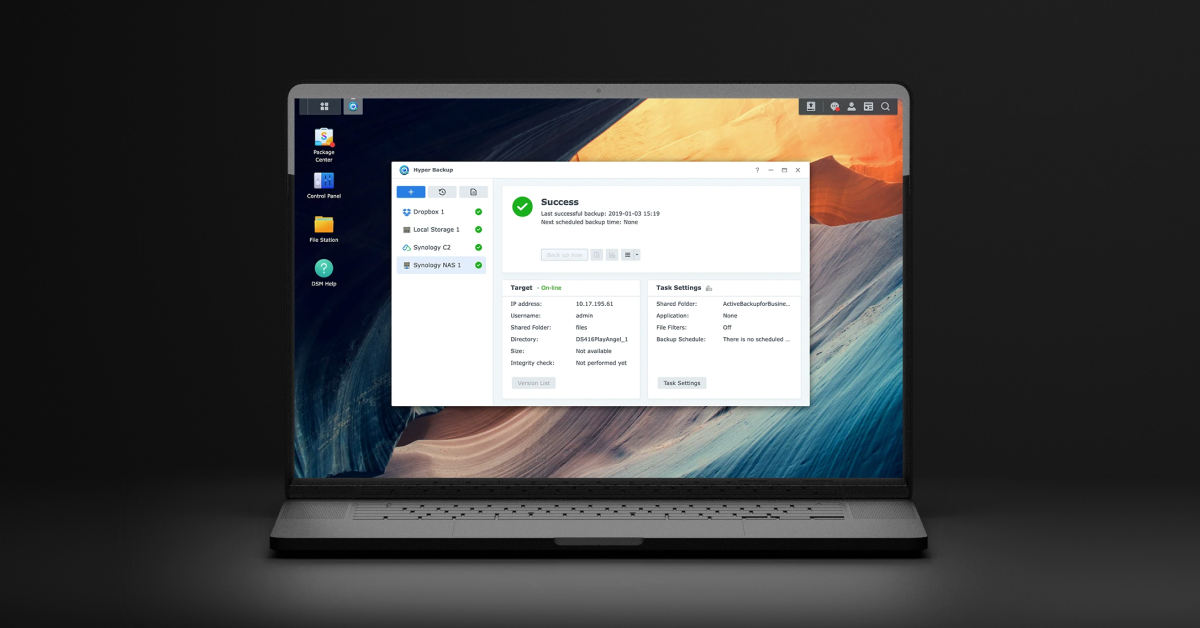
Synology vendor Hyper Backup example with an older interface. The backup-success message does not validate a restore.
A completed Synology backup job is useful evidence, but the recovery test is whether an authorized person can retrieve the required version and use the recovered data. Test a local snapshot and an independent backup against different failure scenarios. Record the version, destination, permissions and actual time needed to make the files usable.
This guide covers business files on a DSM 7-series NAS. It distinguishes Snapshot Replication from Hyper Backup and file recovery from entire-system restoration. Application-consistent databases, virtual machines and endpoint backup products need workload-specific recovery procedures in addition to this file test.
For one unwanted edit or deletion in Drive, first use the Drive version-history and deleted-file recovery decision to check the retained application history and the correct recycle bin. Return to this NAS-level drill when the required state is absent or recovery depends on a separately available snapshot copy or independent backup.
Choose a recovery path that survives the failure you are testing
Scroll sideways to read all columns.
| Protection path | Useful question to test | Boundary to record |
|---|---|---|
| Local shared-folder snapshot | Can a user recover a known earlier file version? | It remains dependent on the storage holding the snapshot |
| Snapshot replication to another system | Can the documented destination supply the required data? | Destination model, topology, access and replication state must qualify |
| Hyper Backup folder/package task | Can selected files and included package data be recovered? | Only selected supported content is covered |
| Hyper Backup entire-system task | Can a compatible replacement recover the configured system? | Specific models, destinations and restoration hardware requirements apply |
| Sync or RAID alone | Does this actually retain the required earlier independent copy? | Do not count either as proven recovery from deletion or appliance loss |
Start with a loss scenario and the owner’s acceptable data loss and interruption. A snapshot stored on the failed NAS cannot by itself answer a total-appliance-loss test. An offsite destination that nobody can authenticate to is not an operational recovery path. These are design checks; the actual recovery exercise must supply the evidence.
Verify snapshot support and test a small version recovery
Snapshot Replication supports shared-folder snapshots on Btrfs volumes, subject to model and package support. Check the actual model specifications and installed DSM/package combination. Review exceptions before promising the same procedure for every share: encrypted shared folders lack online snapshot preview, and homes has restrictions on whole-share restore and failover operations.[1]
Immutable snapshots are a separate capability with an explicit supported-model list. Their protection period restricts deletion of the protected snapshots and associated storage entities. Check support and capacity implications before setting the period; do not label every ordinary snapshot immutable.[2]
For a controlled exercise, create a disposable document in an approved test share, capture a supported snapshot, change its contents and retrieve the earlier version into a separate test location using a supported browse or copy path. Open the recovered file and compare its known contents. Keep the production version untouched until its owner approves any replacement.
Confirm what Hyper Backup actually contains
Read the task’s source selections, destination, version history and latest successful result. A multi-version repository uses Synology’s .hbk format and requires a supported Hyper Backup tool to read it. Encrypted shares or volumes must be unlocked for backup. Entire-system backup is model-limited, uses supported destinations, and has separate replacement-hardware requirements.[3]
Review the task settings rather than assuming that an old version remains available forever. Rotation removes versions according to the configured policy. Schedule integrity checks and inspect which data and versions were checked; the data-check option and its time limit matter. Store the backup encryption password or key under controlled custody outside the NAS and prove retrieval during the exercise.[4]
Record who owns repository access and avoid renaming a destination folder that must later be relinked. Synology documents that one repository can be linked to only one task; relinking a suspended task can discard its incomplete version. Do not relink or modify a production repository merely to experiment.[6]
Restore into a safe destination and test permissions separately
For a multi-version task, open Backup Explorer, choose the required version and retrieve a small approved sample. Synology documents Restore, Copy to… and single-file download paths. Copying or downloading does not preserve the original privilege settings, so a readable exported document is not proof that the production access policy has been restored.[5]
Illustrative exercise: the business owner identifies yesterday’s approved spreadsheet and a PDF in a nested project folder. Restore copies to a restricted recovery area, open both, compare the expected content and check access with an allowed account and a denied account. If a separate NAS is involved, verify account/group mapping and permissions rather than assuming matching display names establish matching identities.
Scroll sideways to read all columns.
| Check | What to record | What requires follow-up |
|---|---|---|
| Recovery point | Chosen version timestamp and expected file contents | The newest available version is older than the agreed requirement |
| Coverage | Selected share, nested folder and representative file types | A required folder or dependency was never selected |
| Usability | The intended application opens the recovered sample | File presence without valid contents or an application dependency |
| Authorization | Allowed and denied account results in the recovery location | Copied files inherit unsuitable destination permissions |
| Operational recovery time | Time to obtain access, retrieve data, validate and hand it back | Only transfer time was measured |
| Owner approval | Named person accepts the result and assigns unresolved actions | A green backup icon is the only acceptance evidence |
Keep a file drill separate from appliance recovery
An entire-system restoration overwrites the destination. It needs its own approved replacement target and plan; do not run it against the working NAS as a casual test. Verify the current model, drive arrangement and capacity requirements in the product specifications, then rehearse on an appropriate isolated target when that recovery objective is required.[3][5]
Before a real restoration, establish whether the loss is accidental deletion, storage failure or an active security incident. Preserve the affected evidence and coordinate containment before returning potentially compromised files or accounts to production. The restore owner should choose the known recovery point and authorize the destination.
Log the result and repeat the relevant test after a material change to the model, encryption custody, repository, identity service or protected workload. Use the NAS deployment checklist to close missing ownership or storage prerequisites, and the SMB diagnosis guide when recovered files exist but users cannot access them correctly.
ALLMSP’s Data Backup & Recovery service and Synology support can help review task scope, retention and a practical recovery exercise. Request a Synology recovery review with the NAS model, task type, destinations and business recovery requirements.
Frequently asked questions
Are Synology snapshots the same as an independent backup?
No. A local snapshot remains dependent on the storage holding it. Use a separately recoverable copy for failure scenarios that remove that storage, and test access to that copy.
Does every Synology NAS support Snapshot Replication?
Do not assume so. Verify the exact model, supported package and installed DSM combination. Shared-folder snapshots require Btrfs, and individual share types have additional limitations.
[1]Is every Synology snapshot immutable?
No. Immutable snapshots are a distinct supported-model capability with a configured protection period. Confirm eligibility and retention behavior before including immutability in the recovery design.
[2]Does Hyper Backup protect everything on the NAS automatically?
No. Check the task type, selected data, supported packages and destination. Folder or package protection is different from entire-system backup, which has specific model and restoration requirements.
[3]Can an encrypted shared folder be backed up while locked?
Synology documents that encrypted volumes and shared folders must be unlocked for backup. Verify task coverage and results rather than assuming locked content was included.
[3]What is needed to restore an encrypted Hyper Backup task?
Is an integrity check enough to prove recovery?
It is useful repository evidence, but it does not demonstrate the whole business workflow. Also retrieve representative data, open it in the intended application, verify access rights and record the operational recovery time.
Does Copy to or Download preserve original file permissions?
Synology documents that these retrieval methods do not preserve original privilege settings. Check the recovery location’s permissions and test allowed and denied accounts before returning files to use.
[5]Can any replacement NAS restore an entire-system backup?
What should a Synology restore-test record contain?
Record the loss scenario, chosen version, sample data, retrieval method, encryption access, recovered-file checks, permission tests, actual recovery time, owner approval and any unresolved action.