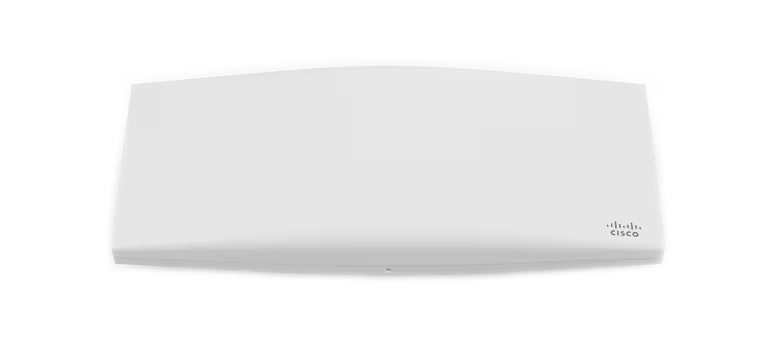
Cisco Meraki MR36 product image; client and network checks still require evidence from the installed access point.
“Connected to Wi-Fi” proves only part of the path. For a Meraki MR client with no internet, identify whether association and authentication completed, the client received the intended address and DNS settings, and traffic can pass through the expected gateway and policy. Record the exact failed task instead of treating every symptom as weak signal.
This guide covers an MR-managed business SSID. Use its actual client-addressing mode, authentication method, AP model and firmware. A bridge-mode corporate SSID and a NAT-mode visitor SSID do not place the client on the same addressing path.
Capture one failing connection and compare like with like
Record the time and time zone, SSID, AP, actual client MAC shown for that session, client OS and exact application or destination that fails. Use the client identity recorded for the failed connection so the log comparison matches the actual session.
Meraki Health separates association, authentication, DHCP and DNS stages and lets administrators narrow issues by client, SSID and AP. Match the selected time interval to the reported failure. The network Wireless Overview page is documented for firmware 28.x and above; do not interpret a missing page on another release as proof of an outage.[1]
Scroll sideways to read all columns.
| Comparison | Useful observation | Next investigation |
|---|---|---|
| Same SSID, another approved client | Only one client fails | Client profile, credentials, assigned policy or local network stack |
| Same client, another AP on that SSID | Failure follows one AP location | AP uplink, client VLAN path or local RF evidence |
| Different SSIDs on one AP | Only one SSID fails | Its authentication, addressing mode, VLAN or policy |
| Approved wired client on the same client VLAN | Both wired and wireless fail | Gateway, DHCP, DNS or upstream service path |
| Internet works but one business service fails | Only a specific destination or name fails | DNS, route, VPN, application or intended access policy |
A comparison is useful only when its differences are recorded. A wired client in the AP management VLAN is not a like-for-like test of a wireless client’s separate VLAN.
Confirm association and authentication before chasing internet routing
Open the client’s connection or event history for the failure time. Distinguish association from the authentication exchange and from later DHCP or DNS activity. Meraki’s event documentation shows separate WPA and 802.1X/RADIUS events; a repeated authentication failure should be investigated with the relevant client or identity owner.[2]
Check that the client uses the approved SSID profile and authentication method. For an enterprise SSID, compare the intended identity, certificate or supplicant configuration with the server-side result. Avoid creating an open test SSID, disabling authentication or removing a security control just to obtain a connection.
Do not treat a single disassociation or “client has left AP” entry as a diagnosis. Correlate it with the user’s timestamp, subsequent reconnect and whether other clients were affected. Meraki documents several possible meanings for disassociation messages, including ordinary client shutdown or roaming.[2]
Follow the client addressing mode and VLAN path
In bridge mode, the wireless client depends on the upstream addressing service and the VLAN path assigned by the SSID or applicable policy. In NAT mode with Meraki DHCP, the AP provides client addressing through a different design. Establish which mode is configured before deciding where to look for a missing address.[3]
For bridge mode, compare the observed client address, subnet, gateway and DNS with the approved client VLAN. Check address-pool availability and the DHCP server or relay path. Inspect the AP switch port’s native and allowed VLAN settings against the SSID design. AP management can work while a tagged client VLAN is absent from the uplink.[3][5]
Illustrative example: the AP management network is VLAN 10 and the corporate SSID is intended for VLAN 20. Dashboard sees the AP, but clients do not receive the expected VLAN 20 addressing. Verify that VLAN 20 actually crosses the AP uplink and the remaining path to its DHCP service. Do not move the corporate SSID to VLAN 10 just to make the symptom disappear.
If packet capture is needed, collect a short authorized sample for the affected client at a known test time and compare the expected request and response across relevant interfaces. Protect the capture as diagnostic data. An administrator should interpret the actual exchange; repeated connection attempts without a timestamp or client filter provide weaker evidence.
Separate gateway, DNS and policy failures
With the intended address present, test the approved gateway and a known required service. A device or firewall may decline ping, so a failed echo alone does not establish that routing is broken. Compare with the intended application transaction and relevant device logs. Meraki’s troubleshooting guidance separates gateway reachability, DNS and client or subnet policy checks.[3]
Query a required name through the configured business resolver and compare its answer with the expected service. If name resolution fails while an approved direct-IP test works, investigate DNS reachability or records with the resolver owner. Do not permanently replace business DNS with a public resolver; that can break internal names and obscure the original dependency.
Review the client’s effective group policy, SSID firewall or splash requirements and the upstream route. When internet access works but a remote private service does not, inspect the actual addressing plan. Meraki documents NAT-mode subnet overlap as a possible VPN connectivity problem; it is a reason to review the topology, not proof that every connected client needs a different SSID mode.[4]
Accept the repair with the original task and restrictions
Scroll sideways to read all columns.
| Check | Evidence of a useful pass |
|---|---|
| Original client and task | The same client completes the reported business transaction |
| Addressing and name resolution | The expected subnet, gateway and resolver behavior are confirmed |
| Comparison client or AP | The scope is understood and no new adjacent failure appears |
| Reconnect | The client reconnects using the approved profile and intended identity |
| Restricted path | A destination or role that should remain blocked is still blocked |
| Support record | The failing stage, narrow correction, timestamp and follow-up owner are saved |
If the AP uplink or power becomes the failure boundary, use the MS switch-port and PoE diagnosis guide. If multiple VLANs fail after an edge change, compare the MX cutover acceptance checks with the current gateway, DHCP and DNS roles.
ALLMSP’s Meraki support and IT help desk can review a reproducible connection failure with its actual logs and topology. Request a Wi-Fi troubleshooting review with the SSID, affected client, time, AP and comparison results so the next test addresses the failed stage.
Frequently asked questions
Why can an MR client show connected without having internet access?
What information should accompany a Meraki Wi-Fi support request?
Provide the exact failure time and time zone, SSID, AP, actual client identity for that session, client OS, failed task and results from an approved comparison client or AP.
Why is Wireless Overview missing on an older MR firmware network?
Meraki documents the network Wireless Overview page for firmware 28.x and above. Check feature availability for the installed release rather than treating an absent page as evidence that the network is down.
[1]Can AP management work while wireless clients have a VLAN problem?
Where does an MR wireless client obtain its IP address?
It depends on the SSID design. A bridge-mode client relies on the upstream addressing path, while NAT mode with Meraki DHCP provides client addressing through the AP. Inspect the actual configured mode first.
[3]Should an open SSID be created to troubleshoot corporate Wi-Fi?
Do not use an open SSID as a general fix. Compare approved clients, profiles, logs and VLAN paths while preserving the intended authentication and access policy.
Does one client-left-AP event prove a wireless fault?
No. Disassociation messages have several possible causes, including ordinary shutdown or roaming. Correlate the event with the reported time, reconnect behavior and other affected clients.
[2]Should business DNS be permanently replaced with public DNS when testing?
No. Test the configured resolver and required names with the responsible owner. A public resolver can bypass the dependency under investigation and fail to resolve internal services.
Why might internet work while a remote private service fails?
Check DNS, the remote route, effective policy and overlapping address ranges. Meraki documents NAT-mode addressing overlap as one possible VPN connectivity issue; it is not a universal diagnosis.
[4]What proves that the no-internet incident is resolved?
The original business task succeeds on the original client, reconnecting works with the intended profile, addressing and DNS are correct, and access that should remain restricted is still denied.