





























































































































































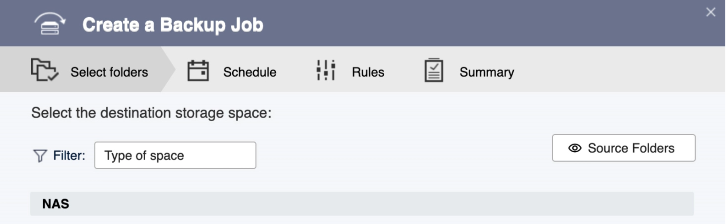
QNAP’s backup-job wizard example shows destination selection before schedule, rules and summary. Match the controls to your installed HBS version.
A useful HBS3 backup job has an agreed recovery point, an understood deletion policy and a person who can retrieve the files. Decide those details before the first large transfer. A completed run alone leaves important questions unanswered: were the required folders selected, will a deleted file remain available, and can someone unlock the backup when the NAS is unavailable?
Use this checklist for file-backup planning in QNAP Hybrid Backup Sync. Record the installed HBS3 build, NAS operating system and destination type. The cited QNAP online guide is the 21.x edition; match the available controls and help to your installed build before applying a menu-specific instruction. Application databases, virtual machines and entire-NAS recovery need their own supported protection plan.
Write down what the job must recover
Ask each data owner for a small set of important files and the latest acceptable recovery point. Record how long the business can wait for those files, including obtaining access, locating a version, retrieving it and checking its contents. Include dependencies such as linked documents or an application that needs to read an exported file.
| Decision | Record in the job plan | Evidence to request |
|---|---|---|
| Coverage | Named shares, required subfolders and intentional exclusions | An owner identifies representative files and exceptions |
| Recovery point | How much recent work the business may lose | The schedule and version policy cover that requirement |
| Destination | Exact storage service, location and access owner | A restricted recovery account can reach the intended copy |
| Deletion | What happens after source deletion or replacement | A disposable sample demonstrates the intended result |
| Ownership | Job reviewer, credential custodian and restore owner | A second authorized person can follow the documented handoff |
HBS3 stores frequently used destination configurations as storage spaces. Record which jobs use a particular space before changing its endpoint or credentials; an entry with a familiar display name does not establish that it points to the intended repository.[2]
Use the business backup-planning guide to agree recovery time, acceptable data loss and service dependencies before translating those requirements into one HBS job.
Choose backup or sync from the required outcome
HBS3 offers different job types. Read the actual direction and action policy rather than treating every second copy as versioned recovery. For cloud one-way sync, the cited guide distinguishes a mirror that removes extra destination items, a copy action that retains source-deleted items at the destination, and a move action that removes transferred source files. Those action choices are destination-specific.[3]
For example, a staff member who deletes a project folder may need yesterday’s version restored. A mirror that faithfully propagates the deletion can behave exactly as configured while failing that recovery requirement. Choose and test the behavior deliberately; do not change a live synchronization policy simply to make it resemble a backup.
Use disposable folders when checking deletion and replacement behavior. Keep the production repository protected while testing the proposed policy, and document which earlier versions should remain accessible.
Review scope, retention and encryption before accepting the job
In the backup-job workflow, review selected folders, filters, version settings and destination policies together. Hidden-file, date, size or file-type exclusions can change coverage. Decide which files must be retained and confirm that an intentional exclusion is documented. The guide also warns that client-side encryption cannot be disabled and its password cannot be changed after it is applied.[1]
Have an authorized custodian prove access to the required encryption material outside the source NAS. Avoid placing the only usable credential in the files protected by that same job. Record recovery-tool requirements and the consequences of changing custody, accounts or destination access.
Use a small pilot to check both a normal included file and a deliberately excluded file. Verify an earlier version after a controlled edit. Expand the job only after the owner accepts what is protected and what is left out.
Plan verification as part of the operating schedule
QNAP documents quick and content integrity checks with different resource and destination limits. A content check can retrieve backup data for comparison, so include bandwidth, destination access and possible retrieval charges in the plan. Check support for the actual job and destination before promising a particular check.[4]
An integrity result and a business recovery exercise supply different evidence. A useful acceptance record includes an actual sample opened in the required application, the chosen version and the access policy at the recovery location. Use the QNAP HBS3 archive and restore-test guide for the recovery procedure and its format/tool boundaries.
| Check | Useful evidence | Follow-up trigger |
|---|---|---|
| Included data | The required sample is present in the selected backup version | A needed share, file type or nested folder was omitted |
| Intentional exclusion | An approved excluded sample is absent | A filter removes more than its owner intended |
| Earlier version | A controlled edited file has the expected recoverable version | The available history does not meet the recovery point |
| Recovery access | The authorized custodian obtains access and opens the sample | A missing password, tool or account prevents retrieval |
| Operational ownership | The reviewer receives and investigates the run result | No one owns a warning, failed run or missed schedule |
Keep the first run and handoff useful to the next operator
Save the job identity, source selections, destination, schedule, version policy, exclusions, encryption custody and acceptance results in controlled documentation. Record the actual HBS3 build and any destination-specific exception. Review the job report for the relevant run; QNAP separates past run results from event logs and provides file-detail downloads and log export.[5]
If a run contains unexpected exclusions or errors, follow the HBS3 warning and file-history investigation before accepting the job. Recheck the plan after a new share, application, destination, credential or retention requirement is introduced.
ALLMSP QNAP Hybrid Backup Sync support includes backup-job planning, retention, monitoring and recovery work. Request a backup review with the installed build, source shares, destination and recovery requirements so the discussion starts with the files the business needs back.
Frequently asked questions
What should be decided before creating an HBS3 backup job?
Define required files, acceptable data loss, recovery time, destination, deletion behavior, retained versions and the people responsible for review and recovery. Write a small acceptance test before copying production data.
Does a successful HBS3 transfer prove that all required data is protected?
Check the selected folders, filters and relevant run records, then retrieve representative files. A successful transfer cannot establish coverage for content the job never selected.
Is an HBS3 one-way mirror a replacement for retained backup versions?
Review the required outcome. For supported cloud one-way sync, a mirror can remove destination items to match the source. Test deletion and earlier-version recovery before treating that behavior as adequate protection.
[3]Can the client-side encryption password be changed after applying it?
The cited HBS3 backup-job guide warns that the password cannot be changed and client-side encryption cannot be disabled after it is applied. Resolve key custody and the supported change plan before production use.
[1]Why should a backup plan name the actual storage space?
Storage spaces hold reusable destination configurations. Record the endpoint, access owner and jobs using that configuration so an apparently small destination change is reviewed in its operational context.
[2]What should a backup-filter acceptance test include?
Use a required sample that should be protected and a disposable sample that should be excluded. Check both outcomes and have the data owner approve the exclusion boundary.
Does an integrity check replace opening a restored business file?
It provides backup-data evidence. Also retrieve the required version, open it in the intended application and verify the recovery location’s access rights.
Can a content integrity check create cloud traffic or retrieval costs?
It can retrieve backup data for comparison. Confirm the destination’s supported check behavior, available bandwidth and provider charges before scheduling it.
[4]Who should own an HBS3 job after setup?
Assign a person to review runs and exceptions, an authorized custodian for recovery access, and an owner who can accept the recovered business files. Keep those responsibilities documented.
When should an accepted HBS3 backup job be reviewed again?
Review it after meaningful changes to source shares, applications, destination, credentials, encryption custody, retention requirements or recovery expectations. Repeat the affected acceptance checks.


