





























































































































































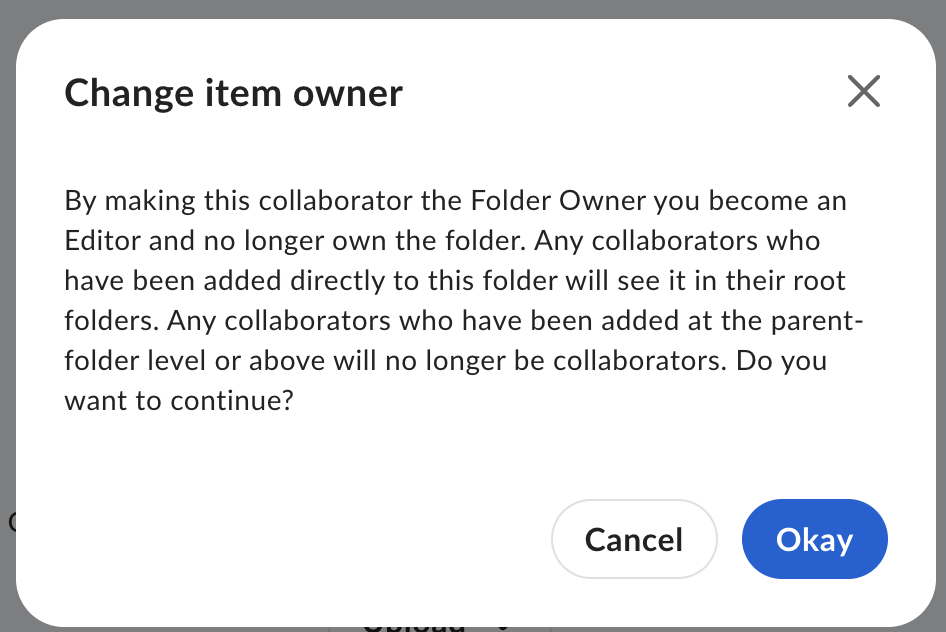
Box’s single-folder Change item owner example warns about inherited collaborators and the previous owner’s new Editor role. Read and test that operation’s access effects separately from bulk managed-user deletion and content transfer. This confirmation does not show a completed handoff.[3] View full-size product image
Removing a departing employee’s sign-in and preserving the team’s working content are separate acceptance tests. For a Box managed user, inventory what they own, what they merely collaborate on and which workflows depend on them. Choose the approved containment and transfer route before clicking through a deletion dialog.
Box provides an inactive status as a less permanent option, but its offboarding guidance says owned content is frozen for collaborators too. Plan that operational effect with the business owner. An administrator should not promise uninterrupted access simply because account deletion was avoided.[1][2]
Separate the objects before choosing an account action
Build an owner-reviewed list of important folders, individually shared files, external collaborators, pending work and Relay workflows. Record the intended receiving managed user and the person who will test the handover. A destination email address alone is not a handover plan.[1]
| Object or action | Question to settle first | Acceptance evidence |
|---|---|---|
| Make the managed user inactive | Can the business tolerate the documented content freeze? | Account access is restricted and affected content users know the temporary boundary |
| Transfer during managed-user deletion | Which existing managed user receives owned content and workflows? | The expected transferred tree and work appear under the approved recipient |
| Change ownership of one folder | Is the operator the owner, and what access is inherited from its parent? | The new owner and intended collaborators pass a test after the specific move |
| Remove a collaboration | Is the departing user a collaborator rather than owner? | The authorized recipient retains access without transferring someone else’s ownership |
| Remove a paid seat commitment | What is the separate subscription process? | The billing owner verifies the change; deleting a user is not the evidence |
Confirm the administrator and destination
Read the content, workflow and records choices in the actual deletion dialog before approval. Do not bypass a Governance restriction to clear an error; keep the records decision with its responsible owner.[1]
Do not confuse a folder transfer with bulk offboarding
The Change item owner image is an example of a single-folder ownership change, not proof that a managed-user deletion transfer succeeded. Box’s collaborator guidance says the current folder owner becomes an Editor after transferring ownership. The published confirmation also warns about access inherited from a parent; inspect that warning before accepting the particular operation.[3]
Allow the transfer to finish, then test the working process
During Box’s scheduled transfer, affected owned files can be inaccessible. Plan the window; a partial destination tree is not a retry instruction.[1]
If the transfer reports an error, record the exact message, intended source/destination and current location of the affected content. Check recipient identity and capacity before escalation. Do not reactivate a former employee or remove retention controls simply to follow a generic error recipe; use the current approved support and records process for the actual state.[4]
The following illustrative handover is a proposed test, not a client case. Replace its sample objects with the owner’s inventory and agreed business process.
| Checkpoint | Illustrative evidence | Open issue if it fails |
|---|---|---|
| Inventory | One owned project folder, one separately shared file and one active workflow are listed | A folder-only review can miss file collaboration or workflow dependencies |
| Contain access | The approved account action is recorded with its content-access impact | A successful lockout does not prove collaborators can work |
| Observe transfer | The expected destination tree appears and the operation finishes without an unresolved error | A partial tree is not permission to replay the transfer |
| Recipient test | The named recipient opens the right content and verifies the workflow’s next required step | Ownership on a screen alone does not prove the business task |
| Collaborator test | An intended teammate and authorized external collaborator test their required paths | Review missing file-level or inherited access individually |
| Close out | Records owner, access tests, remaining exceptions and billing responsibility are documented | Do not equate account removal with retention compliance or seat reduction |
Close only when the recipient finds the intended content, important collaborators complete their work and workflows have accountable operators. Deleting the account does not reduce purchased licenses; keep billing with its separate owner.[1]
Use the Box link-access guide for a specific recipient failure and the Box Drive guide for a device whose cloud/local copies disagree. In a separate Google Drive environment, the Google Drive ownership and stale-access review covers its own product’s controls; a Box transfer does not transfer a Google file or permission.
Frequently asked questions
Does making a Box user inactive preserve normal team access?
Do not assume it does. Box’s offboarding guidance says the user’s owned content is frozen for collaborators too. Plan the effect and verify the team’s required tasks separately from confirming that the departing user is blocked.
[2]Can a co-admin transfer a departing user’s content anywhere?
No. Transfer options depend on the co-admin’s permissions. Verify user-management and content-editing rights, then choose the approved receiving managed account.
[1]What happens to workflows and Trash during deletion transfer?
The current procedure includes owned workflows and content in Trash. Account for them before approving the destination and verify the result against the handover inventory.
[1]Will all existing collaborations survive a bulk user transfer?
Can I use a folder’s Change item owner button for every offboarding task?
No. That changes ownership of the particular folder, makes its previous owner an Editor and can affect parent-inherited access. It does not by itself account for the user’s other folders, file collaborations, workflows or account access.
[3]Why does only part of the transferred folder tree appear?
Box transfers content in scheduled pieces. Track completion and the actual error state instead of repeating the operation because part of the tree is still missing.
[1]Should I reactivate the former employee to clear a transfer error?
Do not make that an automatic fix. Preserve the observed error and ask the authorized administrator to use the current approved support path. Re-enabling an identity or removing a records restriction changes a different control and needs its own decision.
Should retained content be deleted to unblock account removal?
No routine deletion should override the records decision. Box Governance retention can restrict content deletion; use the approved preservation and transfer route.
[1]Does deleting a Box user reduce the purchased seat count?
No. Purchased licenses require a separate subscription decision; deleting the managed user does not reduce them.
[1]What proves the Box offboarding handover is finished?
The approved recipient finds the expected content, important collaborators complete their required tasks, workflows have accountable operators and the departing identity’s access is handled. Record transfer errors and exceptions; a removed user row alone is not enough.


