





























































































































































Acronis Cyber Protect Cloud can expose many recovery paths: individual files, application data, databases, disks, physical or virtual machines, cloud-application items, and recovery servers in a disaster-recovery site. Those paths are not interchangeable. The workable method depends on what was backed up, which agent created or can browse the archive, where the backup resides, the current tenant and role, the target platform, compliance mode, and enabled offerings or add-ons.
Validation is an important layer, not a complete recovery exercise. Checksum verification evaluates recoverable blocks or supported metadata, while run-as-virtual-machine methods can add heartbeat or screenshot evidence for supported disk backups. Cloud validation has its own archive, storage, data-center, compliance, and frequency boundaries. A successful result can raise confidence, yet it cannot prove application transactions, external identity, DNS, dependencies, user workflows, or the organisation’s ability to operate during an incident.
This recovery program connects technical evidence to business ownership. It defines recovery-point eligibility, restore targets, application-aware prerequisites, validation methods, isolated testing, Disaster Recovery add-on boundaries, runbook steps, RPO and RTO decision owners, failover authority, and failback protection. The result is a repeatable exercise with measured outcomes rather than a promise inferred from backup status.
ALLMSP provides Acronis Cyber Protect Cloud backup and recovery validation for Lawrenceville and Suwanee businesses, the wider Gwinnett County and Metro Atlanta area, and organizations across Georgia, with practical coordination across managed IT, cybersecurity, software support, backup, and employee operations.
Key decisions at a glance
- Choose recovery points from the right archive, location, tenant, and browsing agent, then verify that the point predates the incident and contains the required application or system state.
- Use checksum, screenshot, heartbeat, and cloud validation within their documented support boundaries, but retain real restore and business-service tests because validation does not exercise every recovery dependency.
- Separate ordinary file, application, disk, and machine recovery from Disaster Recovery add-on workflows, available targets and methods depend on workload, agent, storage, compliance mode, and licensing.
- Rehearse runbook interaction, isolated test failover, production decisions, failback, and post-failback protection so automation does not conceal manual passwords, confirmations, network work, or service-owner approval.
Classify the Recovery Request and Qualify the Recovery Point
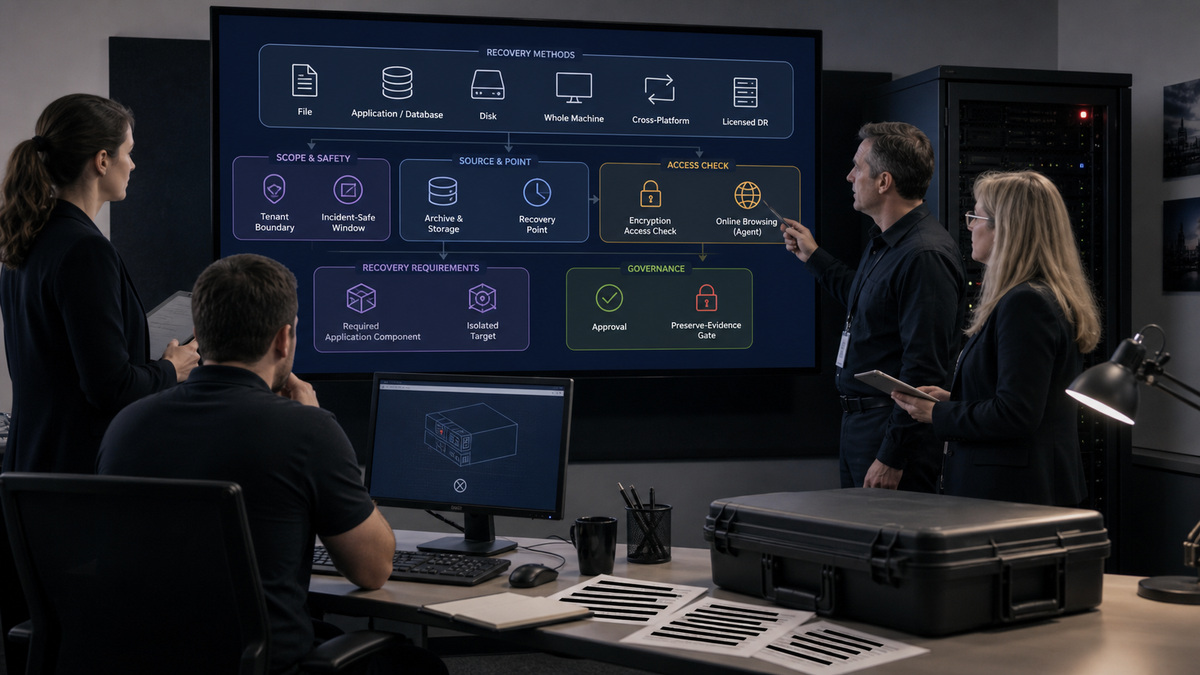
Begin by classifying the loss. Identify affected tenant, workload, service, data object, incident time, suspected compromise window, business owner, security constraints, and maximum acceptable data loss and interruption. Decide whether the task is file retrieval, database or application recovery, disk or entire-machine recovery, cross-platform recovery, or disaster-recovery failover. Keep destructive production recovery separate from evidence preservation and from a clean-room validation of a potentially compromised backup.
Locate the archive through the original workload or Backup storage. Recovery points are filtered by location, and an offline workload may require selecting an online machine to browse a cloud or shared location. Some content requires a specific agent, SQL backup browsing, for example, can require a machine running Agent for SQL. Confirm archive identity, workload and plan association, storage, point timestamp, backup type, encryption access, health, and the target machine before starting any operation.
Check method boundaries early. A disk-level physical-machine backup can be recovered to supported physical or virtual targets, but bare-metal or offline recovery can require bootable media. Application recovery has agent, target version, rights, storage-access, and application-consistency prerequisites. Compliance-mode tenants restrict console recovery. Cross-platform recovery may be possible for supported whole-machine or operating-system disk backups, yet hardware, drivers, applications, and external dependencies still require post-restore verification.
- Record tenant, workload, incident window, required data or service, clean-point criteria, RPO owner, RTO owner, and recovery approver.
- Select an archive and recovery point by workload, location, plan, timestamp, backup type, health, encryption access, and incident safety.
- Verify the online browsing agent and application component needed to expose the recovery data and intended target.
- Choose file, application, database, disk, machine, cross-platform, or disaster-recovery method from current support and licensing.
- Preserve logs and backup evidence before destructive recovery, especially when compromise, deletion, corruption, or legal review is possible.
Layer Validation With Isolated Restore and Application Tests

Apply validation according to the archive and infrastructure. Acronis local validation can use an installed agent and, for supported run-as-virtual-machine validation, access to ESXi or Hyper-V. Cloud validation runs on cloud infrastructure but supports only documented storage, archive, operating-system, data-center, and compliance conditions. Current guidance describes a no-additional-charge allowance for up to ten cloud archive validations in a two-week period, greater scale may require another design such as Disaster Recovery automated test failover.
Understand what each method proves. Checksum verification checks recoverable blocks against stored checksums, although supported cloud file backups use metadata consistency. Screenshot validation can show a supported operating system reaching a visual state, and heartbeat can add boot evidence in supported local virtualisation workflows. Acronis explicitly notes that checksum success does not test all factors that affect recovery. Neither a screenshot nor a checksum establishes database consistency, user authentication, network reachability, recent transactions, or business-process completeness.
Add isolated restores. Recover representative files to a non-production location and have an authorised owner open and compare them. For SQL, Exchange, Active Directory, or other application-aware designs, verify required agents, writers, credentials, supported backup mode, target version, and recovery method, then test the actual object the runbook promises. Capture duration, transferred data, errors, warnings, validation evidence, application checks, security review, and cleanup without recording passwords or readable customer data.
- Select local or cloud validation only after confirming agent, hypervisor, storage, archive version, data-center, and compliance support.
- Treat checksum, screenshot, and heartbeat as different evidence types and document exactly what each method did not test.
- Restore files to an isolated destination and verify usability, ownership, timestamps, permissions, and content with sensitive evidence redacted.
- Run application-aware recovery tests against supported agents and targets, then validate application startup, consistency, and representative transactions.
- Retain test duration, observed RPO, achieved restoration time, issues, remediation, approvers, and next rehearsal date.
Engineer Disaster Recovery Only Where the Add-On and Workload Support It
Treat Acronis Disaster Recovery as a separately qualified capability. It depends on enabled service quotas or add-ons, customer-level access, supported workloads, cloud storage, recovery-server and network configuration, compute capacity, and operator roles. A disaster-recovery protection plan must back up the entire machine or the boot and service disks required by the workload to cloud storage. Unit administrator access does not itself provide Disaster Recovery functionality, and a unit-level assumption must not override current tenant and role documentation.
Create the recovery server and network before promising failover. Acronis allows failover only from recovery points created after the recovery server was created. Document cloud network, production and test addressing, DNS, firewall, connectivity, compute points, licensed applications, credential handling, and an RPO threshold. That threshold describes the maximum age of a suitable failover point for alerting and selection, it does not guarantee the business’s actual data-loss outcome or the time needed to restore service.
Use test failover in its isolated network and validate service dependencies, not just operating-system boot. Acronis’s test VLAN prevents the recovery servers from initiating TCP or UDP connections to local production workloads, which helps containment but can also hide dependencies that need simulated services. Automated test failover can create a virtual machine from the latest point, capture and analyse a screenshot, and report status, but it uses compute points and can fail when required encrypted-backup credentials are unavailable.
- Verify Disaster Recovery add-on or quota, tenant level, role, workload support, cloud-storage protection, and data-center availability.
- Create recovery servers before relying on recovery points and record which post-creation backups are eligible for failover.
- Document cloud network, DNS, firewall, addressing, compute, application licensing, credentials, test access, and production isolation.
- Assign RPO threshold, business RPO, business RTO, failover authority, communications, security review, and cost approval separately.
- Exercise the isolated test network with representative service checks and simulate dependencies that the VLAN intentionally cannot reach.
Rehearse Runbooks, Production Decisions, Failback, and Reprotection
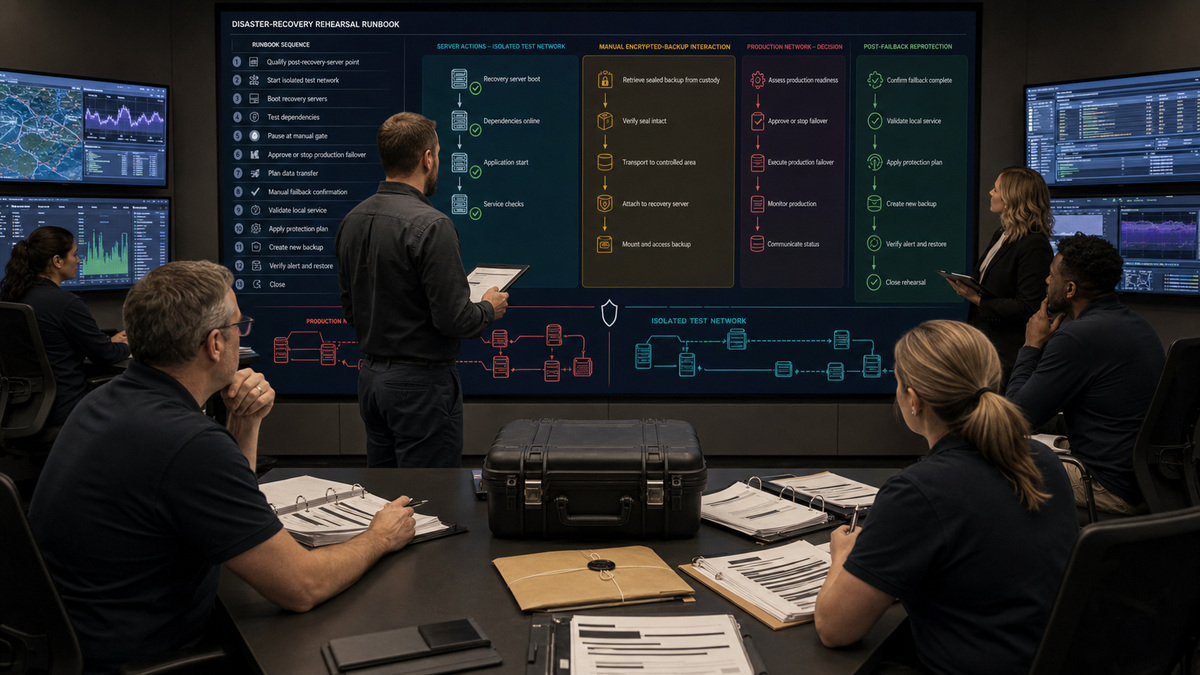
Build runbooks around service order and explicit human decisions. Acronis runbook steps execute consecutively while actions inside a step begin together. Available actions include failover, failback, starting or stopping cloud servers, manual operations, and nested runbooks. A manual operation pauses for a user. An encrypted backup configured through a machine property can pause failover until an operator provides the password, and runbook failback supports manual interaction rather than an unattended end-to-end return.
Test the runbook in a non-production mode and preserve execution history. Confirm recovery-point selection, server sequencing, port or application checks, manual approvals, communications, identity and DNS dependencies, security containment, rollback criteria, and the authority to move from test to production. Production failover should begin only after the original workload is isolated as required, the selected point is approved, and responders understand the lower-performance finalization period and any backup-plan changes on the recovery server.
Failback is part of recovery, not postscript. Plan local infrastructure, target firmware or hypervisor, data transfer, switchover, validation, downtime, and confirmation. Runbook-driven failback still requires the operator to recover the machine and confirm or cancel from the server view. After failback, verify the local service, confirm the process, and apply an appropriate protection plan because that step is not automatically completed by every failback path. Close only after new backups, alerts, monitoring, and a fresh restore test succeed.
- Sequence dependent servers and parallel actions, and include named manual gates for security, business, network, and communication decisions.
- Test encrypted-backup password handling, recovery-point selection, port checks, failure behavior, interaction timeouts, and alternate operators.
- Isolate the original workload before production failover and document finalization performance, service checks, DNS, and protection changes.
- Rehearse failback data transfer, switchover, local validation, confirmation, rollback, and expected downtime with service owners.
- Apply and verify post-failback protection, then preserve new backup, alert, monitoring, restore, and approval evidence before closure.
Official product documentation and ALLMSP resources
- Acronis: Validation
- Acronis: Validating backups
- Acronis: Validation methods
- Acronis: Recovery cheat sheet
- Acronis: Backup storage
- Acronis: Recovery of physical machines
- Acronis: Creating a disaster recovery protection plan
- Acronis Disaster Recovery: Creating a recovery server
- Acronis Disaster Recovery: Test failover
- Acronis Disaster Recovery: Automated test failover
- Acronis: Creating a runbook
- Acronis Disaster Recovery: Failover
- Acronis Disaster Recovery: Failback
- Acronis: Task failure handling
- ALLMSP: Acronis software support category
- ALLMSP: Software support
- ALLMSP: Managed IT
- ALLMSP: Cloud computing and migrations
- ALLMSP: Cybersecurity
Frequently Asked Questions
How should a recovery point be selected in Acronis Cyber Protect Cloud?
Identify the correct tenant, workload, archive, plan, storage location, timestamp, backup type, encryption state, health, and incident-safe window. Confirm that an authorised online agent can browse the point and that the selected backup contains the required file, application, disk, or system state before any destructive production recovery begins.
Is Acronis backup validation the same as a successful restore test?
No. Validation can verify block or metadata consistency and, where supported, add screenshot or heartbeat evidence. Acronis notes that checksum validation does not test every factor affecting recovery. Perform isolated file, application, or machine restores and verify authentication, networking, dependencies, representative data, and business usability in addition to validation.
What are the main boundaries of Acronis cloud validation?
Cloud validation is constrained by supported Acronis-hosted storage, archive version, guest operating systems, data-center Disaster Recovery availability, Compliance mode, and service limits. Current documentation describes a no-additional-charge allowance for ten archives per two-week period. Confirm live licensing and platform support before promising broader automated validation coverage.
When is an online browsing agent needed for Acronis recovery?
If the original workload is offline or the backup is in cloud or shared storage, the operator may need an online machine to browse and recover the archive. Some content needs a specific component, SQL backups can require Agent for SQL. Verify that the browsing and target machine has supported agents, access, and capacity.
What must be tested for application-aware Acronis recovery?
Verify that the source backup was application-aware, required agents and writers were present, credentials and permissions are current, and the target version and recovery method are supported. Restore the actual database or application object to an isolated target, then test consistency, startup, representative transactions, permissions, and the documented return to service.
Does Acronis Disaster Recovery work for every protected workload?
No. Disaster Recovery depends on enabled add-ons or service quotas, tenant and role, supported workload, cloud-storage backup, recovery-server and network configuration, compute capacity, and data-center availability. The protection plan must include the entire machine or the disks needed to boot and provide the service. Verify all boundaries before setting expectations.
Can an old backup be used after creating an Acronis recovery server?
Acronis states that failover can use only recovery points created after the recovery server was created. Record the creation time, ensure new eligible backups complete, and test one before declaring the server ready. An older archive may still support another recovery method, but it is not automatically eligible for recovery-server failover.
What does the Acronis RPO threshold guarantee?
The recovery-server RPO threshold defines the maximum age of a suitable recovery point for platform monitoring and selection. It is not a guarantee of business data loss, backup completion, or recovery time. Assign business RPO and RTO owners separately, monitor actual point age, and measure restoration and service-validation time during exercises.
What manual steps can stop an Acronis runbook?
A runbook pauses at defined manual operations. Failover of a backup encrypted through a machine property can require password entry, and runbook failback requires manual recovery plus confirmation or cancellation. Network, security, communications, application, and business approvals should also be explicit gates with named primary and alternate operators.
What must happen after Acronis failback?
Verify the recovered local machine or virtual machine, application state, networking, identity, dependencies, and security posture before confirming failback. Then apply and validate an appropriate protection plan because post-failback reprotection is not completed automatically by every path. Confirm new backups, monitoring, alerts, and a fresh isolated restore before closure.


