





























































































































































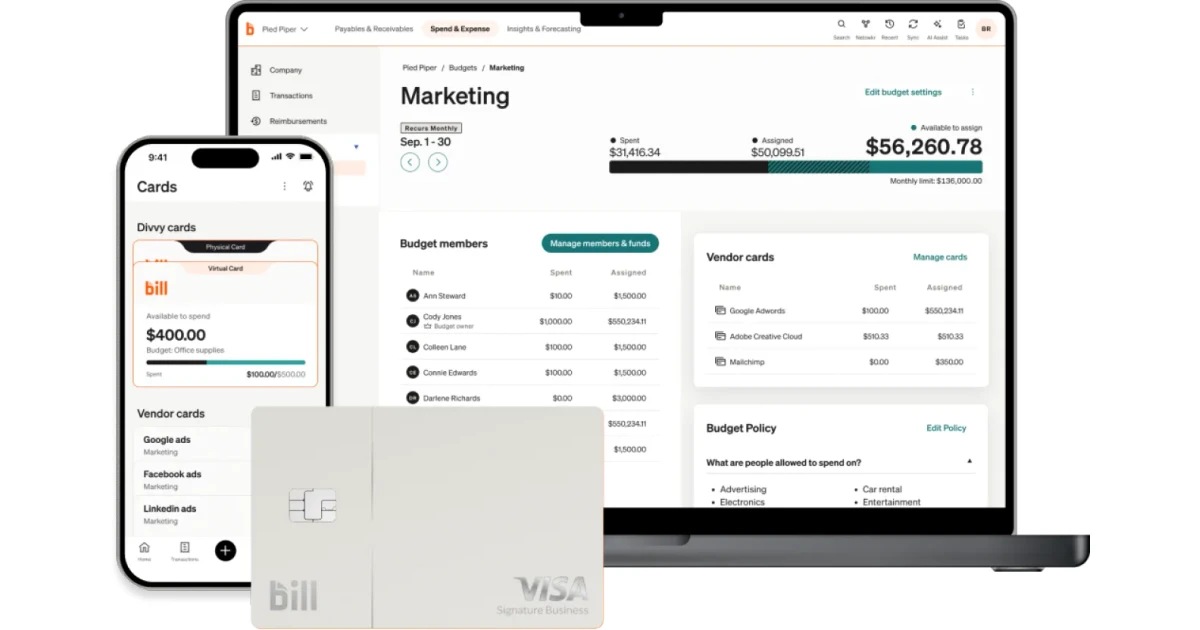
BILL can connect invoice capture, vendor and customer records, approval routing, payments, receivables, and accounting sync. That breadth makes implementation an operating-model project rather than a collection of toggles. A CPA firm may enter bills for several clients while each client retains approval or payment authority. An internal finance team may own vendor records but require department managers to approve. The design must state who performs each action, which product is the record of authority, what evidence proves completion, and which exceptions stop processing.
Current BILL materials use the product names BILL Accounts Payable and BILL Accounts Receivable. BILL also documents a centralized inbox, predefined and custom roles, approval policies, multiple payment funding and delivery options, and two-way sync for supported accounting platforms. Availability can depend on the plan, accounting system, entity configuration, or transaction. Verify the live account and current BILL documentation instead of copying settings from another client or an old implementation checklist.
This guide focuses on AP/AR software administration and rollout. It does not replace treasury authorization, accounting policy, fraud review, tax advice, or a bank’s controls. The safest implementation begins with approved process decisions, proves the smallest representative transaction set, and expands only when BILL, the accounting ledger, the bank, and the supporting documents tell the same story.
Our in-house team delivers BILL deployment and configuration for businesses around Lawrenceville, Suwanee, Gwinnett County, Metro Atlanta, and the rest of Georgia, while coordinating the applications, identities, devices, data, security controls, and employees affected by the work.
Key decisions at a glance
- Treat BILL Accounts Payable, BILL Accounts Receivable, and the accounting platform as one operating design with named ownership at every handoff.
- Clean vendors, customers, chart fields, payment terms, and invoice intake rules before automation magnifies duplicates or ambiguous records.
- Separate bill entry, approval, and payment duties while testing the effective permissions of each BILL role with representative transactions.
- Distinguish the funding source from the vendor delivery method and verify bank, card, ACH, check, and virtual-card decisions under current account eligibility.
- Use a limited pilot with measurable acceptance criteria, controlled cutover, a rollback path, and daily reconciliation before scaling to all entities or clients.
Define the BILL operating model and system-of-record boundaries

Start with transaction lifecycles, not screens. For payables, map invoice receipt, document review, vendor validation, coding, approval, payment scheduling, funding, delivery, accounting sync, clearing, and reconciliation. For receivables, map customer creation, invoice origination, delivery, payment choice, receipt, deposit, application, sync, and exception handling. Identify where BILL is authoritative, where QuickBooks Online, Xero, or another ledger is authoritative, and which changes are allowed to travel in each direction. A single named owner should resolve conflicts in each master or transaction domain.
Decide the participation model for every entity or client. A CPA firm might process inbox documents and coding while a client approver and payer retain authorization. A small business may keep vendor setup with finance, route department-coded bills to managers, and reserve bank funding changes for two administrators. Document substitutes for absence, but do not create a standing shared account. Include the accountant, clerk, approver, payer, administrator, auditor, and custom-role responsibilities that apply to the actual BILL plan and workflow.
Confirm product and integration scope before configuration. Determine whether AP, AR, or both are in use, whether the account connects to QuickBooks Online, Xero, or another supported platform, which entities and bank accounts are included, and which fields must synchronize. BILL describes automatic two-way sync for several leading accounting systems, but feature details vary. Record the verified product, subscription, connection, entity, base currency, chart structure, dimensions, and payment eligibility as dated implementation evidence.
- Create an AP and AR responsibility matrix covering entry, edit, approve, pay, void, sync, reconcile, user administration, and bank administration.
- Name the authoritative system for vendors, customers, accounts, classes or departments, invoices, bills, payments, credits, and attachments.
- Document the exact BILL product, plan, entity, accounting connection, and enabled features rather than assuming another account behaves identically.
- Define stop conditions for duplicate masters, unbalanced mappings, unverified funding accounts, missing approvers, and unexplained sync differences.
Prepare vendors, customers, inbox intake, roles, and payment methods

Clean master data before the first broad import or sync. Normalize legal and display names, tax and remittance contacts, payment terms, duplicate-detection rules, active status, default coding, and ownership for vendors. Apply similar discipline to customers, invoice delivery contacts, payment preferences, and credit or collection responsibilities. Preserve the accounting platform’s identifiers where the integration uses them. A near-duplicate vendor can split history, create a fraudulent change opportunity, or cause payments and credits to land on different records.
Design BILL Inbox handling as a controlled queue. Publish the dedicated intake address only to approved senders, distinguish invoices from statements and supporting documents, and assign responsibility for documents that cannot be matched. BILL’s clerk guidance describes emailed, mobile, and manual uploads and allows inbox items to become bills, vendor credits, received payments, or documents. Require staff to validate vendor, invoice number, dates, amount, coding, attachments, and possible duplicates before saving or routing a transaction.
Configure people and money only after those workflows are approved. Create individual BILL users, assign the narrowest role that completes tested duties, and verify denied actions as well as allowed actions. For payments, distinguish the organization’s funding account or card from the vendor’s disbursement method. BILL documents bank, credit-card, and debit-card funding and vendor delivery options that can include ACH, check, or virtual card depending on eligibility. Record who can add, verify, select, or change each method.
- Deduplicate vendor and customer records using legal name, tax or network identity, remittance data, accounting ID, and business-owner confirmation.
- Create an inbox disposition guide for invoices, statements, credits, receipts, contracts, duplicates, unreadable files, and unrelated documents.
- Test every BILL role with representative positive and negative actions, including vendor edits, coding, approval, payment, export, sync, and user administration.
- Maintain a payment-method register listing the funding owner, verification status, eligible uses, limits, expected delivery method, and emergency disable procedure.
Build approval and payment policy that survives real exceptions

Translate the written authorization policy into BILL rules and approvers. Use criteria that the business can maintain, such as amount, vendor, department, location, general-ledger account, or other available dimensions. Define whether named approvers, approval groups, sequential steps, or a combination is appropriate. BILL states that policy edits are not retroactive to previously created bills or vendor credits, so the change procedure must address in-flight transactions rather than assuming a new rule silently repairs them.
Approval does not equal payment authority. Decide who may schedule, fund, cancel, or void payments and which thresholds require another person. BILL’s current controls describe separation of duties, custom roles, enhanced approval policies, and Dual Control where available. Do not grant administrator access simply to bypass a routing problem. Test high-value invoices, new vendors, bank changes, credits, partial payments, rejected bills, urgent payments, recurring obligations, and an approver who is unavailable.
Create evidence that can be reviewed without reconstructing the implementation from memory. For each test, retain the source document, master record, coding, policy match, approver sequence, comments, payment option, funding source, delivery status, accounting result, and reconciliation. Compare what the policy intended with what BILL actually enforced. If a user can enter, approve, and pay the same bill contrary to the control design, correct the effective role and policy before adding volume.
- Build a policy test matrix around amount bands, vendors, departments, accounts, approver groups, sequential routing, and current feature eligibility.
- Inspect bills created before and after a policy change because BILL documents that approval-policy changes do not apply retroactively.
- Exercise denied, edited, reassigned, partially approved, urgent, credit, duplicate, and out-of-office scenarios in addition to the happy path.
- Require explicit ownership for payment scheduling, funding selection, vendor delivery changes, cancellations, voids, and reconciliation follow-up.
Pilot, cut over, and operate BILL with controlled expansion
Choose a pilot that is small enough to observe but varied enough to reveal control gaps. Include several vendors and customers, recurring and one-time documents, multiple amount bands, more than one approver, a credit, a rejected item, a payment by each approved method, and an accounting sync. Avoid making the first live transaction a high-value or time-critical payment. Record baseline cycle time, duplicate rate, coding corrections, approval exceptions, sync errors, payment status, and reconciliation differences.
Define acceptance gates before cutover. Users must complete role testing and 2FA or MFA setup, funding accounts must be verified, the inbox queue must have an owner, approval policies must match the signed authorization matrix, and the accounting connection must reconcile the pilot. Prepare the cutover inventory, final master-data refresh, transaction freeze window, open-item migration rule, vendor and customer communication, support roster, escalation path, and rollback decision. Do not operate parallel payment authority without an explicit duplicate-payment control.
Stabilize production through short feedback cycles. Review inbox aging, unassigned approvals, payment holds, rejected or returned payments, sync exceptions, duplicates, user changes, and clearing balances daily during the first weeks. Change one controlled configuration item at a time and keep evidence of the before state, approval, result, and rollback. Expand to another client, entity, department, or payment method only after the current scope meets its acceptance thresholds for an agreed period.
- Select pilot transactions that cover AP, AR, credits, approvals, payments, sync, and exceptions without risking payroll, tax, or critical suppliers.
- Set numeric acceptance thresholds for inbox aging, approval time, duplicate rate, sync errors, unresolved payment status, and reconciliation variance.
- Use a cutover checklist with owners, timestamps, frozen activities, open-item treatment, communication, rollback criteria, and post-cutover verification.
- Hold a stabilization review after each production cycle and defer expansion while unexplained accounting or payment differences remain.
Official product documentation and ALLMSP resources
- BILL Accounts Payable
- BILL Accounts Receivable
- BILL invoice automation
- BILL payment approvals
- BILL Accounts Payable controls
- BILL AP setup: clerk role
- BILL AP setup: approver role
- BILL developer documentation: bills
- BILL developer documentation: bill approvals
- BILL developer documentation: payment funding methods
- BILL developer documentation: vendor payment options
- ALLMSP Bill Com Software Support category
- ALLMSP Software Support services
- ALLMSP Software Support articles
- ALLMSP CPA and Financial Firms IT
- Contact ALLMSP
Frequently Asked Questions
Should BILL or the accounting platform own vendor and customer master data?
Choose one authoritative system for each master domain and document which fields can update in each direction. The answer can differ by integration and entity, but unmanaged edits in both systems invite duplicates, overwritten values, and uncertain responsibility.
What should a BILL Inbox procedure require before saving a bill?
Verify the sender or source, vendor, invoice number, invoice and due dates, amount, coding, attachments, possible duplicates, and approver assignment. Statements, credits, receipts, contracts, and unreadable files need separate disposition rules rather than being forced into a bill.
How should vendors be prepared before a BILL rollout?
Normalize legal and display names, tax and remittance contacts, payment terms, accounting identifiers, active status, default coding, and duplicate rules. Assign a business owner who can independently validate changes to payment instructions or contact information.
Are a BILL payment funding method and vendor delivery method the same?
No. A funding method is how the payer funds the transaction, such as an eligible bank account or card. The vendor delivery method describes how the vendor receives value, which may include ACH, check, or virtual card depending on eligibility and configuration.
Do BILL approval-policy changes update existing bills automatically?
BILL states that editing or deleting an approval policy applies to future bills or vendor credits rather than retroactively changing existing items. Review in-flight documents and deliberately edit, recreate, reassign, or otherwise resolve them under an approved procedure.
What belongs in a BILL implementation pilot?
Include multiple vendors and customers, different amounts and approvers, a credit, a denied item, approved payment methods, AP and AR examples, an accounting sync, and at least one exception. Avoid using a critical or unusually large payment as the first live test.
How many BILL roles should a small finance team use?
Use the smallest set that preserves required separation of duties and lets people complete tested work. Role count is less important than effective permissions, an administrator assigned for convenience can erase the intended distinction between entry, approval, payment, and administration.
Should a CPA firm use the same BILL configuration for every client?
No. Reuse a documented design method, but validate each client’s entities, accounting platform, authorization policy, banks, payment methods, dimensions, approvers, service model, and risk tolerance. Template values should never silently become production authority.
What evidence proves a BILL rollout is ready for production?
Retain successful and denied role tests, policy matches, approvals, payment statuses, accounting entries, reconciliations, inbox ownership, verified funding accounts, open-item treatment, user training, exception handling, escalation contacts, acceptance approval, and rollback criteria.
How long should a BILL implementation remain in stabilization?
Use measurable exit criteria instead of an arbitrary number of days. Continue heightened review until invoice intake, approvals, payment status, sync results, duplicates, and clearing balances stay within agreed thresholds across enough normal cycles to represent the operating pattern.


