





























































































































































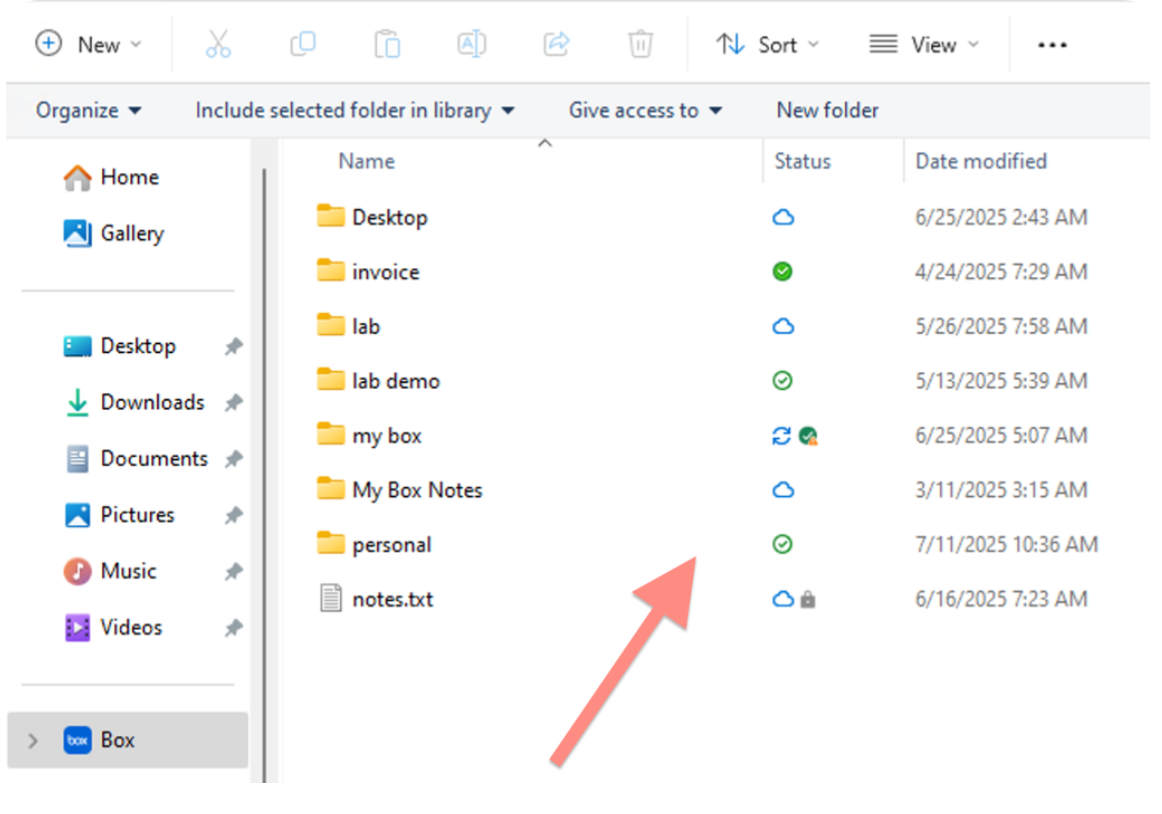
Box’s native Windows architecture example, introduced with Box Drive 2.47, shows different Status indicators in File Explorer. Check the specific file and any problem item before disconnecting; a folder’s status alone does not establish that every required file is ready offline. The red arrow is part of Box’s original image.[1] View full-size product image
A name in File Explorer does not establish that the file’s contents are available without a network connection. For Box Drive on Windows, first identify the installed architecture and whether the failure is downloading, opening a local copy or uploading a saved change. Preserve local work before logging out, removing a folder or reinstalling anything.
Compare the web copy with one controlled local file
Use the same Box identity to locate the exact item in the web app. Record its folder, owner and latest saved version, then compare that with the local path and installed Drive version. If the account cannot reach the web copy, solve access first. If the web copy is correct, investigate the device’s download or upload state instead of changing sharing.
Choose one harmless ordinary document. On the newer Windows client, use Always keep on this device and inspect its actual download state. A pinned folder can still contain items that failed to download.[1]
| Observed state | Next check | What remains unproven |
|---|---|---|
| Item is visible but online-only | Download the permitted test item while connected | Offline opening is not established by its filename |
| Pinned folder includes a problem indicator | Read the affected item’s actual error and download rights | The rest of the folder being present does not prove completeness |
| Local edit remains pending | Close the editing application and compare the web version | A locally saved file is not proof of a completed cloud upload |
| Web item works but local operation is denied | Effective download/edit permission and any lock | Restarting the computer cannot grant an absent permission |
| Downloads stop as space runs low | Free local storage and the remaining required download | Cloud quota and free device space are separate checks |
Resolve the specific problem item
A permission error should go to the file or folder owner with the precise failed operation. Download rights matter for offline work; viewing an online preview is a different capability. If permission changed while an employee was editing, preserve their local work in an approved safe location before reconciling the copy with the owner.[3]
For a space failure, inspect which required files did not download and free space deliberately. Making suitable content online-only can reduce local storage use, but do not delete a cloud item merely to reclaim a device cache. The older offline-storage guide describes its own problem-item and retry controls; use the controls actually present in the installed client.[1][4]
File-management errors can also identify an item deleted on Box, an application keeping a file open or a folder operation that cannot complete. Keep the file’s owner and current web state in view. A local copy recovered for review should have a clear name and controlled destination so it does not silently overwrite someone else’s newer work.[5]
Protect edits before any logout or reset
Box’s general offline documentation warns that logging out removes locally downloaded offline content and clears offline selections. Treat logout as a disruptive step after outstanding work is accounted for, not the first troubleshooting action. Write down any local-only changes and confirm they have reached the correct web item or an approved preserved copy.[2]
In the newer Windows architecture, the synced state follows closing the editing application’s file. Save, close and verify the actual web copy rather than treating an open local document as an uploaded result.[1]
Prove both directions with a small test
This illustrative test uses a disposable document, not a production file or a reported client result. Choose a permitted brief network-disconnection window and keep business applications that require connectivity out of the experiment.
| Step | Test evidence to collect | Pass condition |
|---|---|---|
| Prepare while connected | Correct account, client version, selected file and actual downloaded/pinned state | The required content finishes downloading without a problem item |
| Open without connectivity | The controlled test document opens from the local path | Offline availability is demonstrated for this item and device |
| Save a small test revision | A harmless unique sentence, saved and closed locally | The local result is preserved; cloud upload is still pending until reconnect |
| Reconnect and verify | The same web item/version shows the test sentence after upload | The intended cloud copy matches; no unresolved competing edit remains |
| Review the real working set | Each required item and actual supported file type | The single test does not certify every folder or online-only document type |
Keep cloud-native documents and unsupported file workflows separate from ordinary downloadable files. Box’s general documentation specifically treats Google web documents and Box Notes as online-only for offline use. Avoid promising that an entire project can work disconnected because one PDF opened successfully.[2]
For a recipient who cannot open the web item, use Box link and account checks. If ownership changed during a departure, use the Box offboarding transfer guide. A separate Dropbox device should follow the Dropbox web-copy and sync-state guide; its client controls are not Box commands.
Frequently asked questions
Does seeing a file in Box Drive mean it is available offline?
No. A visible filename can represent online-only content. Confirm the actual downloaded or pinned state, then open a permitted test file without connectivity before relying on it away from the network.
[1]Can I mark a single file offline in Box Drive on Windows?
The native Windows architecture introduced in version 2.47 documents offline selection for individual files and folders. Older folder-only instructions should not be treated as the rule for that architecture.
[1]Why is a pinned folder still incomplete?
Does Box web preview access guarantee an offline download?
No. An account can be allowed to preview content without having the rights required to download it. Give the owner the exact item and failed action; a client restart does not change that permission.
[3]Why does a saved edit still look unsynced?
In the newer Windows architecture, Box documents that the synced state follows closing the file in its editing application. Save, close and verify the intended web copy; local Save alone is not proof of the cloud result.
[1]Should I log out of Box Drive to fix a stuck download?
First protect unsynced work and record required offline selections. Box’s general offline guide warns that logout removes downloaded offline content and clears those selections, so it can create additional recovery work.
[2]Is local disk space the same as the Box owner’s quota?
No. A device needs room for its downloaded working set, while the owner’s account has its own storage limits. Read the actual error and identify which boundary is full before deleting or moving content.
[4]Can Box Notes or Google documents work offline through Box Drive?
Box’s general offline guide identifies Box Notes and Google web documents as online-only formats. Test the actual document type and its supported workflow instead of promising offline access for every item in a folder.
[2]What should I preserve when the cloud file was deleted while I edited it?
Keep the local work in an approved controlled copy and compare it with the owner’s current item state. Do not recreate or overwrite production content automatically; resolve the deletion and competing changes deliberately.
[5]When is the offline/sync issue actually closed?
The required item opens on that device without connectivity, and a harmless saved-and-closed revision reaches the correct web item after reconnection. Document remaining problem items and test the full required working set separately.
Sources
- Box: New Box Drive for Windows — native architecture from version 2.47 ↩
- Box: Making Content Available Offline — general and legacy behavior ↩
- Box: Drive problem items caused by user permissions ↩
- Box: Managing hard drive space for offline content ↩
- Box: Drive problem items caused by file management errors ↩


