





























































































































































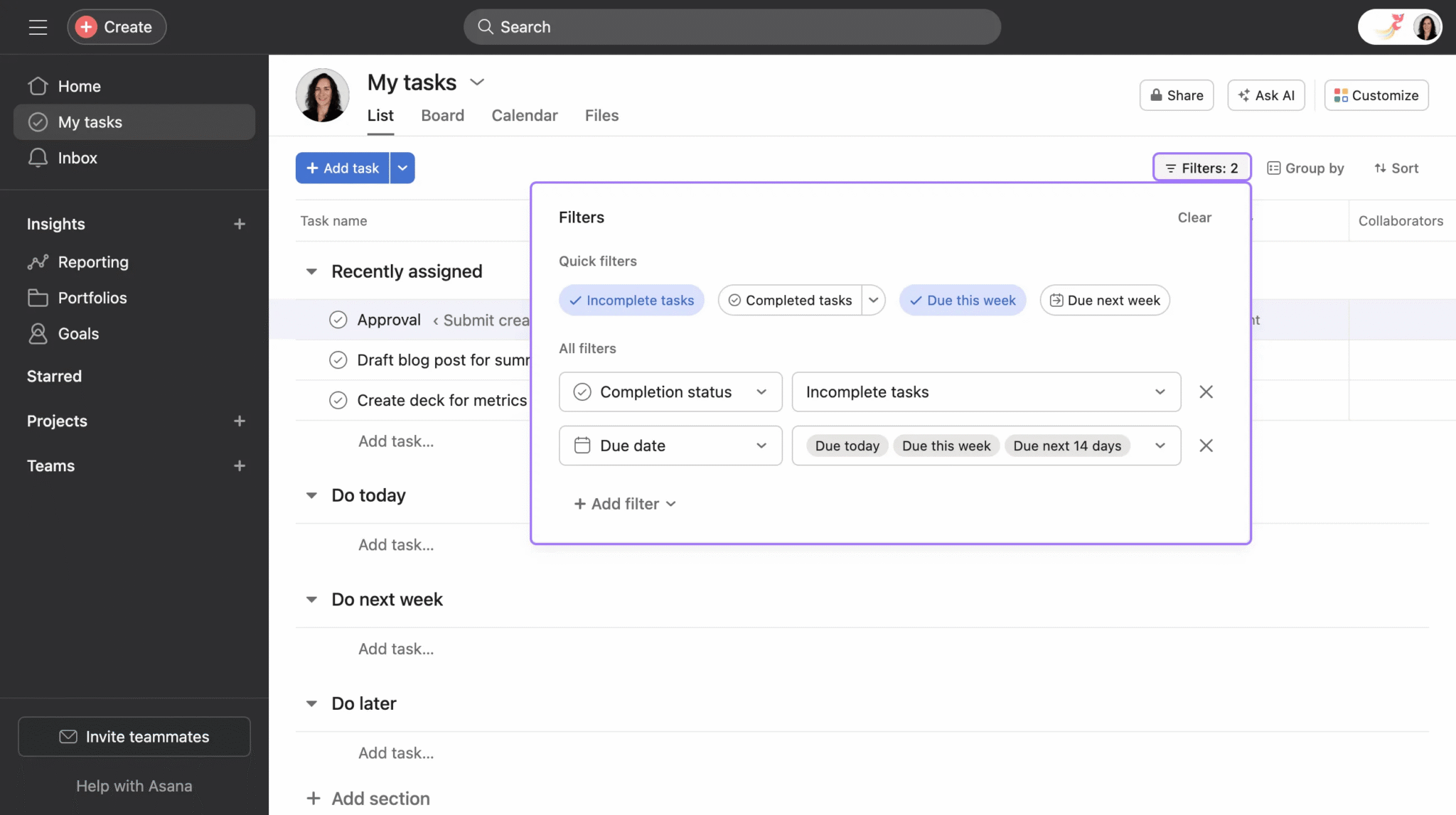
Asana’s published My Tasks example has completion and due-date filters active. Check these filters and the actual assignee before treating an absent task as deleted; this example view does not establish missing work in your account.[1] View full-size product image
A task absent from an Asana view is not necessarily deleted. Check the original task link before creating a replacement. Recreating work too early can split comments, ownership and deadlines between two tasks while leaving the original problem unresolved.
Start with one known task, not an empty screen
Obtain the last known task URL from a legitimate project conversation or your own records. Record its name, expected assignee, project and approximate last-seen time. Ask an authorized colleague whether that same URL opens; a similarly named task is not the same test.
My Tasks gathers work assigned to you. A task can remain in a project without belonging in your My Tasks. Its filters are saved, so a completion or due-date selection can continue hiding otherwise accessible work.[1]
| Observation | Read-only check | Next decision |
|---|---|---|
| Direct task URL opens, but My Tasks is empty | Assignee and active filters | Restore the intended view, not a duplicate task |
| The project opens, but a section appears empty | Completion filter and collapsed section | Expand or widen the view before recreating anything |
| A colleague opens the URL, but you cannot | Account and object access | Ask the owner to review the legitimate access boundary |
| Neither person finds the original task | Exact link, search scope and deletion evidence | Investigate authorized recovery without promising restoration |
Check filters, sections and search scope
In the relevant view, inspect completion status and due-date filters, then expand the expected section. Change one view control at a time and note which change reveals the task. A task hidden by a filter should not be reassigned, reopened or moved just to make it appear.
Use basic search for a distinctive task phrase. A wider full-text search and, where your plan includes it, Advanced search can narrow by relevant criteria. Search results respect permissions, so two colleagues can legitimately see different results.[2]
If the exact task opens from a link but search still misses it, retain that distinction in the support handoff. Check the selected organization or workspace and simplify the query before changing permissions. Avoid using a broad search screenshot as evidence that a specific task was deleted.
Check access without broadening the project
A task can be private or inherit access from a project. Multi-homed tasks can receive a higher access level through another project. Have an authorized owner review its actual project and collaborator context; moving the task to a broader project changes who can see it.[4]
A useful diagnosis states exactly where the task can and cannot be seen: “opens by URL, missing from My Tasks” is much more actionable than “Asana lost the task.” Keep the original URL in the handoff so later checks use the same object.
Use deleted-item recovery only when the evidence points there
Asana’s Deleted view can recover eligible tasks, messages and projects within 30 days. Only the item’s creator or deletor can see and act on it there. Permanently deleted items, and items outside that window, cannot be recovered through this path; support cannot undo permanent deletion.[3]
Do not press Permanently delete while investigating. If an eligible creator or deletor finds the item and recovery is authorized, use Undelete and retest the original task. If no eligible person can find it, collect the URL and deletion context for support rather than promising that an administrator or an upgrade can restore it.
Reconcile the handoff after the task is found
The following is a worked diagnostic example. A review task appears absent from a coordinator’s My Tasks. The point is to identify its state before making any content change.
| Check | Possible observed result | Correct interpretation |
|---|---|---|
| Open the known task URL | The original task opens | The task still exists for this account |
| Read the assignee | A colleague is assigned | It need not appear in this coordinator’s My Tasks |
| Inspect the project view | A completed-only or due-date filter is active | The current view excludes otherwise accessible work |
| Retest the intended view | The original task is visible with its history | No replacement task was necessary |
Close the case with the original URL, the explanation, and the intended assignee, deadline and project confirmed by the owner. If an accidental duplicate was already created, ask the owner to decide how to reconcile it; do not delete either task before the discussion and attachments are accounted for.
Choose the next task
For a task that cannot be opened because of access, use the Asana project-access guide. For accessible work with a missing alert, use the Inbox, email and notification guide.
Frequently asked questions
Does an empty Asana My Tasks mean my tasks were deleted?
No. Check assignment, saved filters and the original task link before drawing that conclusion.
[1]Why is a project task absent from my My Tasks?
My Tasks collects tasks assigned to you. Check the task’s actual assignee rather than assuming project membership assigns every task.
[1]Can completed tasks disappear from a filtered view?
Yes. Check completion filters and collapsed sections before considering recovery or recreating the task.
[3]Can my colleague see a task that search does not show me?
Yes. Search respects access. Compare the same task URL and the intended account rather than copying a colleague’s broader permissions.
[2]Is Advanced search available on every Asana plan?
No. The documented feature is on Starter and higher supported paid tiers, including named legacy tiers. Begin with basic search and the direct task link.
[2]Does adding a task to another project leave privacy unchanged?
Not necessarily. Review the destination’s access because project membership can change who sees the task.
[4]How long can an eligible deleted Asana task be recovered?
Up to 30 days through the documented Deleted view, unless it was permanently deleted. Verify the item and authorize the recovery first.
[3]Can any project administrator recover another person’s deleted task?
Do not assume so. Asana limits the Deleted view’s visibility and actions to the item’s creator and deletor.
[3]Can support recover a permanently deleted task?
No. The documented permanent-deletion path cannot be undone by Asana support.
[3]What information makes a missing-task support request useful?
Include the exact URL, task name, expected assignee, project, last-seen time, current view filters and which authorized account can still open it. Describe observations, not an assumed deletion.


