





























































































































































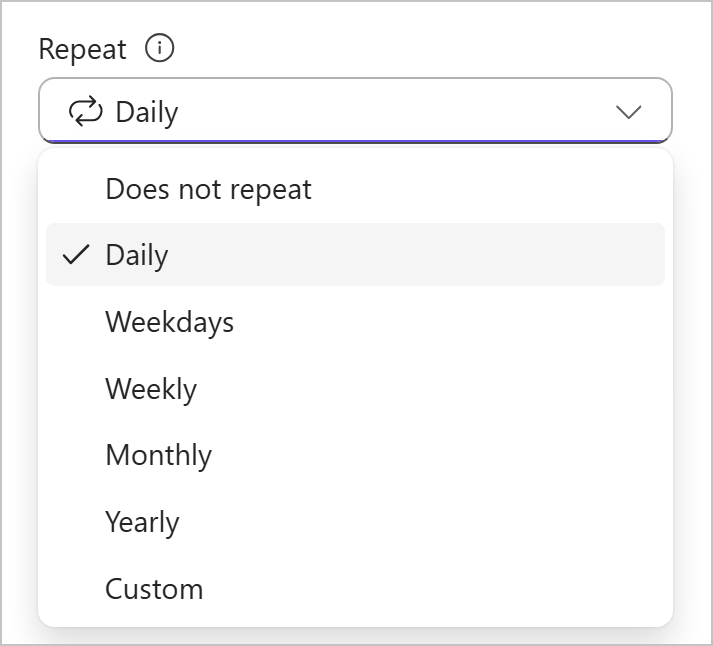
Microsoft’s published Repeat menu has Daily selected. It does not show a saved series, completed work or a generated next occurrence. This guide covers Basic recurring tasks; confirm the actual plan type, due date and completion state.[1] View full-size product image
If next week’s recurring Planner task is not on the board, first check whether this week’s work is still open. Do not make several replacement tasks or tick an unfinished operational check complete merely to generate another one. The task record should describe real work, not a dashboard repair.
This guide covers Planner’s Basic recurring-task workflow. Confirm the plan type before looking for Repeat. Microsoft currently lists recurring tasks under Basic-only features; a Premium plan is not a guarantee that this control exists.
[2]Check the current occurrence before the future calendar
Planner displays the current occurrence and creates the next when that occurrence is completed. Open the task and inspect its due date and Repeat pattern. Removing the due date stops the series. The current help page separates the newer workflow from instructions for the older and government-cloud experience; follow the section that matches your environment.
[1]Record the current task link, owner, planned due date and selected pattern before changing anything. Read the previous completion evidence if the task performs a real business control. If you cannot establish whether the work happened, leave that uncertainty visible and ask its owner rather than fabricating a completion.
Separate three different kinds of “missing”
| Symptom | First check | Avoid |
|---|---|---|
| No later occurrence while the current task is open | Confirm whether the current work is actually finished | Creating several look-alike copies |
| Repeat is absent after editing dates | Inspect the due date and series settings | Removing the date to hide overdue work |
| A later date differs from the expected cycle | Compare the original pattern and the edited due date | Assuming a date edit creates every skipped occurrence |
| Repeat control cannot be found | Confirm Basic/Premium and the actual UI edition | Treating an older screenshot as a universal menu map |
Make an intentional date correction
Start and due dates are task fields, not just board decoration. Check both in the task details and record the intended deadline before saving a correction.
[3]In a recurring series, changing a due date does not replace the original pattern with a new one. Microsoft says earlier planned occurrences before the changed date are not created. Keep a separate record of overdue or missed work instead of expecting recurrence to reconstruct its history.
[1]If the new time controls have reached your Basic plan, compare the plan time zone with your local display. Switching the view is different from changing the shared plan time zone. The latter can change the underlying deadline; do not use it as a personal display fix. These controls are rolling out gradually.
[4]Prove one controlled cycle
Use an owner-approved, non-production test task rather than a live safety, backup or compliance check. Give it a unique name and record the starting fields. Complete only the test work, then inspect the successor’s link, date and owner. Keep the proposed checks below as an acceptance log, not as a claim that your tenant has already passed.
| Stage | Evidence to compare | Reason to stop |
|---|---|---|
| Before completion | Task link, due date, Repeat value and owner | The current occurrence or intended pattern is uncertain |
| After the test work is complete | A successor appears with the intended next date | No successor or an unexpected date appears |
| View reconciliation | The same successor is located in the plan and appropriate personal view | Only an unrelated duplicate is found |
| Operational handoff | Owner accepts the next deadline and missing-history treatment | The team needs each missed interval recorded independently |
For example, a proposed weekly equipment-log check needs one accountable owner and evidence that the work happened. If several weekly checks were missed, creating a later occurrence does not document those missed checks. Decide how to record the exception and any corrective action before closing the current item.
If the requirement is to create a separately tracked obligation at every clock interval regardless of completion, assess that workflow explicitly. Map the trigger, owner and exception handling; do not assume that a completion-driven recurrence meets it or that an untested connector solves it.
Continue with the related issue
If the next task exists but a person cannot find it, check source-plan and personal-view visibility. If you are reusing an entire project rather than one repeated obligation, validate a plan duplicate and its handoff.
Frequently asked questions
Why can I see only one occurrence of a recurring task?
Planner shows the current occurrence. The successor is created after that occurrence is completed.
[1]Should I mark unfinished work complete to generate the next task?
No. Record the real state and have the owner decide how to handle missed work. Use a separate harmless task to test recurrence.
Is this recurring-task feature available in Premium plans?
Microsoft’s current comparison lists it as Basic-only. Check the plan type instead of assuming Premium includes every Basic capability.
[2]Why did Repeat disappear after I removed a due date?
Removing the due date discontinues the recurring series. Check the intended schedule before restoring or replacing it.
[1]Will changing the due date create all the occurrences I missed?
No. Microsoft says planned occurrences before the changed date are not created. Document missed work separately.
[1]Can I choose a weekly or custom interval?
Yes. The documented Repeat menu includes preset intervals and Custom. Confirm the selected pattern on the current task.
[1]Does switching between local time and plan time reschedule the task?
No. That view choice changes display. Changing the shared plan time zone is a different action with scheduling consequences.
[4]Why do I not see the new task-time controls?
Microsoft is rolling them out gradually for Basic plans. Record the actual UI and tenant scope rather than assuming a local fault.
[4]How do I check the successor without confusing it with a manual copy?
Record the original link and give the test a unique name. Compare the next item’s link, due date and owner; a matching title alone is weak evidence.
What should I capture if the next occurrence still does not appear?
Capture plan type, current task link, due date, Repeat setting, actual completion time, the matching UI edition and the observed result. Preserve the task before escalating.


