





























































































































































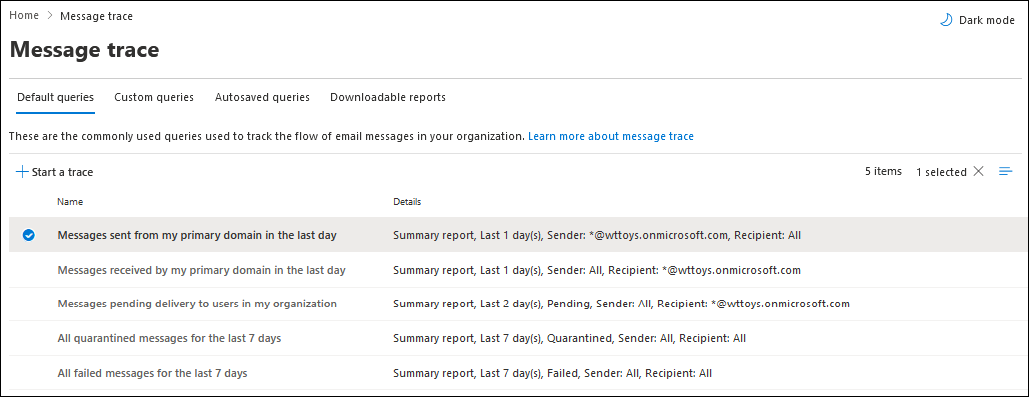
Microsoft’s Message trace example shows saved query scopes for sent, received, pending, quarantined and failed messages. Start a trace with the actual sender, recipient and time window; this query-selection screen is not a delivery result for a particular message.[1] View full-size image
Trace one identifiable message before changing mail settings. Obtain the sender, recipient, send time with time zone, full message ID if available and any nondelivery report. Then determine whether Exchange Online received, rejected, deferred, quarantined or delivered that message. “The sender clicked Send” and “the recipient cannot find it” leave the important part of the journey unanswered.
Choose the direction: inbound, outbound or internal. Check whether one recipient, one external sender, an entire domain or many users are affected. A widespread incident needs service-health and route investigation; one missing message still needs its own evidence.
Run a narrow trace in the current Exchange admin center
Open Mail flow > Message trace in the Exchange admin center. Start with the known sender, recipient and a bounded time window; verify the time-zone selection. Inspect the matching message and its events, rather than treating the first similar subject as the same message.[1]
If there is no match, confirm the actual envelope addresses, alias, time and system that sent the message. Ask the sender’s administrator for its submission or handoff evidence. “No trace result” can mean the query is wrong or the message never reached the service; it does not by itself identify a Microsoft outage.
| Trace result | Next useful check |
|---|---|
| Delivered | Check the intended mailbox, rules, forwarding, folders and client view. Delivery does not prove the user read it. |
| Failed or rejected | Open the detailed event and preserve the exact status code and rejecting system. |
| Pending or deferred | Inspect the current event and routing context; distinguish retries from a final failure. |
| Quarantined | Locate the same item in Defender quarantine and review the policy verdict. |
| Expanded | Follow the group expansion to the actual recipients rather than stopping at the group address. |
Save the query scope and relevant result. A trace result may take time to update, so record when it was observed and revisit the same message after a focused correction. Do not compare two different messages as though they were a single before-and-after test.
Use the nondelivery report to find the rejection owner
Retain the complete nondelivery report, including the enhanced status code, diagnostic information, original recipient and server details. Microsoft’s NDR guidance maps these details to the failing condition.[2]
A recipient-address failure calls for different work from a policy rejection or a remote-server problem. Confirm which system generated the rejection before changing your tenant. If an external destination rejects the message, provide its administrator the exact code and message evidence rather than repeatedly resending a large distribution.
Example: a fictional invoice sender receives an invalid-recipient error for an old alias after a cutover. The relevant question is whether that alias should exist and where the recipient is hosted. A blanket safe-sender entry or a new Outlook profile cannot create the missing recipient.
Check authentication on the actual sending source
SPF, DKIM and DMARC answer related but different questions. Use the complete headers and authentication results for the affected message, identify the actual sending platform, and compare the visible From domain with the authenticated identities. For SPF, compare the envelope MAIL FROM domain; for DKIM, compare the signing d= domain. DMARC checks alignment of a passing authenticated domain with the visible From domain under the configured alignment mode. A pass from an unrelated domain does not establish that alignment.[3]
Keep employee mail, websites, scanners, ticketing services and marketing platforms separate in the evidence. A healthy Microsoft 365 mailbox message does not validate a third-party service sending with the same visible From address. Confirm its current supported configuration and ownership before changing domain-wide policy.
Use a controlled test from the failing source after the correction. Do not weaken DMARC enforcement or add broad filtering bypasses merely to make one message arrive. If a legitimate source is misconfigured, correct that source and verify the resulting headers.
Review quarantine without treating release as a blanket allow
In the Defender portal, open Email & collaboration > Review > Quarantine. Filter for the actual recipient and message evidence, then inspect the reason, policy and expiry. Available user actions depend on the quarantine policy and assigned permissions.[4]
An authorized reviewer should assess the message before release or submission as a false positive. A familiar display name is not proof that the content is safe. Keep the decision narrow: releasing a reviewed message and creating an allow entry are different actions.
After release, verify arrival in the actual mailbox and inspect any subsequent rule or external filtering path. Release re-delivers the message, so Outlook shows the re-delivery timestamp; the original send date remains in its headers. Search using both the message evidence and the appropriate delivery period. A client search in the wrong mailbox can still make a released item appear missing. If the item has expired, use the sender and service evidence to plan a safe resend; quarantine is not an indefinite archive.
Close with a targeted correction and end-to-end receipt
Record the failing stage, supporting evidence, configuration changed and the controlled retest. Verify the destination mailbox or recipient’s receipt, not only the sending application’s success notice. Keep attachments and automated business handoffs in the test when they were part of the failure.
When transport delivery is proven but one client differs, use the Outlook diagnostic guide. When the route or accepted-domain design is wrong, use Exchange mailbox and domain rollout validation. Unexpected forwarding or delegate behavior belongs in the mailbox access review.
For the broader sender design, read Email Security Setup for Mail Flow, DNS Authentication, and Validation. For ALLMSP software support, provide the message identifier, sender/recipient, time zone, NDR and trace evidence without posting the message content publicly.
Frequently asked questions
What do I need before tracing a missing email?
Collect the sender, recipient, send time and time zone, full message ID if available, and any nondelivery report. Establish whether the problem is inbound, outbound or internal.
Where is Exchange Online message trace?
In the Exchange admin center, open Mail flow > Message trace and search a bounded window using the known sender and recipient.
[1]Does Delivered mean the recipient read the message?
No. Investigate the destination mailbox, folders, rules, forwarding and client view when the user still cannot find it.
Does no trace result prove an Exchange outage?
No. Confirm the query, time zone, actual addresses and sender’s handoff evidence. The message might not have reached the service.
What is the useful part of a bounce message?
Preserve the full report, especially its enhanced status code, diagnostic text, recipient and generating server. Those details identify the rejection condition and owner.
[2]Does an SPF pass prove that DMARC passed?
No. Authentication and alignment must be evaluated for the actual message identities. Review the complete results rather than one isolated pass.
[3]Where should an admin inspect quarantined email?
Use Defender > Email & collaboration > Review > Quarantine and filter for the specific recipient and message. Inspect the reason, policy and expiry.
[4]Should a reviewed false positive justify allowing the whole sender domain?
Not automatically. Choose the narrow action supported by the evidence and investigate the underlying cause before creating a broader exception.
Can a released quarantine message still be hard to find?
Yes. Verify its destination receipt and then check mailbox rules, folders, other filtering and the user’s search scope.
What proves the delivery fix worked?
Repeat the failed source-to-recipient path with a controlled message and confirm destination receipt, relevant trace/header results and any required attachment or application handoff.


