






























































































































































A new QuickBooks Online company can look usable minutes after signup, yet a weak starting boundary can surface months later as duplicate income, unexplained Opening Balance Equity, a bank feed mapped to the wrong register, or financial statements built on unsuitable account types. The implementation problem is not how quickly the menus can be completed. It is whether the company settings, chart of accounts, starting date, source records, bank connections, and first reconciliation all describe one defensible accounting history.
Keep this work strictly in QuickBooks Online. A procedure learned in QuickBooks Desktop may use different roles, import tools, file behavior, or bank-feed controls. Current Intuit guidance also changes with the product experience and subscription. Record the QuickBooks Online plan and interface used for every test, verify plan-dependent options in the live company, and have the accountant approve accounting treatment rather than inferring it from a setup screen.
Use this implementation guide with ALLMSP’s [QuickBooks Online support library](https://www.allmsp.com/category/software-support/software-support-quickbooks-online/), [CPA and Financial Firms resources](https://www.allmsp.com/category/cpa-and-financial-firms/), and broader [Software Support guidance](https://www.allmsp.com/category/software-support/). The goal is a controlled company file whose opening balances, transaction population, reports, and bank statements can be traced to approved source evidence.
ALLMSP handles QuickBooks Online migration and data validation to teams near Lawrenceville and Suwanee, elsewhere in Gwinnett County and Metro Atlanta, and throughout Georgia, with planning, configuration, testing, and support completed by the same in-house team.
Key decisions at a glance
- Freeze the fiscal year, accounting method, company identity, tax assumptions, cutover date, reporting dimensions, and close ownership before loading operational data.
- Govern account type, detail type, hierarchy, currency, status, and opening-balance treatment as accounting decisions, do not turn a legacy account list into an unquestioned import file.
- Connect each real bank or credit-card account to the intended QuickBooks Online account and choose a download start date that does not overlap imported or manually entered transactions.
- Release only after representative opening balances, transactions, reports, bank-feed review, reconciliation, role access, evidence retention, and rollback steps pass a documented pilot close.
Freeze Company Settings, Scope, and the Cutover Boundary

Create an implementation register before importing anything. Record the legal and customer-facing company identity, fiscal-year start, accounting method, tax form assumption, home currency, date and number format, customer label, duplicate-number warning, automatic sign-out preference, close owner, bank owners, accountant, subscription, enabled services, integrations, source systems, retention requirements, and the exact cutover date. Store protected references rather than tax IDs, account numbers, payroll details, credentials, or customer records in the register.
Current Intuit guidance places fiscal year, accounting method, closing date, company type, and several formatting or warning preferences in Account and settings. Treat each as a reporting or control decision. Cash versus accrual affects report interpretation, the fiscal-year boundary affects comparative reporting, multicurrency and home-currency decisions can be difficult to unwind, and duplicate-number warnings do not replace a numbering policy. Have the business owner and accountant approve the decisions, with the primary admin responsible for entering and preserving them.
Define what belongs before, on, and after the cutover. Decide whether history will be summarized through opening balances, loaded as transactions, or converted through an approved path. List every source population,accounts, customers, vendors, products and services, open invoices, unpaid bills, fixed assets, loans, payroll balances, sales tax, bank activity, and equity,and name its authoritative source. Do not load a trial balance, open items, and the same historical transactions without an accountant-approved bridge, because that can count balances twice.
- Capture before-and-after settings evidence without exposing company identifiers, tax data, payroll data, or credentials.
- Name one accountable owner for the company file and a second trained administrator for continuity.
- Write the transaction cutoff in calendar terms, including timezone and the treatment of items that clear after cutover.
- Separate accounting decisions from navigation notes so the control survives an Intuit interface update.
- Record which assumptions require accountant approval before any import, journal entry, or opening balance is posted.
Design the Chart of Accounts and Opening-Balance Method Together

Review the chart of accounts as a reporting model, not a file-conversion artifact. For each proposed account, approve the name, account type, detail type, number if used, parent or subaccount relationship, currency, tax relevance, active status, reporting purpose, source-system mapping, and owner. Current Intuit guidance explains that account type controls where an account appears on the financial statements. A familiar legacy label placed under the wrong type can therefore distort balance-sheet or profit-and-loss presentation even when the imported amount is correct.
Clean the import before loading it. Remove exact duplicates, resolve near-duplicate names, retire unused accounts according to policy, normalize hierarchy, and identify system-created or integration-required accounts. Current Intuit guidance supports importing lists and specifies a list-first order, beginning with the chart of accounts before customers, vendors, employees, classes, locations, products, and services. It also warns that some imports cannot be undone in bulk. Test a small representative file, preserve the source and mapping, review the import screen, and reconcile the resulting record count.
Choose an opening-balance method for every balance-sheet account. Current Intuit guidance defines an opening balance as the real-world balance on the date tracking begins and uses Opening Balance Equity to offset entries. Connected bank and credit-card accounts may derive their starting point from the chosen download date, manually created balance-sheet accounts can accept an amount and As of date, imported chart accounts require their balances separately. If older transactions are later added without adjusting the opening balance, the same money may be counted twice, so involve the accountant before changing that history.
- Reconcile the imported account count, hierarchy, types, inactive state, and currency to the approved mapping workbook.
- Use statements, loan schedules, fixed-asset records, subledgers, and an approved trial balance as evidence for starting values.
- Track unresolved opening balances by account, amount class, owner, evidence, and disposition instead of forcing suspense items closed.
- Do not use Opening Balance Equity as a permanent unexplained bucket, require an accountant-reviewed clearing plan.
- Block duplicate customer, vendor, product, and account records before transactions depend on the wrong master record.
Connect Banks Without Overlapping the Accounting History
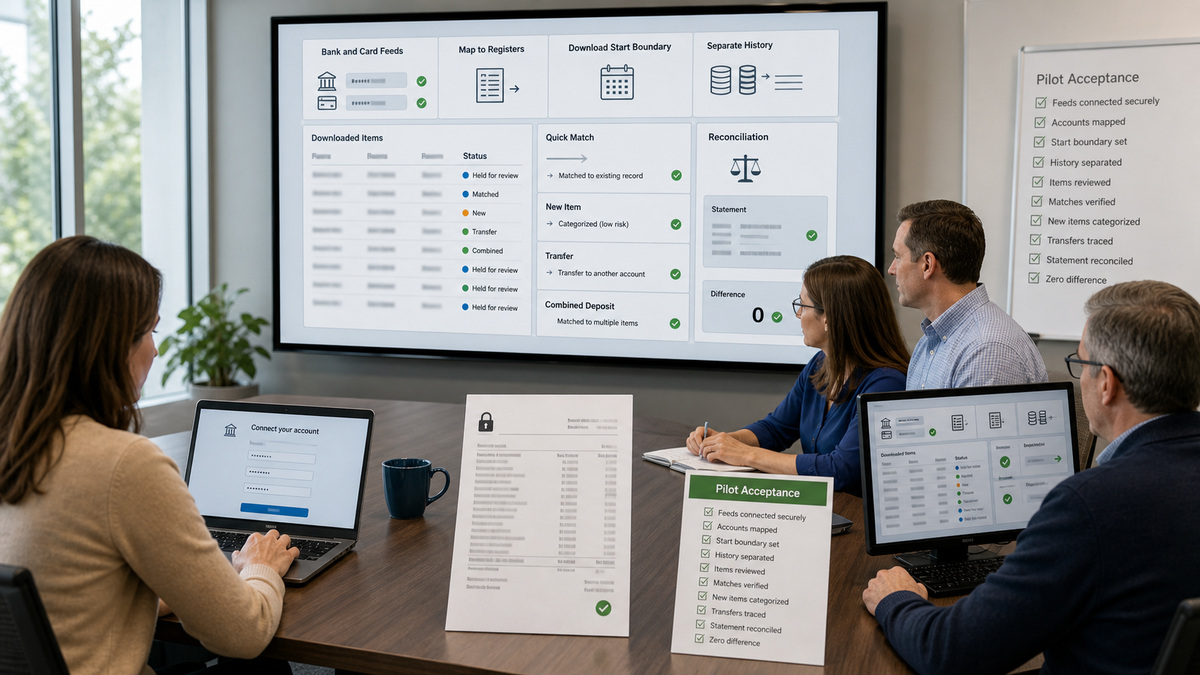
Prepare a bank-connection matrix before anyone signs in to a financial institution. For each checking, savings, credit-card, or other supported account, record the masked bank identity, intended QuickBooks Online account, business owner, connector, start date, statement cycle, opening-balance method, known pending items, and review owner. Current Intuit guidance states that accountants cannot connect a client’s bank for them, the client must perform the connection. Never ask the client to send banking credentials or verification codes to an implementation technician.
Select the feed start date against the cutover ledger, not by choosing the largest history window available. Banks provide different download ranges. If the conversion already contains transactions through a date and the feed starts before it, the Pending or For review queue can include overlapping activity. Preserve the imported or manually entered transaction as the accounting record, then match the downloaded item when appropriate. Categorizing the download as new when the record already exists can duplicate revenue, expense, transfer, payment, or deposit activity.
Run controlled bank-feed tests. Confirm that each bank tile maps to the correct register, that downloaded items remain outside the books until reviewed, that a known existing transaction produces a reasonable match candidate, and that a genuinely new low-risk item can be categorized to the intended account. Test transfers as both sides of one movement, combined deposits against the clearing process, credit-card payments, fees, refunds, and a transaction near the cutoff. Then reconcile the first statement from its opening or beginning balance through a zero difference.
- Use masked account references in tickets and screenshots, and keep statements in the approved evidence repository.
- Prove which date is the last converted transaction and which date is the first bank-feed transaction.
- Review suggested categories and matches, automation is a proposal, not accounting approval.
- Investigate connection errors before disconnecting, because an unsafe reconnect can create duplicate downloads.
- Require a successful statement reconciliation before treating the bank connection as production-ready.
Pilot the First Close and Release With Acceptance Evidence
Use a pilot close that exercises the company file instead of checking only navigation. Trace a representative sale, customer payment, expense, vendor bill, payment, transfer, card purchase, bank fee, deposit, adjustment approved by the accountant, and opening-balance account through their source documents, posting accounts, subledgers, bank-feed treatment, financial statements, and audit trail. Compare trial balance, balance sheet, profit and loss, accounts receivable, accounts payable, and bank reconciliation to the approved cutover package.
Set objective acceptance gates. Required settings must match the register, imports must reconcile to source counts and totals, opening balances must have evidence and approved treatment, bank feeds must map correctly, role access must be tested, integrations must not duplicate records, the first reconciliation must reach the expected difference, reports must agree to the approved bridge, and exceptions must have owners. Preserve the input, mapping, import result, test evidence, approvals, and rollback decision with timestamps and versions.
After release, manage QuickBooks Online as a financial system. Put changes to account type, opening balance, bank mapping, fiscal year, accounting method, integration, or lock date through documented review and testing. Coordinate device and administrator protections through ALLMSP’s [Cybersecurity resources](https://www.allmsp.com/category/cybersecurity/), and [contact ALLMSP](https://www.allmsp.com/contact-us/) when the firm needs controlled migration, access design, bank-feed recovery, or close support. Product support can explain behavior, the accountant and business owner approve accounting treatment.
- Define stop conditions for unexplained balance differences, duplicate populations, wrong bank mapping, or incomplete source evidence.
- Keep a read-only cutover package that lets a reviewer reconstruct the starting books without relying on memory.
- Delay automation rules until the initial transaction paths and reconciliation have been independently reviewed.
- Train users on the approved workflow and support route with synthetic examples that contain no real financial data.
- Schedule an early post-release review before volume, integrations, and prior-period locks make correction more complex.
Official product documentation and ALLMSP resources
- Intuit: Set up advanced account settings in QuickBooks Online
- Intuit: Add an account to your chart of accounts in QuickBooks Online
- Intuit: Enter and manage opening balances in QuickBooks Online
- Intuit: Connect bank and credit card accounts to QuickBooks Online
- Intuit: Common questions about importing data to QuickBooks Online
- Intuit: Reconcile an account in QuickBooks Online
- Intuit: Categorize online bank transactions in QuickBooks Online
- Intuit: Lock your books in QuickBooks Online
- ALLMSP: QuickBooks Online Software Support
- ALLMSP: CPA and Financial Firms
- ALLMSP: Software Support
- ALLMSP: Cybersecurity
- ALLMSP: Contact Us
Frequently Asked Questions
What should be decided before creating a QuickBooks Online company?
Approve the company identity, subscription, fiscal year, accounting method, tax assumptions, home currency, cutover date, reporting dimensions, bank and integration scope, source populations, close owner, primary admin, and accountant. Record those decisions before loading data so configuration and accounting history are not improvised during import.
Should a legacy chart of accounts be imported unchanged?
No. Review every account’s name, type, detail type, number, hierarchy, currency, active state, reporting purpose, and mapping. Remove duplicates and resolve obsolete accounts before import. Because account type affects financial-statement presentation, the accountant should approve the target design rather than accepting legacy labels as sufficient evidence.
Does importing a chart of accounts also import opening balances?
Do not assume it does. Current Intuit guidance explains that imported chart accounts need their opening balances entered separately. Define the method by account, preserve the source statement or schedule, reconcile the resulting entry, and have an accountant review any later attempt to add history before the chosen start date.
How should the QuickBooks Online cutover date be selected?
Choose a date supported by complete source records, preferably aligned to a statement or reporting boundary. State the last date included in the prior system and the first date entered or downloaded in QuickBooks Online. Document timezone, outstanding items, late-clearing transactions, and the bridge between the closing and opening balances.
Who should connect a bank account to QuickBooks Online?
The authorized business user should complete the financial-institution sign-in and its security challenges. Current Intuit guidance says accountants cannot connect the client’s bank for them. Administrators or consultants can prepare the mapping and observe non-sensitive results, but they should never request or receive the client’s bank password or verification code.
How do bank-feed duplicates happen during implementation?
They commonly occur when downloaded history overlaps imported or manually entered transactions, or when a reconnect repeats activity. Preserve the intended accounting record and match the downloaded item when appropriate. Do not categorize every download as new, and investigate bank-connection errors before disconnecting and reconnecting the feed.
What is Opening Balance Equity in a new QuickBooks Online company?
QuickBooks Online uses Opening Balance Equity to offset opening-balance entries. Treat it as a controlled implementation account, not a permanent unexplained balance. Maintain a schedule by originating account, verify the As of dates and amounts to source evidence, and have the accountant approve the entries that clear or reclassify it.
What should a QuickBooks Online implementation pilot include?
Use representative opening balances, customers, vendors, income, expenses, bills, payments, transfers, deposits, bank-feed matches, new categorizations, reports, role tests, and a full statement reconciliation. Record expected and actual results, evidence, exceptions, owners, approvals, stop conditions, and rollback steps before broad release.
When should the books be locked after migration?
Lock only after the implementation team and accountant review completeness, reconcile the accounts through the intended date, resolve or accept exceptions, preserve cutover evidence, and confirm who may approve prior-period changes. A lock is a safeguard against later edits, it does not prove the imported balances were correct.
When should an accountant be involved in QuickBooks Online setup?
Involve the accountant before choosing accounting method, tax treatment, account types, opening-balance entries, conversion bridges, journal entries, prior-period changes, suspense clearing, or reconciliation adjustments. Technical staff can validate product behavior and evidence flow, but they should not invent accounting treatment for uncertain balances or transactions.


