





























































































































































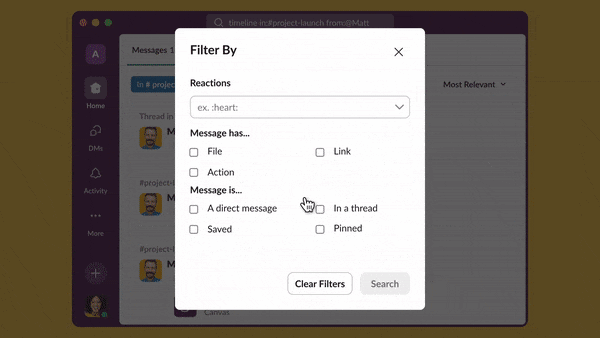
Frame from Slack’s official tutorial at 11.880 seconds: Filter By separates reactions, file/link, direct-message/thread and saved/pinned choices. Review active filters before deciding a message is missing. The vendor’s background result placeholders are demonstration content, not an ALLMSP workspace or evidence that your messages still exist.[6] View full-size product image
An empty Slack search result does not prove that a message was deleted. First verify the workspace and conversation, then test a narrow query against a message you know you can access. Search settings, membership, plan visibility and permanent deletion are separate explanations; changing retention is not a way to search more effectively.
Write down the approximate date, conversation, sender and one distinctive non-sensitive phrase. If a colleague can still see the message, ask them to identify its location through the approved process. Do not borrow their session or request broader access merely to make a search return a result.
Start with one known message and remove accidental filters
Search the current workspace for a controlled message you can already open. Then inspect the result type and active filters. Slack supports narrowing by conversation, sender and date, and offers separate message/file views. An old channel filter or the wrong result type can hide a valid result without affecting the underlying content.[1][6]
Check search preferences for excluded channels before escalating a missing result as data loss. Removing an unintended search exclusion changes the search scope; it does not grant a private-channel membership or recreate content. If the message is in a different workspace, repeat the investigation there with the appropriate account.[2]
| Illustrative query or step | What it tests | Limit to record |
|---|---|---|
| "approval example" | An exact harmless phrase rather than a broad project name | Different wording or a typo can still produce no result |
| in:proj-launch from:@Jordan | A named conversation and sender using fictional example names | The real conversation and person must be correct and accessible |
| after:2026-09-01 before:2026-10-01 | A specific example month rather than all history | Confirm the actual date and time context before narrowing |
| is:thread with a distinctive term | Whether the result is in a thread | A thread filter is not a permission or retention bypass |
| Switch Messages versus Files | The type of object you are trying to find | A file shared from another service has an additional source-location boundary |
Distinguish inaccessible, hidden and deleted content
If another authorized member can open the expected conversation but you cannot, give the owner the actual workspace, channel and access requirement. Search is not a substitute for the owner’s access decision. Preserve the relevant reference in the controlled ticket; do not repost confidential history into a public channel to work around access.
For a free workspace, Slack documents a 90-day message/file visibility window and deletion of data older than a year, subject to the actual configured retention. Those are different boundaries. A message may be outside the searchable window while still retained, or it may already have been permanently deleted. Confirm the workspace’s actual plan and settings rather than applying an age rule from memory.[3][4]
Retention can differ by plan and permitted conversation overrides. Slack warns that retention deletion is permanent and that pinned or saved content is still subject to retention. Do not change a retention policy during the search investigation; have the responsible owner identify the applicable rule and preserve the decision evidence.[4]
Enterprise-sponsored Slack Connect channels have additional free-team retention details. If the missing conversation is external, identify that arrangement before treating the ordinary free-workspace age boundary as universal. Use the exact channel and organization’s documented policy, not a screenshot of an unrelated workspace’s settings.[5]
Check the original location of a linked file
A Slack message, an uploaded file and a link to a file in another system are different objects. If the message is found but its document cannot open, review the document owner and that storage service’s access separately. Slack’s retention documentation distinguishes a third-party file reference from the original file remaining in its originating service.[4]
Do not treat an export as a universal recovery option or a search-permission bypass. Any export request has its own role, scope and preservation rules. If deletion appears likely, ask the authorized owner what retained evidence actually exists before promising restoration. Keep the search result and any records-preservation request separate.
Use a controlled case before concluding data is lost
The following illustrative investigation uses fictional identifiers and a harmless phrase. It shows how to classify the result, not how to prove that all historical Slack content can be recovered.
| Checkpoint | Illustrative observation | Decision |
|---|---|---|
| Known-current-message test | A recent permitted message appears using its exact phrase | Basic search works for the tested identity and conversation |
| Compare the historical location | The expected project decision was in a different workspace | Search the intended workspace before changing filters or retention |
| Review exclusions and dates | An old channel exclusion and an incorrect month were narrowing results | Correct those deliberate search choices and repeat the same query |
| Check access and age | The owner confirms the channel relationship and applicable retention rule | Classify inaccessible, visibility-limited or deleted without guessing |
| Close or escalate | The exact message is located, or evidence of the unresolved boundary is recorded | Do not claim a restore merely because a broader query found a different message |
Close with the workspace, query, filters, conversation and actual result. If retention or an access decision remains unresolved, name its owner and keep the ticket open for that question. A successful current-message test is useful evidence, but it does not certify the historical archive.
For an external channel you never joined, use the Slack Connect access and approval checks. For a visible message that did not trigger an alert, use the Slack notification tests. If the document itself is stored in Box, the Box link-access guide addresses that separate permission boundary; it does not recover a deleted Slack message.
Frequently asked questions
Does an empty Slack search mean the message was deleted?
No. Confirm the workspace, conversation, query, active filters and access before investigating retention. A known-current message is a useful control for testing the same search path.
How can I narrow Slack search by channel and sender?
Use the relevant in: and from: modifiers with the actual conversation and person. Start with a distinctive phrase and add one filter at a time so an incorrect restriction is visible.
[1]Can search preferences hide a whole channel from results?
Yes. Slack allows channels to be excluded from search preferences. Inspect that setting when an accessible channel’s content seems missing; changing the exclusion does not create new access rights.
[2]How do I search a specific date range or a thread?
Slack documents date modifiers such as before: and after:, and is:thread for thread results. Use the actual dates and compare the unfiltered control query before assuming the selected range is correct.
[1]Why are older messages missing in a free Slack workspace?
Will pinning or saving a Slack message protect it from retention?
No. Slack states that retention applies to pinned and saved content too. The owner must verify the actual applicable policy; a saved-item marker is not an independent preservation copy.
[4]Does changing the plan or retention policy restore deleted messages?
Do all free-team Slack Connect channels follow the same one-year boundary?
No universal rule should be assumed. Slack documents special retention behavior for free teams in channels sponsored by an Enterprise organization. Identify that relationship and the actual policy for the conversation.
[5]If a linked document disappears from Slack, is its original deleted too?
Not necessarily. Slack’s retention documentation distinguishes third-party file references from originals stored in the originating service. Check the document’s actual storage location, owner and access separately.
[4]What evidence is useful when a Slack message still cannot be found?
Record the intended workspace and conversation, approximate date, non-sensitive search phrase, filters, known-message control result and the owner of any access or retention question. Keep private message contents and account sessions out of an uncontrolled ticket.
Sources
- Slack: Search in Slack ↩
- Slack: Search preferences and excluded channels ↩
- Slack: Usage limits for free workspaces ↩
- Slack: Customize data retention — current canonical article ↩
- Slack: Enterprise-sponsored free-team channel retention boundary ↩
- Slack: Find information you need — official search-filter tutorial ↩


