





























































































































































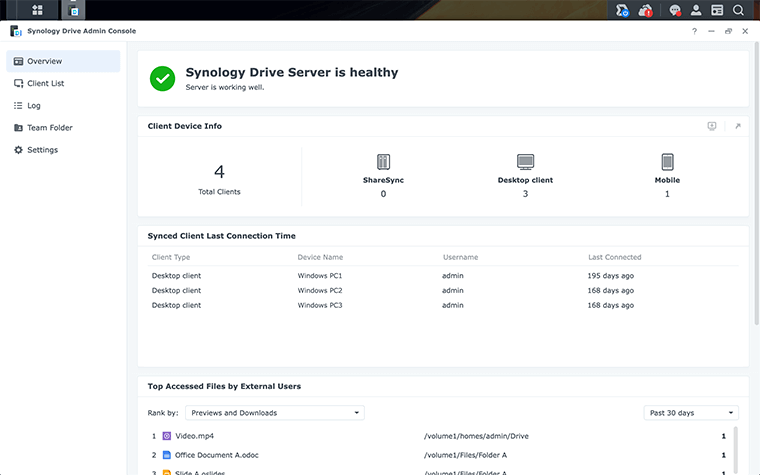
Synology’s example Admin Console separates the server-health banner from each client’s last connection. A healthy server alone does not establish that a specific user’s file has synchronized.
Manufacturer interface example: Synology Drive Admin Console.[8]
A working SMB share does not prove Synology Drive is ready. Deploy the server package, enable the intended shared folder as a Team Folder, and test the actual Drive operations with ordinary accounts before moving a department into it. Confirm both what each person can do and what they must be prevented from doing.
This checklist covers Synology NAS systems running DSM 7, using the current DSM 7 help and the DSM 7.3 Drive specifications. Record the NAS model, DSM build, Drive Server package and each client build. Model capacity and supported client platforms vary; use the applicable specifications rather than assuming every NAS or computer supports the same setup.[1]
Choose the workflow before enabling another folder
Name the business owner, the authoritative folder and the people who need access. Decide whether the requirement is shared working files, personal files or computer backup. Keep an application database or another product’s live backup repository out of an ordinary document-sync pilot until its supported storage and recovery design has been checked.
| Requirement | Configuration to evaluate | Evidence before rollout |
|---|---|---|
| Shared project documents | An approved shared folder enabled as a Team Folder | The correct staff can open and update the intended documents. |
| Private personal workspace | My Drive, with the DSM user home service deliberately enabled | Each ordinary user sees the intended personal space. |
| Copies available on a computer | A compatible Drive Client sync task with a documented direction | A change reaches the expected destination without reaching an excluded location. |
| Computer-folder backup | A separately defined Drive Client Backup Task | The backup source and a tested restore path are recorded separately from sync. |
Do the underlying NAS storage, share and recovery acceptance checks first. This article adds the Drive application layer; it does not repeat a storage-pool or SMB migration procedure.
Enable only the intended Team Folders
Install Synology Drive Server from Package Center on the selected host. In Synology Drive Admin Console, open Team Folder, select the approved shared folder and choose Enable. Set its version policy deliberately. Enable the user home service when personal My Drive is part of the design; a shared departmental workspace should have a named owner and an explicit Team Folder plan.[2]
Folder eligibility matters. The DSM help excludes mounted remote folders, external USB storage and certain application/backup folders from Team Folder use. Check the exact source location before promising that an existing path can simply be enabled. Do not work around an unsupported location with an undocumented mount or link.[6]
Write down who owns the folder, who approves membership changes, how staff should access it, and what should happen when someone leaves. Enable one representative folder and user group first. A limited pilot makes an unexpected permission or sync-direction result easier to investigate.
Test Drive operations instead of assuming ACL details carry over
Shared-folder permission is an input to Drive access, but Drive does not implement every detailed ACL subtype identically. Synology maps the principal read, write and delete combinations into Drive permission types. Its documented example also shows that permission to delete a parent’s child folder can remain even when files inside that child folder are read-only. Check the real action, not just a familiar permission label.[3]
Review group membership before adding an exception directly to one person. At the DSM shared-folder permission level, a conflicting No access assignment takes precedence over Read/Write and Read only. That is a specific shared-folder rule, not a substitute for examining every inherited file ACL.[4]
| Test identity | Positive test | Negative test |
|---|---|---|
| Project editor | Create, edit, rename and sync a disposable pilot file. | Cannot reach a separate restricted team’s folder. |
| Reference-only reader | Open and download the approved reference file using a compatible task. | Cannot upload a replacement or alter the reference file. |
| Unrelated employee | Can still use their own approved workspace. | Cannot browse or retrieve the restricted project file. |
| Folder owner with normal privileges | Can complete the agreed daily workflow. | Does not need a DSM administrator account to do routine work. |
Illustrative acceptance case: a Projects group needs to edit working files while an Archive group may only read final documents. Test those roles separately, including a user who belongs to both relevant groups. Use disposable test content for rename and delete checks. Record an unexpected result before changing permissions so the cause is not lost.
Pilot the client direction and offline behavior
Configure the actual server connection and local folder on a representative computer. Check Drive application privileges if sign-in fails. Choose the remote folder, the local path, the sync direction and the exclusions deliberately. Read-only Team Folder access supports download-only use; it is not sufficient for an upload or two-way task. The current client help also limits macOS On-demand Sync to two-way mode, so a read-only deployment needs a compatible task configuration rather than an assumed Windows-equivalent setting.[5]
Validate the intended encrypted connection and trusted server identity. A certificate warning calls for checking the hostname, certificate and approved connection path, not silently accepting an unknown endpoint. Keep client task folders separate from other synchronization tools.
If staff need offline documents, test that requirement explicitly. An On-demand placeholder can be visible without its file content being stored locally. Pin the selected test document, let its download complete, and verify that it opens when the test computer is disconnected from the network. Use a disposable test case and restore connectivity afterward.[7]
Hand over a service that can be diagnosed and recovered
Keep a short record of the server and client versions, Team Folder path, group ownership, task direction, exclusions, version policy, offline requirements and recovery owner. Confirm that a harmless test edit reaches the expected devices. Also perform a small recovery drill before staff rely on history that nobody has inspected.
For incomplete transfers, use the Drive Client missing-file and conflict checks. For an unwanted edit or deletion, use the Drive history and deletion recovery decision. Those are different failures and need different evidence.
ALLMSP Synology Drive support can help scope the application setup, permission tests, client pilot and handoff. Bring the model, installed builds, intended staff roles and the files or workflows that must work; the acceptance checklist should reflect those requirements.
Frequently asked questions
Why does an SMB share not appear as a Synology Drive Team Folder?
Do all Synology folders qualify as Team Folders?
No. Check the documented eligibility rules. Mounted remote folders, external USB devices and certain application or backup folders are excluded.
[6]Is the user home service required for My Drive?
Yes. Administrators enable DSM user home service to provide each user’s personal My Drive. Plan that personal space separately from shared Team Folders.
[2]Can a read-only user run a two-way Drive sync task?
No. Use a compatible download-only configuration for a read-only Team Folder. The current macOS On-demand mode supports only two-way sync, so check the actual client configuration before deployment.
[5]Does Synology Drive reproduce every detailed Windows ACL setting?
No. Drive maps the main ACL permission combinations into its own permission types. Test create, edit, rename, delete and download actions with the intended ordinary accounts.
[3]Can a group denial defeat a direct shared-folder allowance?
Yes. For conflicting DSM shared-folder assignments, No access takes precedence over Read/Write and Read only. Inspect group membership as well as the individual user.
[4]Does a visible On-demand file prove it is available offline?
No. Download or permanently pin the required file and verify an offline open. A visible placeholder can still require a network connection.
[7]Should the pilot use a DSM administrator as the everyday account?
No. Use ordinary accounts representing the actual editor, reader and excluded-user roles. An administrator’s successful test does not prove normal staff access.
What should be documented before a Drive rollout expands?
Record the model and builds, folder owner, authorized groups, task direction, filters, offline requirement, version policy, recovery owner and observed acceptance results.
What is a useful final deployment acceptance test?
Use disposable files to prove permitted changes reach the intended devices, excluded access remains blocked, required offline content opens, and the recovery owner can retrieve a test version.
Sources
- Synology Drive Technical Specifications | Synology Inc. ↩
- Synology Drive Quick Start Guide for administrators ↩
- How to map shared folder permissions to Synology Drive team folder permissions ↩
- Assign Shared Folder Permissions | DSM ↩
- Synology Drive Client ↩
- Synology Drive Admin Console | Synology Drive Server ↩
- What is On-demand Sync? ↩
- Synology Drive product page — Admin Console screenshot provenance ↩


