





























































































































































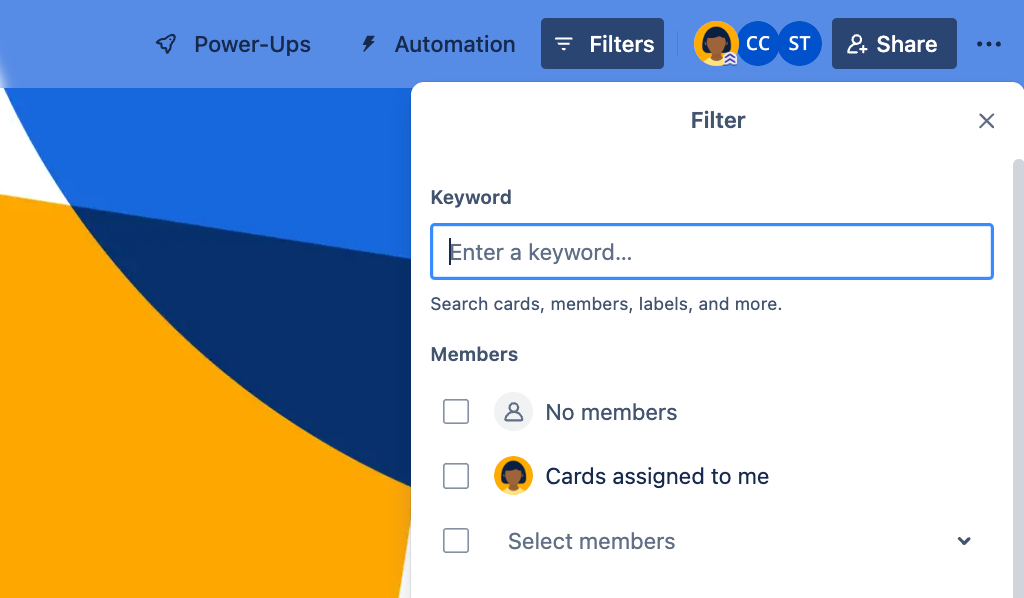
Atlassian’s Trello example shows board-filter choices for a keyword and card members. Check active filters before using wider search or the appropriate archive; this pictured panel does not establish that a card was deleted.[1] View full-size product image
When Trello appears to have lost a card, first try its original link and clear the view that might be hiding it. A filtered card, an archived card and a permanently deleted card are different states. Creating a replacement too soon can leave two versions of the same work with separate comments and deadlines.
Preserve the card identity before searching
Record the original card URL, last known board and list, a distinctive phrase from its title, and the account that last saw it. Ask an authorized board member to check that same URL. If that colleague can open it and you cannot, investigate access instead of treating the card as deleted.
Clear the current board filter
A board filter remains active until cleared, including after a refresh or logout. Inspect members, completion status, due dates and keywords. Clear the active filter to check the unrestricted board view; this changes the view, not the card data.[1]
| Observation | Check next | Avoid this mistaken fix |
|---|---|---|
| Board opens but familiar cards are absent | Active board filters and expected list | Recreating every hidden card |
| Card is absent from this board | Original URL and cross-board search | Assuming the last remembered board is still correct |
| A whole list appears absent | Board archive, switched to lists | Deleting or rebuilding the list |
| Personal capture card is missing | Personal Inbox and its separate archive | Looking only in a board archive |
If several filter categories are selected, check each one. A matching title does not override a member or due-date restriction. The board keyword filter covers card names and custom fields; use the wider search when the remembered phrase is in a comment or description.[1]
Use search for a different question than the board filter
The top search can locate cards across boards. Start with a distinctive name, then use an appropriate operator such as board:name or comment:"handoff phrase". Check whether Advanced search is excluding closed boards or archived cards. Saved searches are a Premium feature; finding one card does not require promising that feature to everyone.[2]
Keep the search broad enough to test the current theory. If a title was edited, try the known URL or a distinctive comment instead of repeatedly searching the old full title. When a result appears, verify its actual board and history before moving it back; the move may have been intentional.
Inspect the appropriate archive without deleting anything
Board-menu Archived items contains archived cards. Find the intended item and use the available restore action when returning it is approved. Archived cards remain available indefinitely unless someone deletes them; a permanently deleted card cannot be restored.[3]
If the missing work belonged to an archived list, switch the archive to lists and inspect that list. Trello supports returning it with Send to Board. Deleting an archived list also deletes its cards permanently, so deletion is not a cleanup step during this investigation.[4]
Trello Inbox is personal and separate from boards, including its own archive. Check the Inbox menu’s archived-card view if the card was captured there rather than moved to a board. Do not share another person’s Inbox or assume a board member can inspect it for you.[5]
Confirm the original work, not just a replacement title
This is an illustrative diagnostic case. A team member cannot see a handoff card on the expected board. The goal is to locate the original discussion and ownership before making a content change.
| Step | Example finding | Appropriate outcome |
|---|---|---|
| Open the exact known URL | Original card opens for the recipient | Existence and access confirmed |
| Clear the board’s active filter | An assignment filter had hidden the card | Original card returns without content changes |
| Check current list and activity | Card was intentionally moved for review | Confirm the workflow with its owner |
| Inspect comments, members and date | Original history is intact | Close the case without duplicating work |
If the card remains missing, send the owner or support the original URL, account, board/list, last-seen time and the checks already made. State whether any authorized person can still open it. An empty search alone does not establish deletion, and a paid plan is not a recovery guarantee.
Choose the next task
If the board or card link fails for one account, use the Trello membership and guest-access checks. If the card exists but alerts are missing, use the watching, reminder and delivery checks.
Frequently asked questions
Can a Trello filter keep hiding cards after I reload?
Yes. Board filters persist until cleared. Check the filter before creating replacement cards.
[1]Why does a title search miss text I remember from a comment?
Does marking a card complete automatically mean it was archived?
Where should I look for an archived Trello card?
Open the board’s Archived items and search there. Return the correct card only when restoring it to the board is appropriate.
[3]Will an archived Trello card eventually delete itself?
No. Trello documents indefinite archiving unless someone chooses to delete the card.
[3]Can a permanently deleted Trello card be restored?
No. Permanent deletion cannot be undone. Do not select Delete during a search or archive investigation.
[3]What if an entire Trello list is missing?
Inspect Archived items switched to lists. Deleting an archived list would permanently delete its cards; use the approved return action instead.
[4]Is my Trello Inbox archive the same as a board archive?
No. Inbox has its own archive. Check where the card was captured before assuming it belonged to a board.
[5]Do I need Premium to search for a missing card?
Do not confuse search with Premium saved searches. Start with ordinary search and the original card URL; review the options your account actually provides.
[2]What proves I found the right card?
Confirm the original URL, comments, current board/list, members and due date with the owner. A new card with the same title is not equivalent evidence.


