





























































































































































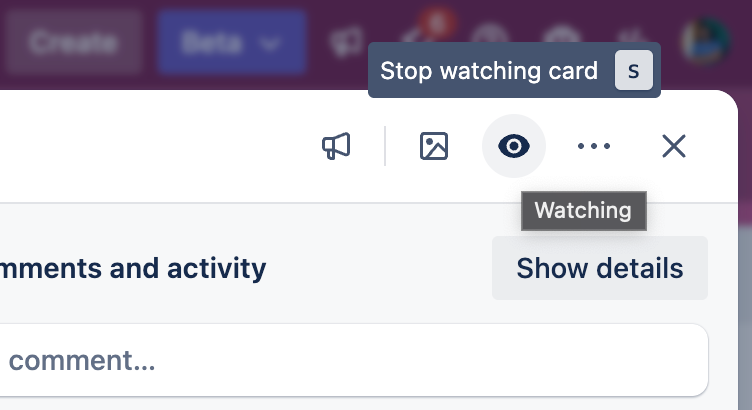
Atlassian’s Trello example shows the watching eye and Stop watching card tooltip, indicating an already watched card. Confirm the required card’s state, then test another person’s event; the image does not prove email or browser delivery.[2] View full-size product image
If a Trello alert does not arrive, identify the event you expected and where you expected it. A board membership, a watched card, a due-date reminder and an email are separate controls. Testing your own card edit or enabling every board alert can produce misleading results.
Choose one event from another person
Use a non-sensitive test card with the intended recipient and a colleague. Record the card URL, board, account, event and time. Ask the colleague to add the agreed comment or mention while the recipient notes what appears in Trello’s notification drawer. Do not base the test only on an action performed by the recipient.
Trello does not notify you about your own actions. A notification read in Trello before its email is sent can suppress that email, even when the account uses instant email delivery. Preserve that timing distinction when diagnosing a missing message.[1]
| Symptom | First check | What it does not establish |
|---|---|---|
| Another person’s card comment produces no expected alert | Card assignment or actual watching state | Membership of the board is not a subscription to every card event |
| The notification drawer updates, but email does not | Email categories, frequency and whether it was already read | A mailbox fault has not yet been demonstrated |
| No due-date reminder arrives | Reminder selection, recipient relationship and archive state | A visible date alone is not a reminder configuration |
| Email works, browser is silent | Site permission, system notification policy and an open Trello tab | Email success does not prove desktop permission |
Check what the recipient is actually watching
Watching can apply to a card, list or whole board. Adding someone as a card member automatically starts them watching, but they can stop watching later. Inspect the eye indicator rather than assuming assignment guarantees the current subscription. Cards still in personal Inbox cannot be watched; move approved collaborative work to a board first.[2]
Choose the smallest useful subscription. If one handoff card needs attention, watching an entire busy board can bury its important updates. The published screenshot’s “Stop watching card” tooltip indicates an already active watching state; it is not an instruction to disable the required subscription.
Treat due-date alerts as a separate test
For a planned reminder test, agree on a harmless test card, the intended reminder time and the recipient. Record the configured date, time and reminder selection before waiting for the event. Do not repeatedly push a real client deadline forward just to test a notification.
Check email and desktop delivery without destroying useful settings
Account settings separate email frequency from category preferences. Never, Periodically and Instantly are different choices; Periodically is an hourly summary. Desktop notifications come from the browser and require Trello open in a tab. The site and operating system must permit the alert.[3]
If an expected email is still absent after the relevant timing and category checks, inspect junk and organization mail handling. Trello’s troubleshooting page links a notification test. Use it only from the intended account, and distinguish a successful test email from a failure tied to one particular card event.[1]
For desktop alerts, review the specific Trello site permission and the device’s intentional quiet-period policy. Schedule the test when an alert is allowed. Keep unrelated browser permissions and system-wide notification settings intact.
Close with a small, recorded acceptance test
This is an illustrative event-to-delivery test. It is designed to isolate one route rather than to prove every future notification will arrive.
| Step | Evidence | Pass scope |
|---|---|---|
| Colleague makes the agreed update | Card URL, actor and timestamp | The test event actually exists |
| Recipient checks actual watching and drawer | Watching indicator and matching notification | The expected app subscription/event works |
| Recipient checks the chosen email route | Frequency, category, read timing and delivery | That configured email route is explained |
| Test an allowed desktop alert if needed | Open tab, permissions and observed banner | This browser route works at the agreed test time |
Restore any intentionally narrowed views or schedules after testing. If escalation is needed, provide the card URL, event time, watching state and the exact delivery layer that failed. A useful handoff preserves what already works instead of resetting every preference.
Choose the next task
If the card cannot be found, use the Trello missing-card guide. If the recipient cannot open the board, use the board membership and guest-access guide.
Frequently asked questions
Should Trello notify me when I edit my own card?
No. Test a relevant action from another person; Trello does not send notifications for your own actions.
[1]Does joining a board subscribe me to every card comment?
Do not assume so. Inspect whether you are watching the relevant card, list or board and which event occurred.
[2]Does the eye icon mean I am already watching a Trello card?
Yes. Confirm its current state; a Stop watching control indicates watching is already active.
[2]Can I watch a card that is still in my personal Trello Inbox?
No. Cards in Inbox cannot be watched. Move work intended for collaboration to an appropriate board first.
[2]Will a card’s due date alone trigger a reminder?
Do archived cards send due-date alerts?
No. Atlassian documents that archived-card activity notifications, including due dates, are not sent.
[4]Why is the Trello drawer updated but the corresponding email absent?
Check email preferences and whether the notification was read before the email was sent. That behavior can be intentional rather than a failed mailbox.
[1]What does Periodically mean for Trello email notifications?
It is an hourly summary. Confirm the selected frequency before expecting an immediate email.
[3]Must Trello stay open for desktop notifications?
Yes. The browser route requires an open Trello tab, allowed site permission and compatible system notification settings.
[3]What should I send support about one failed alert?
Include the card URL, intended account, another person’s event and time, watching state, reminder if relevant, and the observed drawer/email/browser outcomes. Exclude unrelated private cards.


