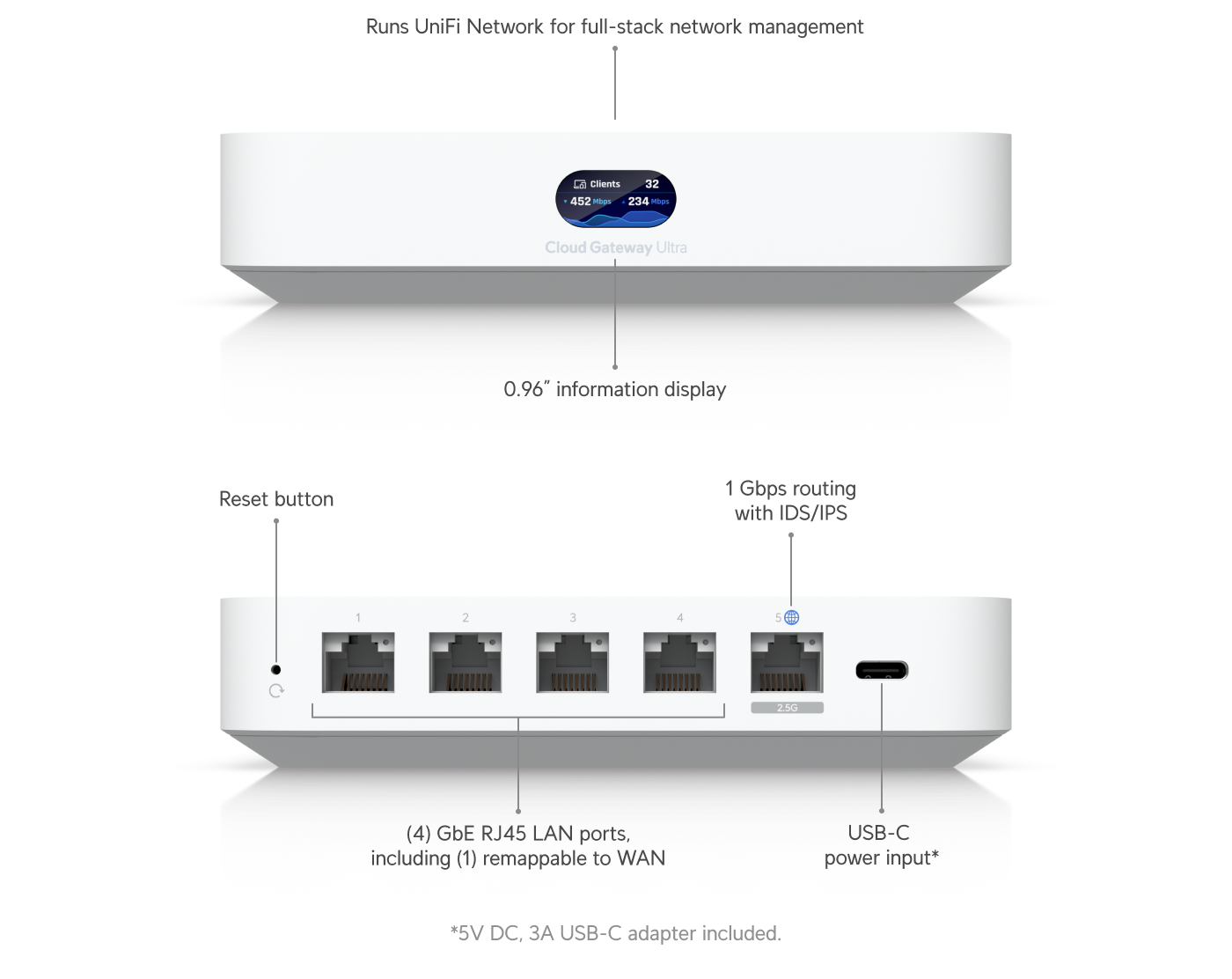
Ubiquiti’s Cloud Gateway Ultra (UCG-Ultra) combines the gateway and UniFi Network host. Its rear view identifies the WAN/LAN ports and USB-C power input. Record this host choice before adoption; this model is not an external-controller gateway.[8] View full-size image
A UniFi deployment needs three decisions before the first access point is adopted: where UniFi Network will run, who controls that environment, and how devices will reach it. Start with a site inventory and an acceptance test. Buying compatible-looking equipment does not establish a workable management or recovery design.
This guide covers UniFi Network gateways, switches and access points. Protect cameras and Access door systems need their own application, equipment and operating review; network adoption alone does not validate those systems.
Choose the management host and gateway as one design
Site Manager is the central access interface; the control plane runs on the chosen host. A Cloud Gateway combines gateway functions and local management. A CloudKey, UniFi OS Server or Official UniFi Hosting separates management from the gateway. Identify which component runs Network, which routes traffic and which team maintains each one.[1]
Do not confuse the current UniFi OS Server with the legacy UniFi Network Server. Ubiquiti now identifies OS Server as its self-hosting standard. A Cloud Gateway already runs Network and cannot be adopted into an external OS Server; an independent UXG gateway is the relevant separate-gateway family. OS Server does not self-host Protect, Access, Talk or Connect.[2]
| Design choice | Decide before purchase | Evidence to retain |
|---|---|---|
| Cloud Gateway | Will this model supply the routing, management and capacity the site requires? | Exact model, required applications, port/power needs and supported capacity. |
| Existing third-party firewall | Who owns routing, DHCP and firewall changes while UniFi manages APs and switches? | Named firewall owner and a documented route from devices to the Network host. |
| Separate management host | Who maintains its operating system, availability and application recovery? | Host location, maintenance owner, recovery method and local support access. |
| Additional UniFi applications | Which compatible console will run each application? | A separate Network/Protect/Access application-to-host map. |
A familiar product family is a starting point, not a sizing method. Check the exact current technical specification for throughput, powered ports, application capacity, storage and environmental requirements. Record the required workload rather than assuming every model supports the same features.
Make business access work before the installer leaves
Record the company’s designated owner, administrator accounts, account-recovery arrangements and support responsibilities. Use named accounts and test the intended permissions. The documented single-site Owner and Super Admin roles are highly privileged; giving a person “support access” should be a deliberate decision.[3]
Ask the installer to demonstrate the company representative’s access from that representative’s own account. Record the site name, host address, device inventory, purchase records and where protected credentials will be maintained. A screenshot from the installer’s account is not evidence that the business can administer its network.
Separate ordinary support duties from approval of routing, security and ownership changes. Before removing an old administrator, prove the replacement account can reach the right site and perform the work it will own. For a console transfer or recovery plan, continue with the UniFi backups, updates and ownership-handoff guide.
Map management, client networks and physical power
Create a compact worksheet for management, staff, guests and any operational devices. For each network, record the VLAN ID, subnet, gateway, DHCP/DNS owner, intended port or Wi-Fi assignment, and required destinations. With a third-party gateway, define its VLAN/subnet/DHCP configuration there and represent the matching network in UniFi. Creating a network does not itself place every device in it.[4]
Keep the management path separate in the worksheet from the wireless client path. An AP must reach its host; a guest laptop must receive the intended client network and permitted access. These are different acceptance tests. Write the allowed business flows explicitly, including printer, booking or voice dependencies, then test both allowed and denied traffic.
For every powered device, match the exact supported PoE mode and required power to its port or injector, then check the switch’s aggregate power availability. An available Ethernet socket does not establish a suitable power source.[5]
Survey the installation rather than choosing AP positions from a floor plan alone. Use the business Wi-Fi site-survey guide for coverage and client requirements, and cabling planning for paths, terminations and future capacity.
Adopt one representative path and test the real work
Start with a powered device on the intended network and the correct host running Network. Same-network Cloud Gateway adoption normally uses automatic discovery. Different subnets or a remote host need the appropriate routing and adoption design; do not copy a remote inform address into an unrelated local deployment.[6]
Label the device by physical location and retain its MAC address, switch/port and intended site. Confirm that the adopted device appears in the company’s intended host, receives the expected configuration and supports a normal client task. Repeat for every materially different switch path or device role before expanding.
- Verify a staff device receives the intended addressing and reaches the required application.
- Verify a guest device gets its intended service while the tested staff-only destination remains blocked.
- Check the AP’s management reachability independently from its clients’ connectivity.
- Confirm the accountable administrator can connect locally. UniFi documents local browser/app access when connected to the deployment’s network.[7]
- Save the accepted configuration, device list and an unresolved-issues record before the next wave.
Example: a managed firewall stays in place
Suppose an office retains a third-party firewall while replacing its APs and switches with UniFi. The plan records that the firewall team owns the staff and guest subnets, while the Network host manages the UniFi devices. A pilot checks one AP through the actual closet uplink, not only on a bench beside the host.
The acceptance record distinguishes “AP adopted,” “staff application reached” and “guest isolation passed.” If only adoption passes, the team has evidence to investigate the client network before replacing the remaining APs. This is an illustrative planning exercise, not a report of a customer outcome.
Move from deployment to dependable support
Use the UniFi offline, adoption, PoE and VLAN diagnostic guide when a device fails an acceptance check. Use the maintenance and recovery guide before scheduling updates or changing ownership.
ALLMSP’s UniFi support and integration services cover architecture, configuration, testing, documentation and ongoing support. Bring the host choice, current firewall arrangement, site survey, device models and acceptance worksheet to a planning discussion. If the physical path needs work, low-voltage wiring support connects that installation work to the network design.
Frequently asked questions
Do I need a UniFi Cloud Gateway to use UniFi access points?
No. A supported separate Network host can manage the APs while another gateway handles routing. Plan the host, gateway and adoption path together.
[1]Can a Cloud Gateway be adopted into an external UniFi OS Server?
No. It includes its own Network control plane. Ubiquiti identifies independent UXG gateways for an externally managed gateway design.
[2]Is Site Manager the same thing as the site’s Network host?
No. Site Manager provides centralized access to deployments; the chosen control plane hosts the application.
[1]Can UniFi OS Server also host Protect and Access?
No. Those applications require a compatible UniFi console. Confirm the host for each application separately.
[2]Should the installer keep the only administrator account?
The business should retain tested administration and recovery access. Agree the owner, support roles and handoff before deployment.
Does creating a VLAN in UniFi automatically assign every device?
No. Device or Wi-Fi assignments must also match the intended design. With a third-party gateway, coordinate its network configuration.
[4]Can I select a PoE switch only by its number of ports?
No. Check the supported power mode, each device’s requirement and the switch’s total power availability.
[5]Does a device showing adopted prove guest isolation works?
No. Test the guest client’s allowed service and a destination that should be blocked. Record both results.
Can an administrator manage UniFi during an internet outage?
UniFi supports local management from the deployment’s local network. Test the actual administrator’s local access before an outage.
[7]What should be delivered with a completed deployment?
Keep the ownership record, model and location inventory, network/port map, protected access details, accepted test results and recovery procedure.
Sources
- Understanding UniFi Cloud Architecture ↩
- Self-Hosting UniFi ↩
- UniFi Roles Explained: Admins and Users/Members ↩
- Creating Virtual Networks (VLANs) ↩
- PoE Availability and Modes ↩
- UniFi - Device Adoption ↩
- UniFi Local Management ↩
- UniFi Cloud Gateway Ultra host and port identification — manufacturer technical reference ↩