





























































































































































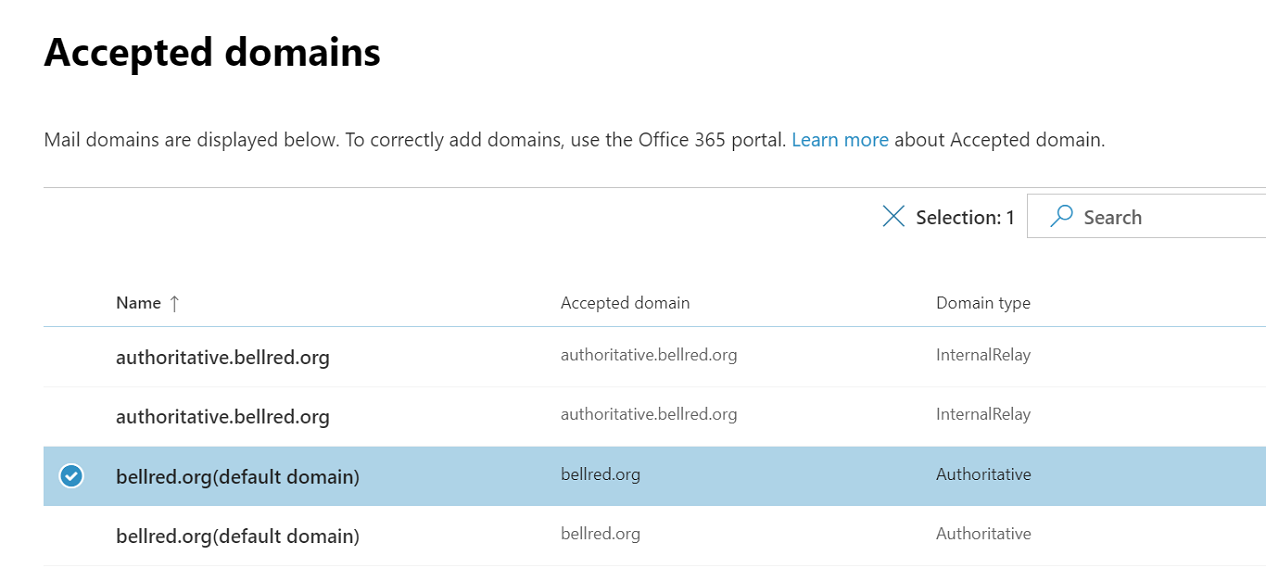
In Microsoft’s sample list, a name beginning “authoritative” is actually marked InternalRelay. Read Domain type and verify where recipients live; names and a default-domain label do not prove routing readiness. This is a vendor example, not this tenant’s configuration.[7] View full-size image
Prepare the recipients and mail routes before directing a domain’s incoming mail to Exchange Online. The cutover is ready when intended addresses exist, the domain type matches the design, DNS and authentication values are correct, and representative message paths pass. A successful user sign-in or domain-verification screen does not prove all of that.
Keep the existing provider, gateway and application senders in the plan. Inventory primary addresses, aliases, shared and resource mailboxes, groups, external contacts, forwarding, scanners, web forms and relay services. Assign an owner to each route and define how the team will detect a missing recipient after the change.
Provision recipients before changing the delivery destination
Use the Microsoft 365 admin center to create the intended users and assign the appropriate service licenses. Exchange Online user mailboxes are provisioned through the licensed user setup; verify the actual mailbox rather than stopping at a purchased subscription.[1]
Microsoft explicitly advises preparing all domain users and mailboxes before changing the MX record for Microsoft 365.[2] Compare the new recipient list with the current provider, including aliases and shared or group addresses. Obtain business-owner acceptance for deliberate exclusions.
| Recipient type | Prove this result |
|---|---|
| User mailbox | Correct primary address and aliases, appropriate license and successful mailbox access. |
| Shared or resource mailbox | Correct address, authorized access and the expected booking or reply task. |
| Group or routed recipient | Expected expansion or onward route, including external destinations where approved. |
| Application sender | A supported authentication/relay method and delivery to its real destination. |
Test one representative of every type. A migration pilot that contains only an administrator’s personal mailbox misses reception addresses, finance workflows and application messages that customers depend on.
Choose the accepted-domain type from recipient location
In the Exchange admin center, open Mail flow > Accepted domains. Authoritative domains reject mail for unknown recipients. Internal relay is for designs where some recipients are elsewhere and requires an appropriate onward connector. It is not a general workaround for an incomplete cloud recipient list.[3]
Write the route in one sentence: where inbound mail first arrives, which system knows the recipient, and where mail goes next. For a split or hybrid design, have the responsible messaging administrator confirm the recipient objects and supported route before changing the domain type.
Most cloud-only Exchange Online organizations do not need connectors for ordinary internet mail. Use them for the specific partner, on-premises or application-relay scenario that actually requires one.[4] Review existing connectors, transport rules and security gateways for an old route that could bypass or loop around the new design.
Use tenant-provided DNS and authentication values
In Microsoft 365 Settings > Domains, inspect the selected domain and the records the tenant requires. Record existing DNS values and the intended change before cutover. Domain ownership verification and routing mail to the service are separate decisions.[2]
Maintain one SPF record for each sending domain and account for every approved sending system; do not append a second SPF record for a new provider.[5] Review application and marketing senders before removing a former provider’s authorization.
For custom-domain DKIM, retrieve the actual selector CNAME values from Microsoft’s current portal or PowerShell guidance. Microsoft has updated the format for newer domains; do not construct selectors from a remembered tenant-name pattern. Verify signing from a controlled outbound message after configuration.[6]
Treat DNS convergence as a condition to observe, not a fixed countdown. Keep an agreed transition route for messages arriving through the former service, and preserve the records needed to investigate a mixed-path delivery complaint.
Accept each message path with a labeled test
| Path | Verify at the destination | Keep as evidence |
|---|---|---|
| External sender → cloud user and alias | Message reaches the intended mailbox under its correct recipient identity. | Sender, recipient, time zone, message ID and trace result. |
| Cloud user → controlled external mailbox | Message arrives and expected authentication is visible in full headers. | Recipient receipt and relevant header results. |
| Shared mailbox or delegated sender → recipient | The intended From identity and reply path work. | Sent/reply result and delegate used. |
| Scanner, website or business application → recipient | Real sending configuration works, including required attachment or notification. | Application event, message and actual destination receipt. |
Choose controlled recipients and clearly label the tests. A successful message from a user mailbox does not validate a printer’s relay, and a message accepted by a web form does not prove that the notification arrived. Investigate the failed path before changing unrelated DNS or permissions.
Use Exchange message tracing and quarantine diagnosis to explain a failed test. When a delegate can read but cannot send, use the mailbox-permission review instead of adding transport exceptions.
Keep the first operating day testable
Document the old and new routes, the cutover decision, completed recipient tests, unresolved exceptions, support contact and rollback limits. Returning an MX record does not undo messages already delivered or data already migrated, so reconcile where new mail was received before planning any reversal.
Example: a fictional company’s user-mail tests pass, but a quote form still submits to an old gateway restricted by IP. The fix belongs to that application route. Changing every mailbox or weakening the new filtering policy would leave the actual dependency unexplained.
For the broader identity and migration work, use Microsoft 365 rollout planning. After server-side delivery is proven, the Outlook diagnostic guide can address a client that still does not show the item. For a review with ALLMSP cloud support, bring the recipient inventory, DNS plan, route diagram in words and test results.
Frequently asked questions
Should I change MX before creating Exchange Online recipients?
Prepare and verify the intended users and mailboxes first. Otherwise incoming mail can reach the new service before its recipient exists.
[2]Does buying an Exchange license prove the mailbox is ready?
No. Verify the license assignment, actual provisioned mailbox, addresses and a successful mailbox task for that user.
[1]What does an authoritative accepted domain do?
It delivers to recipients known to the organization and rejects unknown recipients. Confirm the recipient list before directing mail through that domain.
[3]When is an internal-relay domain appropriate?
Use it for a supported design with recipients outside the cloud organization and a working onward connector. Do not select it merely to hide missing cloud recipients.
[3]Does every cloud-only tenant need a mail connector?
No. Ordinary internet mail generally does not require one. Add connectors only for the documented partner, on-premises or relay scenario.
[4]Can I publish separate SPF records for Microsoft 365 and another sender?
No. Maintain the domain’s single SPF record with the authorized sources and validate it after changes.
[5]Can I build DKIM CNAME targets from an old example?
Use the actual values supplied for the tenant and domain. Microsoft has changed the format for newer domains, so copied examples can be wrong.
[6]Which mail paths should a cutover test include?
Test inbound user and alias delivery, outbound external delivery, shared/delegated sending and each important application or device sender.
Does moving MX back reverse the whole migration?
No. It changes future routing behavior after DNS resolution; it does not remove mail already delivered or reconcile data received in different systems.
What should the cutover handover contain?
Keep the recipient scope, old and new routes, DNS changes, successful message-path tests, unresolved exceptions, responsible contact and limits of the reversal plan.


