





























































































































































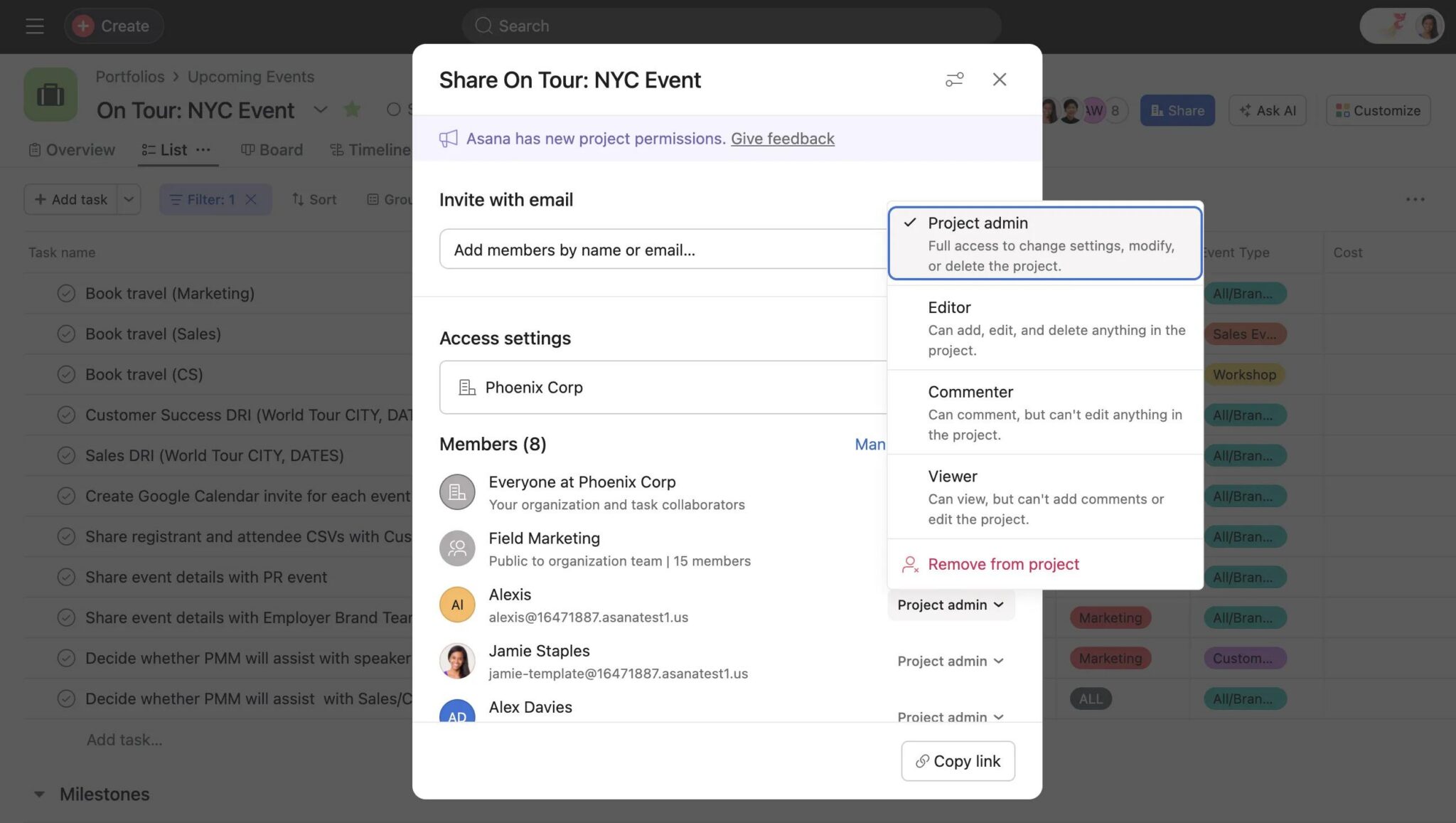
Asana’s published On Tour: NYC Event example shows a member-role menu in Share, with Project admin selected. Check the recipient’s intended role and any team grants; the administrator role is an example, not the recommended fix for an access problem.[2] View full-size product image
If an Asana project opens for its owner but not for a colleague, start with the colleague’s exact account and project URL. A missing invitation, a private project and permission to view without editing require different fixes. Do not share a confidential project more widely merely to remove an access message.
Identify the account, space and action that actually fail
Record the project link, the intended email address, the organization or workspace, and one failed action: open, comment, edit a task, or change project settings. Have the recipient check their own signed-in account; do not use the owner’s successful session as the acceptance test.
One Asana account can belong to multiple separate workspaces and organizations. Accept the legitimate invitation in the appropriate account and select the expected space. Joining one space does not make its projects available in another.[4]
| What the recipient observes | What the owner should inspect | What a successful check establishes |
|---|---|---|
| Project URL cannot be opened | Exact identity and project membership | The intended account can reach this project |
| One task opens but its project does not | Whether only that task was shared | Task access is narrower than project access |
| Project opens but an edit is unavailable | The effective project role and requested action | Whether that action is permitted, not just visibility |
| A user has more access than expected | Direct and team-based grants | Which wider grant explains the effective role |
Inspect privacy before adding another invitation
For a project marked Private to members, check its actual people and team membership. Organization-wide sharing excludes guests unless they receive the relevant explicit access. The organization-sharing option depends on subscription scope; it is not available for every paid team or division.[1]
A task collaborator may have access to an individual task without access to the rest of its project. A workspace or organization membership also does not answer every project-level question. Inspect the specific object that is failing.[3]
Ask the project owner to state the smallest appropriate audience before changing it. If a contractor needs only one handoff task, discuss whether exposing the whole project would reveal unrelated work. An access request should result in a deliberate membership decision, not a project-wide privacy switch.
Match the role to the real work
In Share, inspect the member’s role rather than assuming that being invited grants editing. Viewer and Commenter are paid permission options. Asana combines overlapping grants using the highest access level, so a narrower direct role can be outweighed by a team grant.[2]
Agree on the actions required for this handoff. Reading a schedule, commenting on a review and managing project settings are separate needs. Test the required action on harmless work, and also check that the recipient cannot make an unapproved change. Do not promote everyone to Project admin as a diagnostic step.
Test an approved handoff, including the limit
This is an illustrative access test, not an account of a client engagement. A reviewer needs to read a launch plan and leave feedback, while the project owner retains control of its structure. Use a non-sensitive test task and the intended reviewer account.
| Test | Expected result | Record before closing |
|---|---|---|
| Open the exact approved project | Reviewer reaches the correct plan | Account and project URL |
| Perform the agreed feedback action | The required action is available | Action tested and effective role |
| Try an agreed restricted project-setting action | Restricted action remains unavailable | Which boundary was checked |
| Review other grants with the owner | No unexplained broader access | Direct/team membership decision |
If the check fails, retain the exact message and failing action. The owner can resolve an approved invitation or role change; an organization administrator can investigate a policy-controlled membership problem. Avoid repeated invitation attempts with alternate personal accounts, which can make the identity problem harder to diagnose.
Choose the next task
If the project opens but expected work is absent, use the Asana missing-task checks. If the work is accessible and only alerts are missing, use the Inbox and notification checks.
Frequently asked questions
Why can the project owner open an Asana link when I cannot?
Does an Asana task invitation give access to the whole project?
No. A task can be shared independently. Confirm project membership separately if the approved work requires the rest of the project.
[3]Can an organization guest automatically see organization-shared projects?
No. That sharing audience excludes guests; check the guest’s explicit project or team access instead.
[1]Should I make a private project organization-wide to fix one invitation?
Only if that wider disclosure is an approved business decision. Resolve the intended person’s access first; one failed invitation does not justify exposing the project.
Why can I read an Asana project but not edit it?
Visibility and editing are different permissions. Ask the owner to inspect your effective role and test the specific action required.
[2]Why does a direct Viewer role not seem to limit someone?
Another grant can provide greater rights. Inspect team-based and direct membership because Asana applies the highest applicable access level.
[2]Are Viewer and Commenter available on every Asana plan?
No. Asana documents them as paid permission options. Confirm your subscription and the roles actually offered in this project.
[2]Can I use one Asana account in more than one organization?
Yes. The spaces remain separate. Confirm which space contains the project instead of creating another account as the first fix.
[4]What should I send an administrator about an access failure?
Send the approved project URL, intended account, selected space, exact message and failed action. Exclude passwords and session tokens.
What proves the project access issue is resolved?
The intended recipient completes the required task with the approved account and role, and the agreed restricted action remains unavailable. Record both results.


