





























































































































































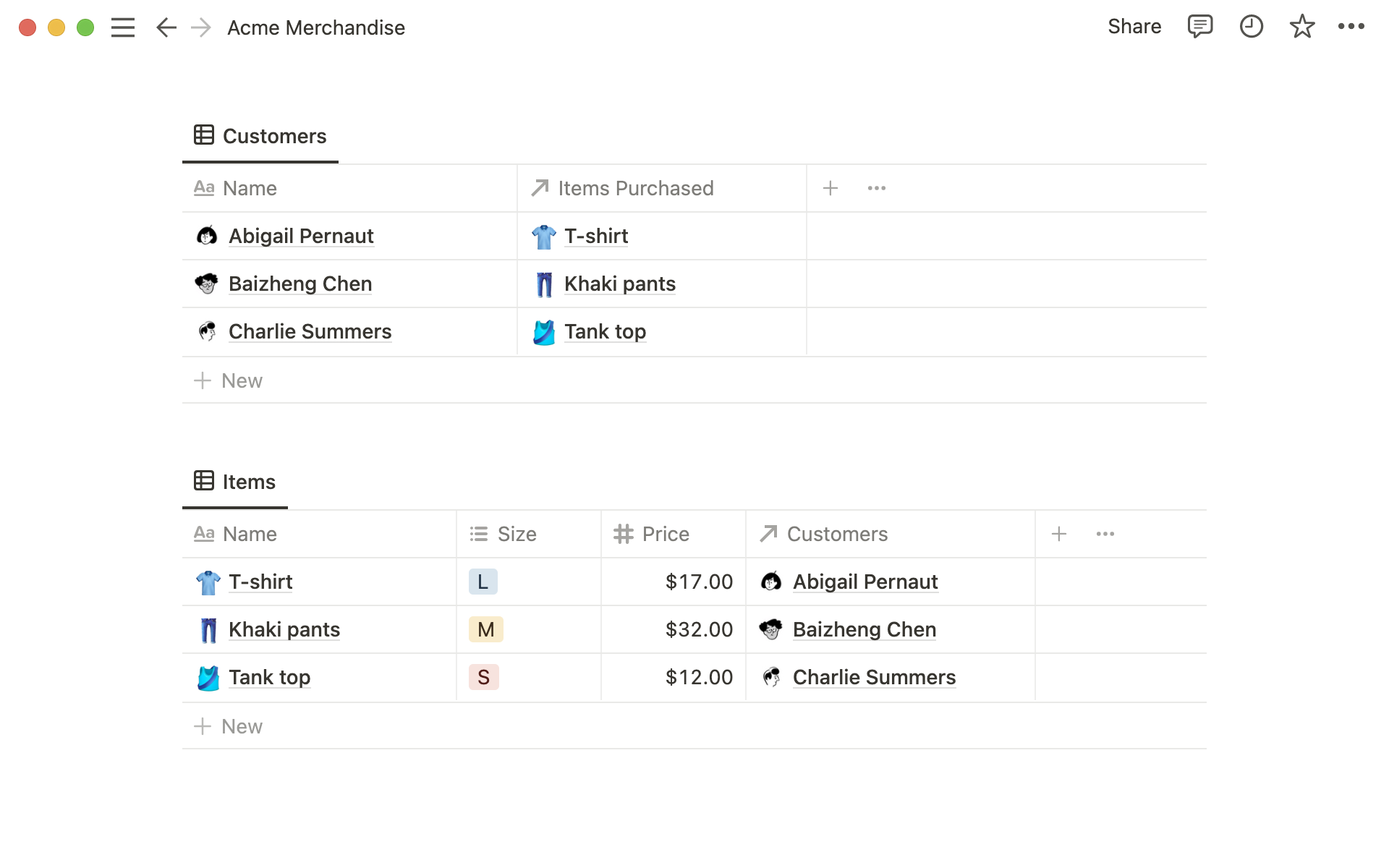
Notion’s published Acme Merchandise example links Customers and Items through relation properties. No rollup calculation or result is shown. Check the exact linked pages, source property and calculation before relying on a summary.[1] View full-size product image
When a Notion total is blank or unexpectedly large, check what feeds it before replacing the formula or rebuilding the database. A rollup can only summarize the pages and property values selected through its relation. A sensible-looking number is not enough: you need to know which records contributed to it.
Trace one result from the source pages
Inspect one record’s relation, selected source property and calculation. Check its linked-page values before changing a shared column.[1]
Write the expected result in plain language: for example, “sum the approved estimate on these two linked work items.” This makes a wrong source property or an extra linked page easier to spot than a vague report that the total looks wrong.
| Observation | First inspection | What it separates |
|---|---|---|
| Blank relation | Which pages are linked to this record | Missing input versus calculation trouble |
| Linked page has no estimate | Source property value on that exact page | An empty value versus a legitimate zero |
| Output is a list rather than a number | Selected rollup calculation | Showing values versus aggregating them |
| Total includes another project | Every linked page and its intended owner | Wrong relationship versus wrong arithmetic |
Distinguish data type, display and input
A Number property supplies numeric values; Text supplies strings even when those strings look like amounts. Inspect the actual type of the chosen source property. Date, Formula, Relation and Rollup are also distinct property types, so column names alone are insufficient.[2]
Sum requires a numeric source; Count values excludes empty values. Rolling up another rollup is unsupported. Choose the operation that answers the question.[1]
A view’s filters control which records you see. They do not by themselves document which pages a relation contains. Compare the underlying linked records, then use the view settings to explain why a reviewer is seeing a shorter list.[3]
Use a hand-checkable example
This is an illustrative diagnostic case, not a customer result. A project should include two work items with estimates of 2 and 3 hours. The independent expected total is 5. A third item belongs to another project and should not contribute.
| Test case | Input to inspect | Expected decision |
|---|---|---|
| Only Work A and Work B are linked | Numeric estimates 2 and 3 | The intended sum is 5 |
| Work C is also linked | An additional estimate of 8 | A sum of 13 is explainable but outside this project’s intended scope |
| Work B has an empty estimate | No agreed estimate for that page | Resolve the missing input; do not silently label it zero |
| Work A estimate changes from 2 to 4 | One approved source correction | Recheck the resulting total of 7 and the exact linked pages |
Keep the test small enough to explain without a screenshot of a whole dashboard. Record the record URL, relation name, source property, calculation and expected result. If a correction changes a shared total, tell the owner which input or configuration changed and which dependent report was rechecked.
Check direction and access without widening the audience
Relations between different databases start one-way unless a corresponding relation is enabled. Inspect that setting before creating another relationship.[1]
Notion respects the broadest grant a user receives. Inspect a reviewer’s actual page access; do not publish a source database simply to investigate a calculation.[4]
Choose the next check
If the source rows came from a spreadsheet, verify CSV import types and duplicate batches before repairing calculated results. If a client needs to review the outcome, use the guest-sharing checks to define what they should be able to open.
Frequently asked questions
What are the first three things to inspect in a wrong Notion rollup?
Inspect the linked pages, the selected source property and the calculation. Write down the expected result before changing any of them.
[1]Why is a rollup blank when the source database has records?
Check the relation on the affected record. Records existing elsewhere do not establish that the intended pages are linked to this result.
[1]Why is Sum unavailable for the property I selected?
Is an empty estimate the same as zero?
No. Treat an empty estimate as missing information until the owner confirms its meaning; using zero can hide unfinished data entry.
[2]Does Count values always equal the number of linked pages?
No. It counts non-empty values for the selected property. Decide whether you need a page count or a count of completed source values.
[1]Can I create a rollup of a rollup?
No. Use a supported source property and redesign the calculation with the database owner rather than layering another rollup.
[1]Does a filtered view prove which items feed the rollup?
No. Inspect the relation itself and the source records. A view’s visible subset and the configured calculation are separate checks.
[3]Why does the other database have no corresponding relation column?
The relation may be one-way. Check whether a corresponding relation was enabled before treating the absent reverse property as a fault.
[1]Should I give a reviewer full access to investigate a wrong total?
Grant only the access needed for the approved review. First identify whether the issue is an inaccessible linked page or an incorrect calculation.
[4]

