





























































































































































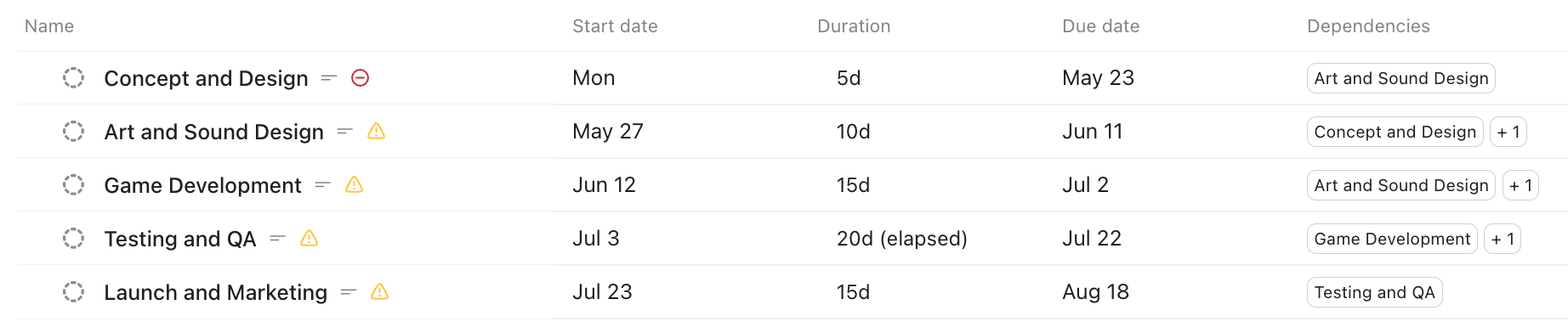
ClickUp’s published game-project example shows dates, durations and dependency columns. It is a sample schedule, not a validated client plan or proof that a date change propagated. Check the actual relationship direction, required dates and scheduling rules with one controlled shift.[4] View full-size product image
Linking two ClickUp tasks is not the whole scheduling setup. If a delivery slips but the next task stays put, check the relationship’s direction, the required dates and the scheduling feature that should make the change. Avoid dragging a chain of live tasks until you know which mechanism is responsible.
Confirm which task is blocking which
Inspect the task’s Related or dependency section for “This task blocks” versus “This task is blocked by.” A general link is not a substitute for the intended Dependency Relationship. Dependencies are available on all plans, but their task controls are not available in the mobile app.[2]
Record both task IDs and describe the handoff: “Review must finish before Release can start.” Check that the relationship expresses that direction. Do not clear all dependencies as a diagnostic shortcut; it can remove other teams’ scheduling logic.
| Intended behavior | Inspect | What is different |
|---|---|---|
| A blocking task moves its dependents | Reschedule Dependencies and actual dependency links | Not merely a parent/subtask relationship |
| A parent’s delay shifts subtask due dates | Remap Subtask Due Dates | A downward shift rather than dependency propagation |
| Subtasks determine the parent’s overall dates | Parent and subtask date sync | A bottom-up summary rather than moving dependents |
| A calendar skips non-working days | Workspace schedule and relevant ClickApp | Calendar-day movement can differ from working-day movement |
Check the minimum inputs and actual Space configuration
For dependency rescheduling, the blocking task needs a due date and the blocked task needs a start date. An administrator can inspect the Rescheduling Dependencies ClickApp and the Spaces where it is enabled. Check the option governing closed tasks as well; do not assume completed work is excluded.[1]
Availability differs across scheduling features. The current plan table lists Reschedule Dependencies on all plans, while Duration and Skip Non-Working Days start at Unlimited; parent/subtask sync is listed on Business Plus and Enterprise. A missing adjacent feature does not establish that every dependency function is unavailable.[3]
If a date shifts by a surprising amount, inspect the work schedule, holidays and exceptions when Skip Non-Working Days is active. If testing through Gantt, note that dependency rescheduling there applies only to visible tasks and their dependencies.[1]
Verify one small date shift before the full chain
This is an illustrative acceptance record using relative calendar-day labels, not a real delivery promise. In a separate approved test location with its scheduling rules recorded, task A blocks task B. Use a two-day shift so the result is easy to reconcile. If working-day rules apply, calculate the expected dates using that actual schedule instead.
| Checkpoint | Blocking task A | Blocked task B |
|---|---|---|
| Baseline | Due Day 10 | Start Day 11; due Day 12 |
| Approved two-calendar-day delay | Due Day 12 | Expected start Day 13; due Day 14 when no working-day adjustment applies |
| Observe actual result | Record the saved A date | Record both B dates, not just the timeline bar |
| Investigate a mismatch | Check trigger/date and configured Space | Check start date, direction, closed state and scheduling/view rules |
Check a third unaffected task too. That demonstrates the intended boundary rather than only showing movement somewhere. Keep the before/after dates and the relevant setting with the owner’s decision. Do not repeatedly move a production deadline to test the feature.
Keep duration, recurrence and Automation rules distinct
Duration, start date and due date are related scheduling inputs: setting two can calculate the third. Parent-to-subtask remapping and bottom-up parent date sync are separate workflows from dependency rescheduling. Choose the mechanism that matches the handoff instead of enabling several overlapping rules.[4]
If repeated tasks are producing unexpected dates, use the recurrence checks. If a custom rule is also changing dates, trace the Automation and its Activity so one task does not have two unexplained schedulers.
Frequently asked questions
Does linking two ClickUp tasks automatically move their dates?
Which dates are required for dependency rescheduling?
The blocking task needs a due date and the blocked task needs a start date.
[1]How do I confirm the dependency points in the correct direction?
Open the relationship and compare “This task blocks” with “This task is blocked by” against the intended handoff between the two task IDs.
[2]Can I create task Dependency Relationships in the mobile app?
The current documentation says task Dependencies are not available in the ClickUp mobile app. Use the supported task interface for this check.
[2]Can a closed task still be rescheduled?
Yes. The documented default includes closed dependencies. An administrator can inspect the setting that controls that behavior.
[1]Why does a Gantt test move fewer tasks than I expected?
Gantt dependency rescheduling applies to visible tasks and their dependencies. Check what is visible before treating the result as a whole-workspace test.
[1]Why did a task move to a different day than a simple calendar-day addition?
Inspect Skip Non-Working Days and the workspace’s workweek, holidays and exceptions. Use that actual schedule when calculating the expected result.
[1]Is Reschedule Dependencies limited to the same plans as Duration?
No. The current table lists dependency rescheduling on all plans and Duration on Unlimited and above. Check each feature separately.
[3]Is parent/subtask date sync the same as dependency rescheduling?
No. Parent sync summarizes subtask dates upward; dependency rescheduling moves work linked through blocking relationships.
[4]

